Growth is supposed to feel good. You've won the clients, you've gotten the budget approved, and you're finally adding headcount. And then, just weeks into the hiring surge, one of your new hires sends you a Slack message: "Hey‚ I still can't get into [the CRM / the ERP / the whatever]."
You check with IT. They're aware. They're working on it. There are a lot of new people right now.
This is one of the most predictable failure patterns in business technology, and it happens at companies of every size from 30-person startups adding their first team to 500-person firms opening a second office.The root cause is almost never the people in IT. It's the way IT is structured. And once you understand what breaks IT and why, fixing it becomes a lot more straightforward to fix.
What Actually Breaks (and When)
IT doesn't fail randomly during a hiring surge. It fails in specific, predictable ways and usually in the same sequence, at the same points in the onboarding process.
The Provisioning Backlog
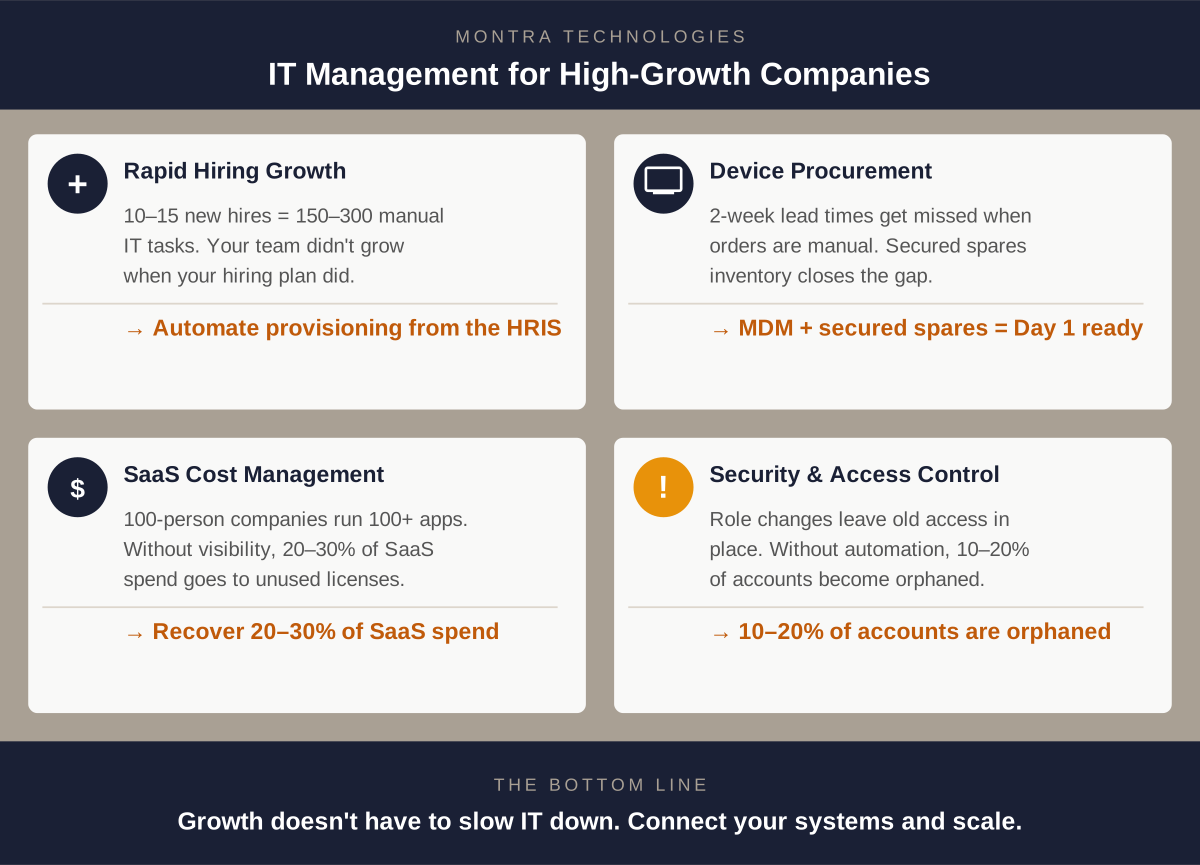
Every new hire needs account access. Email. The core business applications. The VPN. The project management tool. The CRM. The communication platform. The industry-specific software. Depending on your stack, that's anywhere from 8 to 80 separate accounts, each requiring a manual action by someone in IT.
When you're hiring one or two people a month, this is manageable. When you're onboarding a cohort of 10 or 15 at once, you've just created a 150-to-300-item manual task list that didn't exist last week. Your IT team didn't get bigger when your hiring plan did.
The result: provisioning gets batched. Not everything gets set up before day one. New hires spend their first day, and sometimes their first week, waiting for access.
The Role-Access Mismatch
Even when accounts get created on time, they often get created wrong. Manual provisioning relies on whoever is doing the setup knowing what a specific role actually needs access to. That knowledge lives in someone's head or a spreadsheet, but not in a system.
The wrong template gets applied. The new marketing manager gets the same permissions as the last marketing coordinator. The new finance analyst gets access to systems she doesn't need and misses one she does. These mismatches aren't caught until someone asks why they can't do something, or worse, until a security audit surfaces over-provisioned accounts six months later.
The Equipment Delay
Hardware has a lead time problem that software doesn't. A laptop needs to be ordered, received, imaged with your security configuration, and shipped or handed of. This is typically a two-to-three-week process if everything goes right. When a hiring decision is made late, or the request doesn't get submitted until an offer is accepted, the timeline doesn't work.
New hires show up without a computer. They borrow a colleague's device. IT scrambles to find something in inventory that may or may not have current software. The employee's first impression of your company is that you didn’t care to be ready for them.
The Offboarding Residue
Hiring surges eventually end. Sometimes they reverse. And when someone leaves during or after a growth period, the same manual process that struggled to get them set up now has to undo everything. Accounts that don't get deprovisioned promptly are a security liability, and in regulated industries, they're a compliance liability.
A company that grew from 80 to 130 employees in 18 months and then had some attrition can easily have 10 to 15 orphaned accounts sitting in various SaaS applications: people who left six months ago but still have active credentials.
Why IT Teams Aren't the Problem
Most IT administrators who are overwhelmed during a hiring surge are competent, hardworking people who are simply dealing with a process problem. Manual provisioning is slow not because the people doing it are slow, but because the process requires human attention for every step of every new hire.
When your IT team is managing 12 new hires at once plus normal helpdesk volume, triage is inevitable. Something doesn't get done on time. That's not a people failure. It's a capacity model that doesn't scale with growth.
The companies that handle hiring surges without IT breakdowns aren't doing it with better IT people. They're doing it with a different kind of process.
What a Fixed Version Looks Like
The companies that solve this problem consistently have one thing in common: IT provisioning is triggered by your HR system, not by a manual request.
Here's what that means in practice.
When a new hire record is created in your HRIS (i.e., your system of record for people)‚ that event automatically kicks off a structured workflow in your IT platform. The role associated with that hire maps to a predefined access template: the exact set of applications, permissions, and security policies appropriate for that job function. Accounts get created. Licenses get assigned. Your identity provider gets updated. The device order gets queued.
By the time IT sees it, the routine work is already done. IT's job becomes exception-handling: reviewing edge cases, approving access outside the template, handling requests that don't fit the standard workflow. The 150-item manual task list becomes a short list of things that actually require human judgment.
For equipment, the same trigger creates a device order and kicks off the imaging and configuration workflow automatically the moment the hire record is created. Two to three weeks of lead time means you need two to three weeks of advance notice. When the system creates the order automatically at the point of hire, you have that notice. When a human has to remember to submit a form, you often don't.
For offboarding, termination in the HRIS triggers the reverse: immediate deprovisioning across all connected applications, device return initiated, access logs closed. The accounts don't linger because there's no human step that can be delayed or forgotten.
The Numbers Are Hard to Ignore
The math on manual vs. automated IT onboarding is worth doing explicitly.
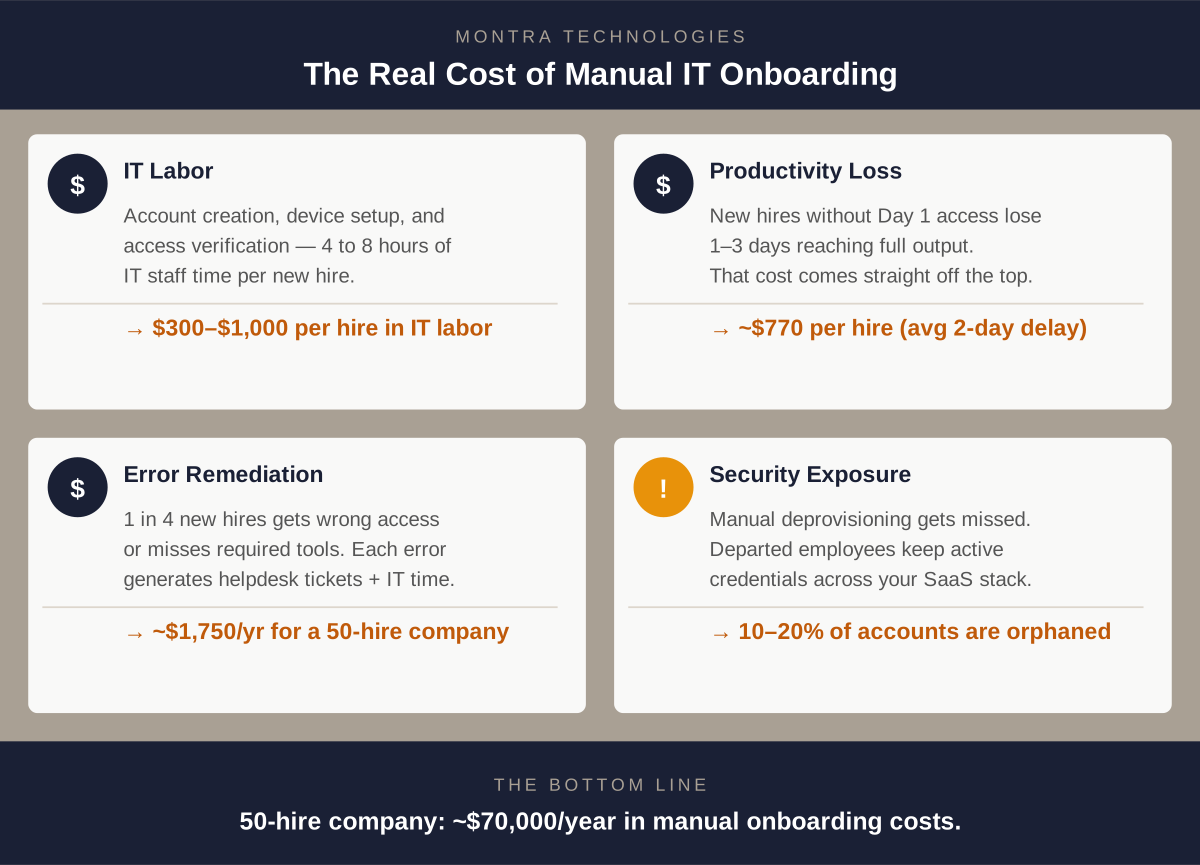
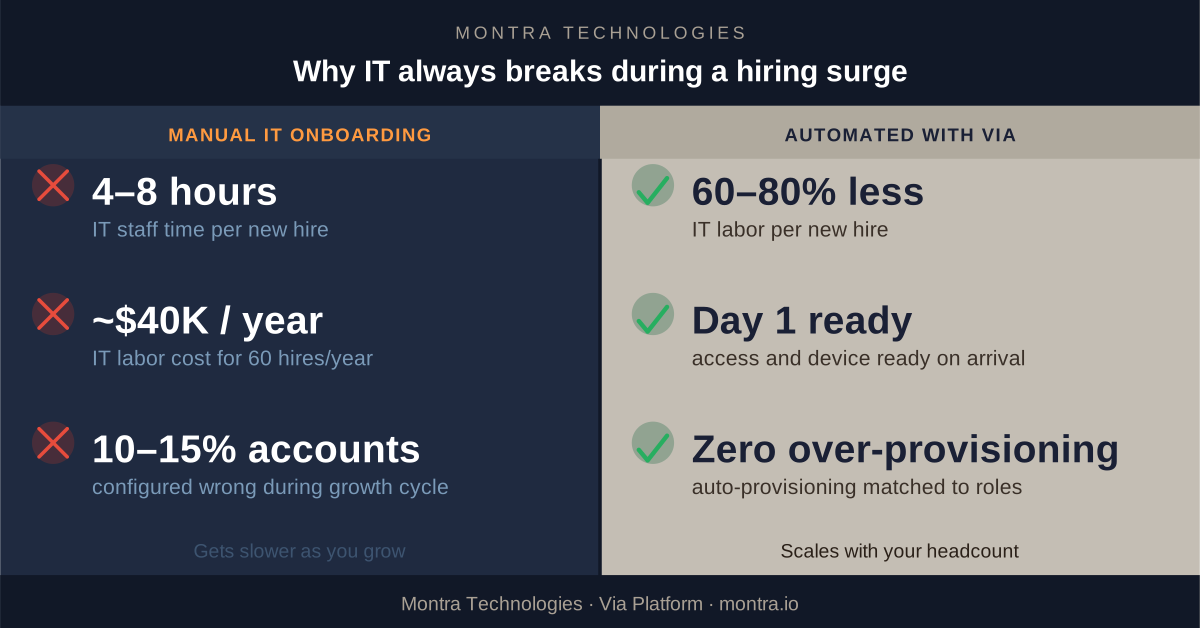
A typical manual onboarding process, which includes accounts creation, device ordering and configuration, access verification, new hire orientation on their setup‚ takes 4 to 8 hours of IT staff time per person. At a fully loaded IT staff rate of $100 to $150 per hour, that's ~$750 per new hire, just in IT labor.
For a company hiring 60 people in a year, that's ~$40,000 in IT labor on new hire setup alone. That’s before counting the helpdesk tickets generated by the mistakes, the productivity lost by employees who couldn't work on day one, and the security exposure from access that wasn't provisioned or deprovisioned correctly.
Automated onboarding, run through a platform connected to your HRIS, reduces IT labor per hire by 60 to 80 percent. The savings accumulate fast. More importantly, the errors‚ the mismatched access levels, the late equipment, and the orphaned accounts‚ largely disappear.
What to Look for in a Solution
Not all IT automation is the same. If you're evaluating options, here's what matters:
- HRIS integration is non-negotiable. The trigger for IT provisioning must be a real-time event in your HR system, not a form someone fills out. If the two systems aren't connected, the delay and manual handoff come back.
- Role-based access templates need to be configurable. Your company has roles that don't look like anyone else's. The platform needs to let you define exactly what each role gets and enforce it consistently, every time.
- The system needs to handle the full lifecycle, not just onboarding. Promotions change access needs. Transfers between departments do too. Offboarding has to be as automated as onboarding, or you've only solved half the problem.
- Reporting and audit trails matter. In a regulated industry, you need to be able to demonstrate that access was granted correctly and revoked promptly. A system that acts but doesn't log is a compliance problem waiting to happen.
How Montra Handles This
Montra built the Via platform specifically for companies experiencing this kind of growth. Via connects directly to your HRIS and identity provider to automate the full employee IT lifecycle from a single place.
When your HR team creates a new hire record, Via reads it, maps the role to your access templates, provisions accounts across your connected applications, queues the device order, and updates your identity policies automatically, before the first human in IT is even aware of the hire.
When someone leaves, Via initiates immediate deprovisioning, triggers the device return workflow, and closes out the access logs with a full audit trail. For Atlanta-area companies that are growing fast‚ hiring 20, 50, or 100 people a year‚ Via is the reason IT doesn't become the bottleneck. The provisioning scales with your headcount because it's automated. The 10th hire in a month takes the same amount of IT labor as the first: almost none.
If your company is heading into a growth phase and you're already feeling the strain on your IT team, this is the right time to look at what automated onboarding actually looks like in practice. We're happy to walk you through it.
Montra Technologies is an Atlanta-based managed service provider and IT automation company. We help mid-market companies manage workforce technology, device lifecycle, SaaS access, and security compliance through our Via platform‚ built for scale and powered by agentic AI. Named to the Inc. 5000 two consecutive years and recognized by Channel Futures as an MSP 501 company.
See how Via can handle onboarding automatically for you.