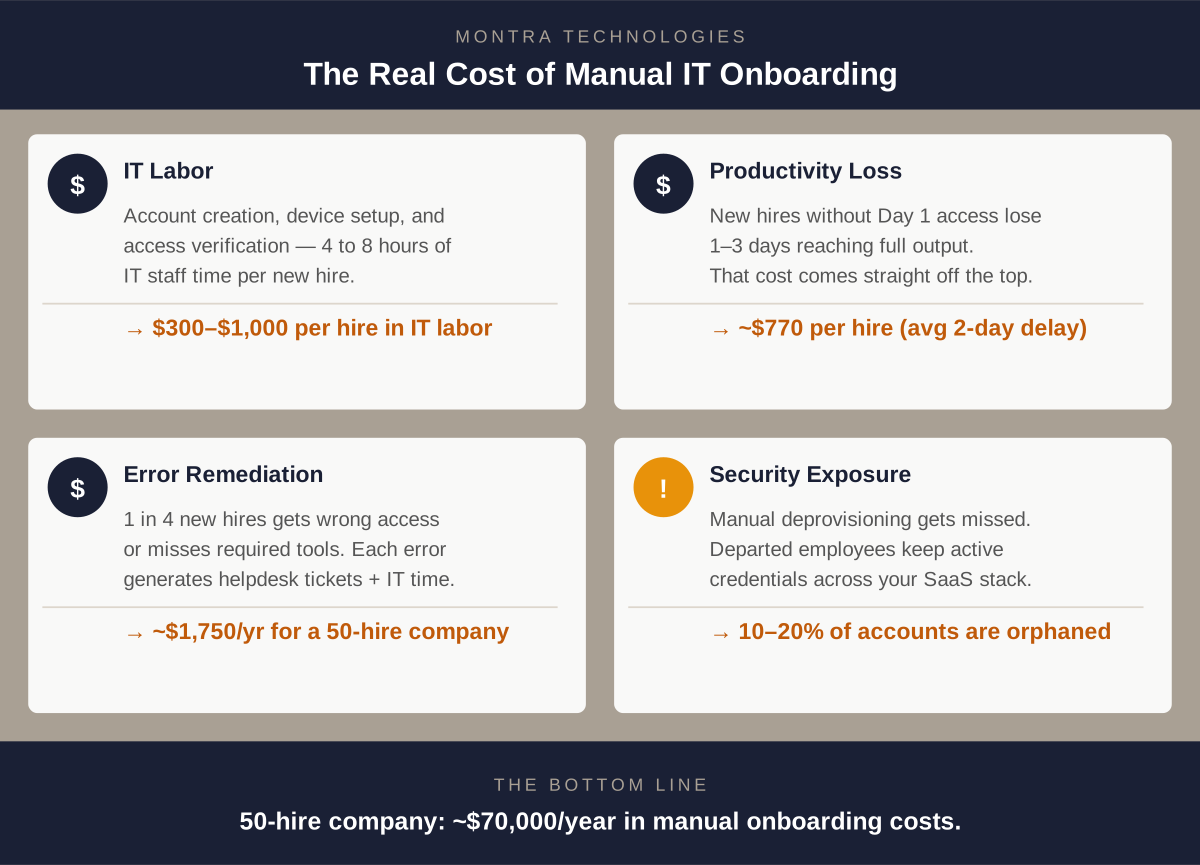
The Real Cost of Manual IT Onboarding

Most companies know that manual IT onboarding is slow. Fewer have done the math on exactly how much it costs.

The direct labor cost of an IT administrator spending 4 to 8 hours per new hire creating accounts, ordering devices, and setting up access is visible and measurable. But it’s probably the smallest part of the real number. When you add up lost new-hire productivity, error remediation, helpdesk ticket volume, and the security exposure from accounts that don’t get configured correctly, the true cost of manual IT onboarding is often two to three times higher than the IT labor line alone.

This post walks through that math. We’ll cover each cost category, give you benchmarks to work with, and show you what a realistic automation ROI looks like for a growing company.

The Direct Cost: IT Labor per Hire

Let’s start with what’s easy to quantify.

A complete manual IT onboarding — account creation across all business applications, device ordering and configuration, identity provider setup, license assignment, and access verification — takes an experienced IT administrator 4 to 8 hours per new hire under normal conditions. In a hiring surge, when multiple onboardings are running simultaneously, the number often rises because task-switching and batching reduce efficiency.

Using a fully-loaded IT staff cost of $75 to $125 per hour (salary plus benefits, overhead, and tools), the math looks like this:

  • At 4 hours / $75/hr: $300 per hire
  • At 6 hours / $100/hr: $600 per hire
  • At 8 hours / $125/hr: $1,000 per hire

For a company hiring 50 people per year at the midpoint, that’s $30,000 in direct IT labor on new hire setup — before anything goes wrong.

The Indirect Cost: Lost New-Hire Productivity

This is where the number gets significantly larger, and where most companies have no estimate at all.

When a new employee cannot access the systems they need on Day 1, they are not productive. They sit in orientation. They shadow a colleague. They set up their desk. Some of them — especially technical hires who expected to hit the ground running — have a negative first impression that affects their engagement.

Research on new hire time-to-productivity consistently shows that incomplete system access on Day 1 delays full productivity by one to three days, depending on the role. For a knowledge worker earning $80,000 per year (roughly $385/day in compensation cost), a two-day delay in productivity costs the company approximately $770 per hire — not counting the cost of the colleague whose time was consumed helping them navigate their first week.

For a company hiring 50 people per year, that’s another $38,500 in productivity loss, on top of the IT labor cost.

The Error Cost: Fixing What Was Configured Wrong

Manual provisioning has an error rate. The wrong application template gets applied. The wrong security group gets assigned. A license for a required application doesn’t get added until someone asks for it two weeks in.

Each error creates a helpdesk ticket. Each ticket takes IT time to diagnose and resolve — typically 30 to 90 minutes per ticket. In studies of IT onboarding processes at mid-market companies, between 20 and 35 percent of new hires generate at least one access-related helpdesk ticket in their first two weeks, with an average of 1.4 tickets per affected hire.

For a company hiring 50 people per year with a 25% error rate and 1.4 average tickets at 60 minutes each:

  • 50 hires × 25% error rate = 12.5 affected hires
  • 12.5 × 1.4 tickets = 17.5 tickets
  • 17.5 × 1 hour × $100/hr = $1,750 in remediation labor

That’s smaller in absolute terms, but it also doesn’t count the cost to the new hire themselves — the frustration, the time lost waiting for the fix, and the signal it sends about how the company operates.

The Security Cost: Accounts That Shouldn’t Exist

Here’s the cost category that is hardest to quantify and potentially most expensive.

Manual IT provisioning fails at the end of the employee lifecycle just as reliably as it does at the beginning. When someone leaves — whether voluntarily or through a reduction in force — deprovisioning their access requires the same manual steps as provisioning it. Under the pressure of an active transition, those steps frequently get missed or delayed.

The industry benchmark: orphaned accounts (active credentials belonging to departed employees) affect approximately 10 to 20 percent of SaaS application instances at companies without automated deprovisioning. For a company with 80 SaaS applications and 200 employees with 15% annual attrition, that’s potentially 30 departures per year with incomplete deprovisioning — and each orphaned account represents an active attack surface.

The cost of a security incident attributable to orphaned credentials varies widely, but the IBM Cost of a Data Breach report consistently puts the average breach cost for companies under 1,000 employees at $3M to $5M when fully loaded (investigation, remediation, regulatory, reputational). Even if the probability of an incident from orphaned accounts is low in any given year, the expected cost is not.

For compliance purposes, the cost is more concrete: HIPAA fines for access control violations range from $100 to $50,000 per violation, depending on the level of negligence. SOC 2 findings related to access provisioning and deprovisioning have derailed audits and client relationships.

The Full Picture: What Manual Onboarding Actually Costs

Pulling together the quantifiable costs for a company hiring 50 people per year:

Cost Category Annual Estimate
Direct IT labor (6 hrs × $100 × 50 hires) $30,000
Lost New-hire Productivity (2 days × $385 × 50 hires) $38,500
Error Remediation (help desk tickets) $1,750
Total Quantifiable Cost $70,250


And that’s before any security incident — which, if it happens, would dwarf all of the above.

The Automation Math: What Changes and by How Much

Automated IT onboarding — triggered by your HRIS, executed by a connected IT platform — reduces each of these cost categories differently.

IT Labor: Automation handles account provisioning, license assignment, identity configuration, and device queuing automatically, with no IT administrator manually executing steps. IT review time drops to exceptions only. Typical labor reduction: 65 to 80 percent per hire.

New-hire productivity loss: When provisioning happens automatically at the moment of hire record creation, access is ready before the employee’s first day. Productivity loss from access delays drops to near zero. Devices ship on schedule because the order is placed automatically. Typical improvement: 80 to 90 percent reduction in Day 1 access issues.

Error Rate: Role-based access templates, enforced by a system rather than recalled by a person, eliminate the most common class of provisioning errors. Typical error rate reduction: 70 to 85 percent.

Deprovisioning: Automated deprovisioning, triggered by HRIS termination events, closes accounts immediately and consistently — not when someone remembers to do it. Orphaned account exposure drops to near zero for connected applications.

Applied to the same 50-hire company:

Cost Category Manual Automated Savings
IT Labor $30,000 $8,400 $21,600
New-hire Productivity Loss $38,500 $5,775 $32,725
Error Remediation $1,750 $350 $1,400
Total $70,250 $14,525 $55,725


That’s a rough annual savings of $56,000 for a company hiring 50 people per year — before the security risk reduction is counted.

What Does Automation Cost?

Managed IT automation through a platform like Via is typically priced per user per month as part of a broader IT management agreement. For a 200-person company, full automation of identity and device lifecycle management — including HRIS integration, role-based provisioning, device management, and automated deprovisioning — is generally included within a managed IT services agreement in the range of $85 to $150 per user per month.

But the relevant comparison isn’t automation cost vs. zero — it’s automation cost vs. the labor, productivity loss, and risk that manual processes accumulate. For most growing companies, the math favors automation significantly.

Run Your Own Numbers

The inputs that matter most are: how many people you hire per year, your average IT staff cost, and your average new-hire compensation. Plug those into the calculator below to see what your current manual onboarding is likely costing — and what automation would change.

IT Onboarding ROI Calculator
Estimate what manual IT onboarding costs your company — and what automation saves.
New hires per year 50
IT staff fully-loaded hourly rate $125 / hr
IT hours per manual onboard 6 hrs
Average new hire annual salary $80,000

Annual cost — manual
Estimated annual savings
Cost per hire — manual
Cost per hire — automated
Cost category Manual Automated Savings
IT labor
Lost new-hire productivity
Error remediation
Total
Cost reduction with automation
Estimates use industry benchmarks: 72% IT labor reduction, 85% new-hire productivity-loss reduction, and 80% error rate reduction with HRIS-connected automated onboarding. Security risk reduction from automated deprovisioning is not included. Actual results vary. Talk to Montra about your specific numbers →
 

The Bottom Line

Manual IT onboarding has a real cost that extends well beyond the IT administrator’s time. When you account for lost new-hire productivity, error remediation, and security exposure from incomplete deprovisioning, the number for a 50-person-per-year hiring company is typically in the range of $50,000 to $80,000 annually.

Automation doesn’t eliminate all of that — but it eliminates most of it, and it does so while also improving the experience for the new hire, reducing security risk, and freeing IT to focus on work that actually requires human judgment.

If you’d like to understand what automated onboarding would look like for your company specifically, we’re happy to walk you through it.


Montra Technologies is an Atlanta-based managed IT service provider and automation company. Our Via platform connects directly to your HRIS and identity provider to automate employee onboarding, offboarding, and access management — for mid-market companies managing real growth. Named to the Inc. 5000 two consecutive years and recognized by Channel Futures as an MSP 501 company.
IT Onboarding Cost Graphic

Why IT Breaks During a Hiring Surge (And How to Fix It)

Growth is supposed to feel good. You’ve won the clients, you’ve gotten the budget approved, and you’re finally adding headcount. And then, just weeks into the hiring surge, one of your new hires sends you a Slack message: “Hey‚ I still can’t get into [the CRM / the ERP / the whatever].”

You check with IT. They’re aware. They’re working on it. There are a lot of new people right now.

This is one of the most predictable failure patterns in business technology, and it happens at companies of every size from 30-person startups adding their first team to 500-person firms opening a second office.The root cause is almost never the people in IT. It’s the way IT is structured. And once you understand what breaks IT and why, fixing it becomes a lot more straightforward to fix.

What Actually Breaks (and When)

IT doesn’t fail randomly during a hiring surge. It fails in specific, predictable ways and usually in the same sequence, at the same points in the onboarding process.

The Provisioning Backlog

Every new hire needs account access. Email. The core business applications. The VPN. The project management tool. The CRM. The communication platform. The industry-specific software. Depending on your stack, that’s anywhere from 8 to 80 separate accounts, each requiring a manual action by someone in IT.

When you’re hiring one or two people a month, this is manageable. When you’re onboarding a cohort of 10 or 15 at once, you’ve just created a 150-to-300-item manual task list that didn’t exist last week. Your IT team didn’t get bigger when your hiring plan did.

The result: provisioning gets batched. Not everything gets set up before day one. New hires spend their first day, and sometimes their first week, waiting for access.

The Role-Access Mismatch

Even when accounts get created on time, they often get created wrong. Manual provisioning relies on whoever is doing the setup knowing what a specific role actually needs access to. That knowledge lives in someone’s head or a spreadsheet, but not in a system.

The wrong template gets applied. The new marketing manager gets the same permissions as the last marketing coordinator. The new finance analyst gets access to systems she doesn’t need and misses one she does. These mismatches aren’t caught until someone asks why they can’t do something, or worse, until a security audit surfaces over-provisioned accounts six months later.

The Equipment Delay

Hardware has a lead time problem that software doesn’t. A laptop needs to be ordered, received, imaged with your security configuration, and shipped or handed of. This is typically a two-to-three-week process if everything goes right. When a hiring decision is made late, or the request doesn’t get submitted until an offer is accepted, the timeline doesn’t work.

New hires show up without a computer. They borrow a colleague’s device. IT scrambles to find something in inventory that may or may not have current software. The employee’s first impression of your company is that you didn’t care to be ready for them.

The Offboarding Residue

Hiring surges eventually end. Sometimes they reverse. And when someone leaves during or after a growth period, the same manual process that struggled to get them set up now has to undo everything. Accounts that don’t get deprovisioned promptly are a security liability, and in regulated industries, they’re a compliance liability.

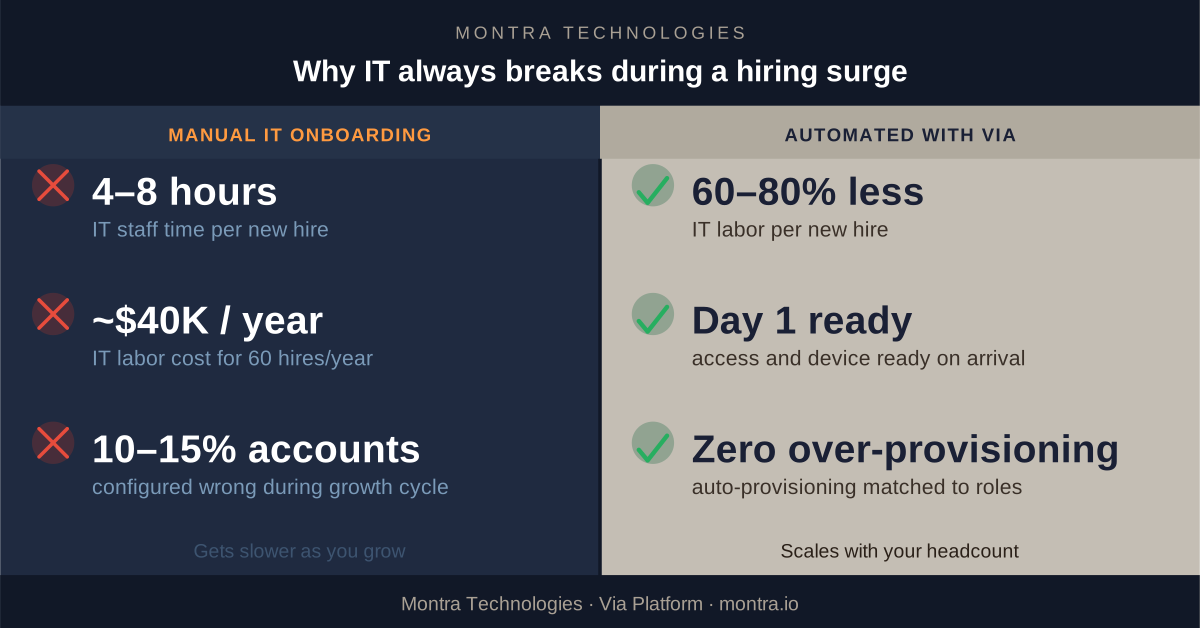
A company that grew from 80 to 130 employees in 18 months and then had some attrition can easily have 10 to 15 orphaned accounts sitting in various SaaS applications: people who left six months ago but still have active credentials.

Why IT Teams Aren’t the Problem

Most IT administrators who are overwhelmed during a hiring surge are competent, hardworking people who are simply dealing with a process problem. Manual provisioning is slow not because the people doing it are slow, but because the process requires human attention for every step of every new hire.

When your IT team is managing 12 new hires at once plus normal helpdesk volume, triage is inevitable. Something doesn’t get done on time. That’s not a people failure. It’s a capacity model that doesn’t scale with growth.

The companies that handle hiring surges without IT breakdowns aren’t doing it with better IT people. They’re doing it with a different kind of process.

Via AI Flow Conditional Access

What a Fixed Version Looks Like

The companies that solve this problem consistently have one thing in common: IT provisioning is triggered by your HR system, not by a manual request.

Here’s what that means in practice.

When a new hire record is created in your HRIS (i.e., your system of record for people)‚ that event automatically kicks off a structured workflow in your IT platform. The role associated with that hire maps to a predefined access template: the exact set of applications, permissions, and security policies appropriate for that job function. Accounts get created. Licenses get assigned. Your identity provider gets updated. The device order gets queued.

By the time IT sees it, the routine work is already done. IT’s job becomes exception-handling: reviewing edge cases, approving access outside the template, handling requests that don’t fit the standard workflow. The 150-item manual task list becomes a short list of things that actually require human judgment.

For equipment, the same trigger creates a device order and kicks off the imaging and configuration workflow automatically the moment the hire record is created. Two to three weeks of lead time means you need two to three weeks of advance notice. When the system creates the order automatically at the point of hire, you have that notice. When a human has to remember to submit a form, you often don’t.

For offboarding, termination in the HRIS triggers the reverse: immediate deprovisioning across all connected applications, device return initiated, access logs closed. The accounts don’t linger because there’s no human step that can be delayed or forgotten.

The Numbers Are Hard to Ignore

The math on manual vs. automated IT onboarding is worth doing explicitly.

A typical manual onboarding process, which includes accounts creation, device ordering and configuration, access verification, new hire orientation on their setup‚ takes 4 to 8 hours of IT staff time per person. At a fully loaded IT staff rate of $100 to $150 per hour, that’s ~$750 per new hire, just in IT labor.

For a company hiring 60 people in a year, that’s ~$40,000 in IT labor on new hire setup alone. That’s before counting the helpdesk tickets generated by the mistakes, the productivity lost by employees who couldn’t work on day one, and the security exposure from access that wasn’t provisioned or deprovisioned correctly.

Automated onboarding, run through a platform connected to your HRIS, reduces IT labor per hire by 60 to 80 percent. The savings accumulate fast. More importantly, the errors‚ the mismatched access levels, the late equipment, and the orphaned accounts‚ largely disappear.

What to Look for in a Solution

Not all IT automation is the same. If you’re evaluating options, here’s what matters:

  • HRIS integration is non-negotiable. The trigger for IT provisioning must be a real-time event in your HR system, not a form someone fills out. If the two systems aren’t connected, the delay and manual handoff come back.
  • Role-based access templates need to be configurable. Your company has roles that don’t look like anyone else’s. The platform needs to let you define exactly what each role gets and enforce it consistently, every time.
  • The system needs to handle the full lifecycle, not just onboarding. Promotions change access needs. Transfers between departments do too. Offboarding has to be as automated as onboarding, or you’ve only solved half the problem.
  • Reporting and audit trails matter. In a regulated industry, you need to be able to demonstrate that access was granted correctly and revoked promptly. A system that acts but doesn’t log is a compliance problem waiting to happen.


How Montra Handles This

Montra built the Via platform specifically for companies experiencing this kind of growth. Via connects directly to your HRIS and identity provider to automate the full employee IT lifecycle from a single place.
When your HR team creates a new hire record, Via reads it, maps the role to your access templates, provisions accounts across your connected applications, queues the device order, and updates your identity policies automatically, before the first human in IT is even aware of the hire.

When someone leaves, Via initiates immediate deprovisioning, triggers the device return workflow, and closes out the access logs with a full audit trail. For Atlanta-area companies that are growing fast‚ hiring 20, 50, or 100 people a year‚ Via is the reason IT doesn’t become the bottleneck. The provisioning scales with your headcount because it’s automated. The 10th hire in a month takes the same amount of IT labor as the first: almost none.

If your company is heading into a growth phase and you’re already feeling the strain on your IT team, this is the right time to look at what automated onboarding actually looks like in practice. We’re happy to walk you through it.

Montra Technologies is an Atlanta-based managed service provider and IT automation company. We help mid-market companies manage workforce technology, device lifecycle, SaaS access, and security compliance through our Via platform‚ built for scale and powered by agentic AI. Named to the Inc. 5000 two consecutive years and recognized by Channel Futures as an MSP 501 company.
See how Via can handle onboarding automatically for you.

Identity Lifecycle Management for Fast-Growing Tech Companies: Challenges and How to Solve Them

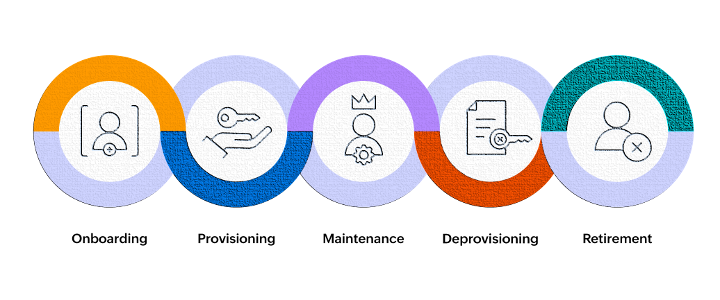
In today’s fast-paced digital landscape, managing user identities efficiently and securely has become a cornerstone for business security and productivity. Identity Lifecycle Management (ILM) is a comprehensive approach that governs the creation, maintenance, and deletion of user identities across an organization’s IT infrastructure. As the digital footprint of businesses diversifies, ILM plays a crucial role in enhancing security, ensuring compliance, and improving operational efficiency.

ILM Cycle Diag

The market for Identity Lifecycle Management market was estimated at around $3-5 billion in 2023 with an expected CAGR of 12-14% over the next 5 years (Sources: Gartner, Allied, Fortune, Grand View). This growth is driven by increasingly stringent regulatory requirements like the General Data Protection Regulation (GDPR) and California Consumer Privacy Act (CCPA) . Additionally, demand is driven by escalating cybersecurity threats. In 2023, the estimated global cost of cybercrime was approximately $8.4 trillion, according to various industry reports. By 2025, this figure is expected to reach $10.5 trillion annually, as forecasted by Cybersecurity Ventures

Finally, the adoption of SaaS and Cloud technologies, the increasing amount of hybrid work, and the growth of IoT and connected devices, has created additional demand for ILM as organizations prioritize securing their digital assets and data no matter where their workforce may be. 

Security and Management Challenges in ILM

No matter what the industry, managing an effective ILM process presents some significant challenges to IT departments.

Complexity of Integration

Implementing ILM solutions can be a daunting task, especially when integrating with existing legacy systems. The intricacies involved in aligning ILM with various software applications and IT infrastructures demand substantial IT expertise and time. Organizations often face challenges in ensuring seamless data flow and synchronization across platforms, which can impede operational efficiency and increase vulnerability to security breaches.

Data Privacy Concerns

With the increasing focus on data protection and privacy regulations, such as GDPR, tech companies face the critical challenge of ensuring compliance. Managing vast amounts of personal and sensitive data requires robust privacy measures to prevent unauthorized access and data breaches. Failure to adhere to these regulations can result in severe penalties and damage to a company’s reputation.

Scalability Issues

As tech companies grow and their user bases expand, the scalability of ILM solutions becomes a pressing concern. Adapting these systems to accommodate new users and technologies necessitates continuous updates and infrastructure investments. Organizations must ensure their ILM strategies are flexible enough to scale efficiently without compromising performance or security. 

Unique Challenges Faced by Tech Companies in ILM

Technology companies encounter a distinctive set of challenges in Identity Lifecycle Management due to their inherently dynamic nature and rapid growth trajectories.

Rapid Expansion

One key issue is the onboarding and offboarding processes for employees, contractors, and partners, which are often more complex in tech industries due to the distributed, global workforce. Ensuring seamless and secure access management while accommodating remote work arrangements requires robust automation and real-time updating of identity databases.

Broad Software Integrations

Additionally, tech companies frequently integrate with a multitude of third-party applications, necessitating advanced inter-system compatibility and secure data sharing protocols to prevent unauthorized access and data breaches.

Software Development Challenges

Moreover, the fast-paced development cycles in tech companies introduce a continual flux of user roles and permissions that complicates identity governance. As tech companies strive to innovate and deploy new features rapidly, maintaining alignment between development teams and IT governance processes becomes critical. 

There is also the persistent challenge of balancing security with user productivity, as tech professionals often require access to a vast range of tools and environments. Successfully navigating these issues demands a tailored ILM strategy that is adaptable, scalable, and integrates seamlessly with evolving technologies.

Keys to Success in Setting Up ILM

The challenges of implementing a successful ILM program can be overcome by focusing on a few critical areas.

Automation

Incorporating automation into ILM strategies significantly enhances their effectiveness and efficiency. Automation facilitates the streamlined management of user identities throughout their lifecycle, reducing the manual workload on IT departments. This is particularly beneficial in handling repetitive tasks such as provisioning, deprovisioning, and role assignment, which are prone to human error if performed manually. 

By leveraging automated workflows, organizations can ensure that access rights are consistently updated in real-time, maintaining compliance with security policies and reducing the risk of unauthorized access. Furthermore, automation supports scalability by enabling the seamless addition of new users and systems without compromising the integrity or speed of identity management processes. Ultimately, adopting automation not only optimizes operational efficiency but also fortifies security postures, as policies can be enforced uniformly across the entire enterprise.

Upfront Planning

To navigate the complexities of ILM implementation, comprehensive planning is essential. A well-structured plan ensures that all aspects of the ILM process are covered, from data governance to system integration, facilitating a smoother transition and reducing the risk of disruptions. For example, a strong ILM process will include information gathered about each role in the company, so that when a new onboarding occurs, the new member of the workforce can have access to only the systems and services they need.

Continuous Monitoring and Improvement

The dynamic nature of cyber threats and technological advancements necessitates ongoing monitoring and improvement of ILM systems. Organizations must adopt a proactive approach, continually assessing and updating their ILM strategies to combat new threats and leverage emerging technologies. Regular training and awareness initiatives can also empower employees to recognize and respond to security challenges effectively. 

Partner with Montra for ILM Excellence

Identity Lifecycle Management is an integral component of modern IT strategies, offering substantial benefits in security, compliance, and operational efficiency. By addressing key challenges and implementing effective strategies, tech companies can maximize the advantages of ILM and drive long-term success.

Embarking on your ILM journey requires expertise and precision. Montra stands ready to guide your organization through the complexities of ILM deployment, ensuring robust security measures and seamless integration with your existing systems. Our unique software and our team of experts is committed to tailoring solutions that meet your unique needs, helping you achieve compliance and operational efficiency. Contact Montra today to learn how our solution can uniquely support you in securing and managing your digital identities effectively.

Reach out to us at info@montra.io or visit our website for more information on how we can help you succeed.

Three Obstacles to Better IT Onboarding and How to Avoid Them

In the dynamic realm of organizational onboarding, anything that improves the new hire experience reigns supreme. Discover how embracing advanced IT onboarding solutions can mitigate common onboarding challenges, paving the way for seamless integration of new employees into the workforce.

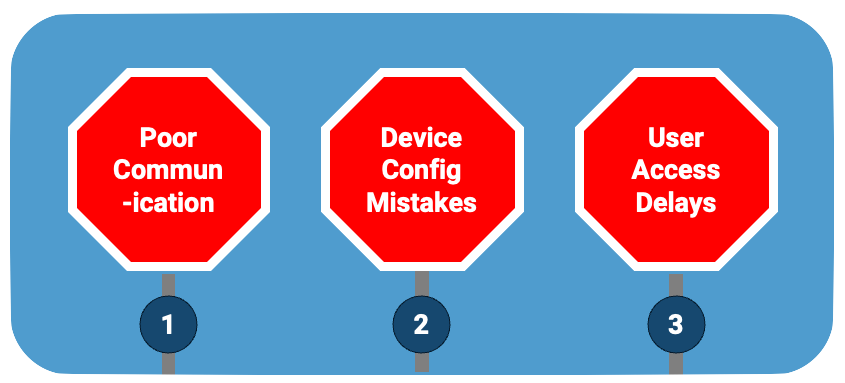
3 Onboard Obstacles

Uncovering Onboarding Obstacles

There are three common IT obstacles that all companies face when trying to optimize the onboarding experience of their new hires. Overcoming these hurdles should be a key goal for all HR and IT organizations.

1. Communication Gaps Between HR and IT Departments

One of the primary hurdles faced during onboarding is the disconnect between HR and IT departments. HR is often caught up in all of the legal and compliance requirements for onboarding a new team member and does not notify IT until the last minute about a new hire. This lack of communication often leads to delays in device setup and access provisioning, hindering new hires from swiftly becoming productive to their roles.

Picture a scenario where a new employee eagerly starts their first day working from their home office, only to find their email and application accounts non-existent, and no device delivered for their work. Basic miscommunication between HR and IT leaves them feeling unimportant to the company while valuable time is lost in the onboarding process.

2. Mistake-prone Device Procurement and Provisioning

Device procurement and provisioning tends to be a mistake-prone process and therefore stands as another impediment to efficient onboarding. Lengthy lead times for hardware procurement add risk to any mistakes being made, and the constant change on hardware models and availability make it difficult to order correctly. Additionally, provisioning of devices is often filled with mistakes in the software that is loaded as well and the account that is setup for the device.

We have all seen the situation where a newly hired person awaits hours or days for an outdated device to be configured on their first day. This delay not only frustrates the employee but also sets a suboptimal tone for their journey within the organization.

3. Slow Access Granting to SaaS Applications

Restricted access to crucial SaaS applications adds complexity to the onboarding experience. It is very common that new hires go weeks without access to some applications due to broken processes that could streamline the the granting of user access. Without immediate provisioning of necessary tools, new team members struggle to engage fully with their responsibilities, hampering overall productivity.

How often have you seen it where a new team member has no idea what is happening because this are not receiving communication or updates within critical business applications. They often find out negatively that they have missed a deadline or update in their first few weeks by no fault of their own. It can be frustrating and de-motivating for a new hire when they are just getting started in their new role.

Flattening Obstacles with a Modern Solution

Modern IT onboarding solutions offer a paradigm shift in onboarding processes by automating and expediting critical workflows. The right solution can break down the obstacles to great IT onboarding with an integrative approach that drastically reduces setup timelines, ensuring workers are functional immediately.

1. Connect HR and IT

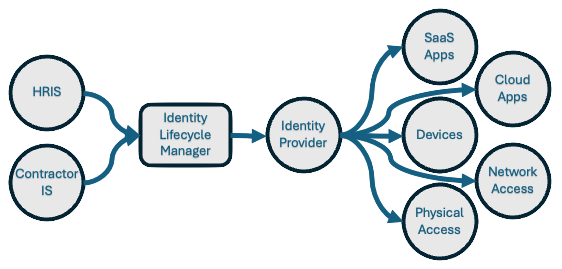
All companies have at least two systems of record for workforce identity – the HRIS which is run by HR and the Identity Provider, which is run by IT. Connecting these systems together is critical to better HR-IT communication. The systems should be connected both in workflow automation like onboarding and offboarding of workers, as well and the data that is stored in those systems like address, emails, and phone numbers.

Connecting HR and IT systems and processes is nuanced and must be implemented well. For instance, if all sales team members are supposed to have access to the CRM, then HR and IT must be in lockstep about what departments are considered sales especially during org changes and restructurings.

2. Automate Procurement and Provisioning

With automation, organizations can minimize human errors and ensure that new hires have the necessary equipment and access from Day One. This entails leveraging technology to streamline device ordering, setup, and delivery. Best practices for procurement may include maintaining an inventory of pre-configured devices ready for deployment, significantly reducing the lead times for new hires.

Furthermore, automation in provisioning allows IT departments to seamlessly install required software, security protocols, and configurations ahead of time. Best practices also involve creating standard setups for various roles within the company customized to the specific needs and job functions of each worker. Auto-provisioning should also include automatic updates and patches to software, ensuring that all devices remain secure and up to date.

3. Implement Profile-based Application Provisioning

Automated application account provisioning should be based on user information such as title, department, location, and employment type. Provisioning in this way is a significant leap forward in operational efficiency. This approach leverages predefined roles and permissions templates that align with specific job functions within an organization. For instance, an employee with a VP title in the marketing department can automatically determine their access to the budgeting system as well as the CRM they need from Day One. This method not only accelerates the onboarding process but also minimizes the risk of human error in granting access to sensitive company resources.

Furthermore, automation can adapt to the dynamic nature of modern workplaces, where remote work and flexible office locations are becoming the norm. By incorporating location and employment type into the provisioning process, IT departments can ensure that employees have access to location-specific groups and applications, while also making certain that remote contractors, for instance, do not have access sensitive data that cannot cross international boundaries. Through automating SaaS application account provisioning, companies can achieve a more secure, efficient, and adaptable IT infrastructure that supports their evolving needs.

Elevating Onboarding Experiences

In conclusion, the adoption of an advanced IT onboarding solution is a significant stride towards optimizing the IT onboarding process for any organization. By addressing communication gaps, expediting device setups, and templating application access, organizations can provide a seamless onboarding journey that empowers new hires to excel from day one. Embracing modern IT onboarding isn’t just about operational efficiency—it’s about fostering a culture of innovation, agility, and success in the ever-evolving organizational landscape.

Montra, an Atlanta-based IT management company, helps growing companies solve exactly these three problems with Via — our platform that connects directly to your HRIS and automates onboarding from day one.


About the Author

Scott Ryan is a seasoned executive with over 25 years in the IT infrastructure and media technology industries. His experience spans across entrepreneurship, leadership, and strategic planning, having led or assisted in leading the successful exit of multiple companies. Scott is a frequent speaker and panelist at industry events, investment conferences and podcasts. He lives in Atlanta with his wife and two children.

About Montra Technologies

Montra Technologies is the innovator of identity and device management solutions for modern IT management. Modern IT management puts identity at the center of security and provisioning for all services and devices being used by employees. Montra’s platform is directly integrated with a company’s current HR and IT software for seamless, automated management of people and devices, regardless of location. Montra is trusted by some of the world’s most recognizable brands which use Montra’s innovative platform to improve the efficiency and security of their identity and device operations. The company was founded by industry experts with decades of technology leadership. Recognized by Channel Futures as an MSP to Watch and listed on the Inc. 5000, Montra is a Signature member of the ATDC at Georgia Tech.

What Is Identity Lifecycle Management? A Practical Guide for Modern IT Teams

In today’s digital landscape, where data breaches and cyber threats are prevalent, businesses are increasingly focusing on Identity Lifecycle Management (ILM) to safeguard their sensitive information and ensure secure access control.

For instance, an Atlanta-based professional services firm implemented Via and received a 2x reduction in onboarding time and a 3x reduction in onboarding and offboarding mistakes within the first two months. They have improved the experience for their new employees who are getting productive faster, and they are reducing their security and compliance risks by ensuring “zombie” accounts aren’t left open after a departure.

Understanding Identity Lifecycle Management

ILM Diag

The Identity Lifecycle

Identity Governance enables organizations to strike a delicate balance between productivity – ensuring swift access to necessary resources for individuals entering the organization – and security – determining adjustments in access rights as per changes in employment status.

At the core of Identity Governance lies Identity Lifecycle Management, a crucial component for effectively managing digital identities. Scaling up governance successfully requires the modernization of the infrastructure supporting identity lifecycle management in applications. The objective of Identity Lifecycle Management is to streamline and automate the entire digital identity lifecycle process for individuals associated with an organization.

Identity Lifecycle Management encompasses the processes and technologies used by organizations to manage the lifecycle of user identities within their systems. It involves creating, maintaining, and revoking user access rights throughout the user’s journey with the organization:

  • Onboard: When a person requires access, applications require an identity. Hence, a new digital identity might need creation if not already existing.

  • Transfer: When someone transitions across boundaries necessitating adjustments to their digital identity by adding or removing access authorizations.

  • Offboard: When someone no longer requires access, it’s necessary to revoke access. Subsequently, the identity may become unnecessary for applications except for audit or forensic purposes.

Benefits of Implementing Identity Lifecycle Management

Implementing ILM offers several benefits to businesses including:

  • Security Enhancement: By enforcing access controls, it bolsters security measures to restrict sensitive data and system access solely to authorized users.

  • Administrative Efficiency: The solution simplifies user access management tasks, minimizing the chances of human error and unauthorized entry.

  • Compliance Maintenance: Additionally, ILM aids organizations in adhering to regulatory standards like GDPR and HIPAA, ensuring continued compliance.

Addressing Challenges with Identity Lifecycle Management

Businesses face challenges such as ensuring rapid onboarding and offboarding processes, and maintaining a balance between security and user convenience. ILM addresses these challenges by providing automated workflows for user provisioning and deprovisioning, role-based access control, and continuous monitoring of user activities.

Implementing Montra Via for Efficient Identity Lifecycle Management

To streamline the ILM process and ensure compliance, companies can leverage cutting-edge solutions like Montra Via. Via offers advanced features such as automated onboarding and offboarding of users, profile-based provisioning of user accounts on over 350 applications, direct integration with identity providers like Microsoft Entra and HR systems like ADP Workforce Now. By implementing Via, organizations can improve operational efficiency, enhance security, and reduce compliance risks.

Tips for Creating a Successful Identity Lifecycle Management Strategy

Creating and maintaining a successful ILM strategy requires more than just great software. Businesses need to change their processes and make certain their people have what they need to be successful. Any businesses should consider the following tips:

  • Balance Security and Accessibility: Strive to find a balance between stringent security measures and user-friendly access controls to ensure that users will follow the processes they should.

  • Security Awareness Training: Provide comprehensive training to employees on security best practices, data protection protocols, and the importance of adhering to ILM policies.

  • Rights Monitoring: Regularly monitor user access rights, review permissions, and conduct audits to identify and address any security vulnerabilities.

  • Seek Guidance: Keep abreast of industry trends, regulatory changes, and emerging technologies to adapt your ILM strategy accordingly. And if you need, find partners that can help you stay current.

By following these best practices, businesses can establish a robust Identity Lifecycle Management framework that safeguards critical assets, mitigates risks, and fosters a culture of proactive cybersecurity.

In conclusion, Identity Lifecycle Management plays a crucial role in modern business operations by ensuring secure and efficient management of user identities. By adopting advanced solutions like Montra Via and adhering to best practices, organizations can effectively navigate the complexities of identity management and safeguard their digital assets.

For more information about Montra, please contact us at info@montra.io.

Sources