What Agentic AI Means for Your IT

If you’ve heard an IT company claim they use “agentic AI” and wondered what that actually means in practice ‚ you’re not alone. The phrase is everywhere right now, but most explanations stop at the buzzword and never get to what does it do, and why you should care.

The answer: agentic AI, applied to IT management, means your IT systems act instead of wait. Instead of a human IT administrator triggering every provisioning task, access change, or device assignment, an AI-powered system monitors your business systems, detects what needs to happen, and executes it automatically‚ without a delay, and without a mistake caused by someone copy-pasting the wrong name into a form.

This is a fundamental shift in how managed IT services work. And for growing companies in Atlanta and beyond, it’s the difference between IT that scales with your business and IT that becomes a bottleneck every time you hire, promote, or offboard someone.

What “Agentic” Means

Traditional software is reactive. You log in, you click a button, something happens. AI-assisted software is helpful but still human-initiated. It suggests the next step, but you still take it.

Agentic AI is different. An agentic system has a goal, monitors for conditions, makes decisions, and takes actions independently. In an IT context, that looks like this:

Your HR system records a new hire starting in two weeks. Your agentic IT platform reads that signal, determines what applications, devices, and access levels that role requires, cross-references your security policies, and begins provisioning everything automatically in the background, days before the employee walks in the door.

No IT ticket. No manual checklist. No back-and-forth between HR and IT. The system acted.

Why This Matters More Than You Think

Manual IT management has a hidden cost most companies don’t fully measure, and it shows up most clearly in the requests that seem simple but never are. Consider what happens when someone submits a help desk ticket asking for temporary access for an executive while she’s on vacation:

  • The ticket sits in the queue until an IT admin gets to it
  • The admin reads the request and tries to figure out what it actually means: which systems, which dates, what level of access — then emails back to clarify and waits
  • Once the details are sorted, the admin manually edits the conditional access policies in Entra ID or Active Directory, scoping permissions by hand
  • Nobody sets an end date — because that requires a separate reminder, a separate task, a separate manual step
  • The executive returns from vacation. The access is still open. It stays open for weeks.
  • A security audit flags the over-provisioned account. IT spends another hour cleaning it up. A compliance incident gets logged.

A single routine request, the kind that comes in a dozen times a week at a growing company, consumed 3 to 6 hours of IT staff time, introduced real execution risk, and still ended with an error.

Agentic AI handles the entire sequence differently. When the Via AI sees that same ticket, it parses the request in seconds: who needs access, to which systems, for which dates. It sends a plain-language summary back to the requestor asking for confirmation. Once approved, it creates a scoped, time-bounded conditional access policy that activates on the start date, and automatically revokes on the end date, with a full audit trail. The requestor gets a notification. The ticket closes. The IT team never touches it.

That’s 10 times faster. And unlike the manual version, there’s nothing left to forget.

Via AI Flow Conditional Access
Where Agentic AI Is Already Working in IT Management

The most impactful applications of agentic AI in IT management today aren’t theoretical. They’re running right now inside well-managed companies.

Identity Lifecycle Automation

When an employee is hired, promoted, transferred, or terminated, their digital identity needs to change. New access granted. Old access revoked. Group memberships updated. Security roles adjusted. Done manually, this is tedious, error-prone, and often delayed, which creates real security exposure. Done with agentic AI, every identity change triggers automatically from your HRIS, with no human in the loop required.

Device Lifecycle Management

From procurement to deployment to refresh to retirement, a managed device goes through dozens of touchpoints over its lifespan. Agentic systems track where every device is, flag devices approaching end-of-life, automate imaging and configuration before deployment, and initiate return-materials-authorization (RMA) workflows when something breaks ‚all without an administrator manually tracking spreadsheets.

SaaS Access Reconciliation

The average company uses 80+ SaaS applications. Keeping track of who has access to what‚ and making sure terminated employees lose that access immediately‚ is nearly impossible to do manually at scale. Agentic IT management reconciles your active employee roster against your SaaS application access lists continuously, surfacing orphaned accounts, over-provisioned users, and compliance gaps automatically.

Security and Compliance Monitoring

Agentic systems can monitor policy compliance across your device fleet and user accounts in real time, alerting on deviations before they become incidents. When a device falls out of patch compliance or a user’s MFA configuration lapses, the system flags it‚ or in many cases, remediates it without waiting for a quarterly audit.

The Difference Between AI-Assisted and AI-Powered IT

It’s worth drawing a clear line here, because not all IT vendors who use the word “AI” mean the same thing.

AI-assisted IT means a human IT administrator uses AI tools to work faster, maybe a chatbot that helps write runbooks, or a dashboard that uses machine learning to surface anomalies. The human is still in the loop for every action.

AI-enabled IT is agentic AI‚ which means the software itself is the actor. The platform monitors conditions, makes decisions within defined parameters, and executes actions. The human sets the rules, reviews exceptions, and is only called upon for high risk actions. The system handles everything that fits within those rules, which is the vast majority of day-to-day IT operations.

For most growing companies, the distinction matters enormously. If your MSP is using AI to help their team work slightly faster, you’re getting marginal improvements. If your IT platform is agentic ‚Äî acting on your behalf continuously ‚Äî you’re getting a fundamentally different level of service.

What This Means for Atlanta Businesses Specifically

Atlanta is consistently one of the fas growing cities in teh US for small businesses. The companies winning here are in FinTech, healthcare, management consulting, enterprise SaaS, and cyversecurity. Businesses in these sectors are adding headcount quickly, often expanding into new offices or geographies, and operating in environments with regulatory and compliance requirements.

That growth creates pressure on IT. More hires mean more provisioning. New offices mean new device deployments. Compliance requirements mean constant policy enforcement. And every one of those tasks, done manually, adds to the IT backlog.

Agentic AI-powered IT management is built for this environment. It doesn’t get slower as you grow. The automation scales linearly with your headcount. The 10th hire is as well-provisioned as the 100th hire. The 50th offboarding is as thorough as the first.

Montra is headquartered in Atlanta and built the Via platform specifically for companies operating in this kind of high-growth, compliance-aware environment. We’ve seen firsthand what happens when a 50-person company tries to manage IT the same way it did at 20 people ‚ and we’ve built the automation to prevent it.

What to Ask Your MSP About AI

If you’re evaluating a managed service provider and they claim to use AI, here are five questions worth asking:

  1. Is the AI taking actions or just making suggestions? An agentic system acts. A reporting dashboard doesn’t.
  2. What triggers an automated action? The answer should be a specific business event, like a new hire in the HRIS, a device check-in failure, or a SaaS license anomaly.
  3. What’s the human review process? Good agentic IT has guardrails. That is things the system does automatically within policy, and things it flags for human review. Ask where the line is.
  4. Can you show me the automation? Any MSP with real agentic AI can demo it running. If the answer is a slide deck or a video, keep moving.
  5. How does it integrate with my HRIS and identity provider? Agentic IT needs to connect to the systems that contain your sources of truth: your HR system and your Identity Provider, and your device management platform.

The Bottom Line

“Agentic AI” is a real capability today. It’s not a dream as long as it’s implemented correctly. For IT management, it means moving from a world where IT administrators manually execute every routine task to one where AI executes the routine automatically and IT administrators focus on architecture, exceptions, and strategy.

For growing companies, it means IT that doesn’t become a bottleneck as you scale. For leadership, it means fewer surprise IT failures and more predictable operations. For security and compliance teams, it means continuous enforcement rather than periodic audits.

Montra is one of the first and only managed IT service providers that has deployed a genuinely agentic platform and deployed it for Atlanta-area companies managing real growth. If you want to see what that looks like in practice, we’re happy to show you.

Montra Technologies is an Atlanta-based managed service provider (MSP) and IT automation company. We help mid-market companies manage workforce technology, devices, SaaS access, and security compliance through our services and Via platform, which is powered by agentic AI and built for scale. Named to the Inc. 5000 two consecutive years and recognized by Channel Futures as an MSP 501 company.
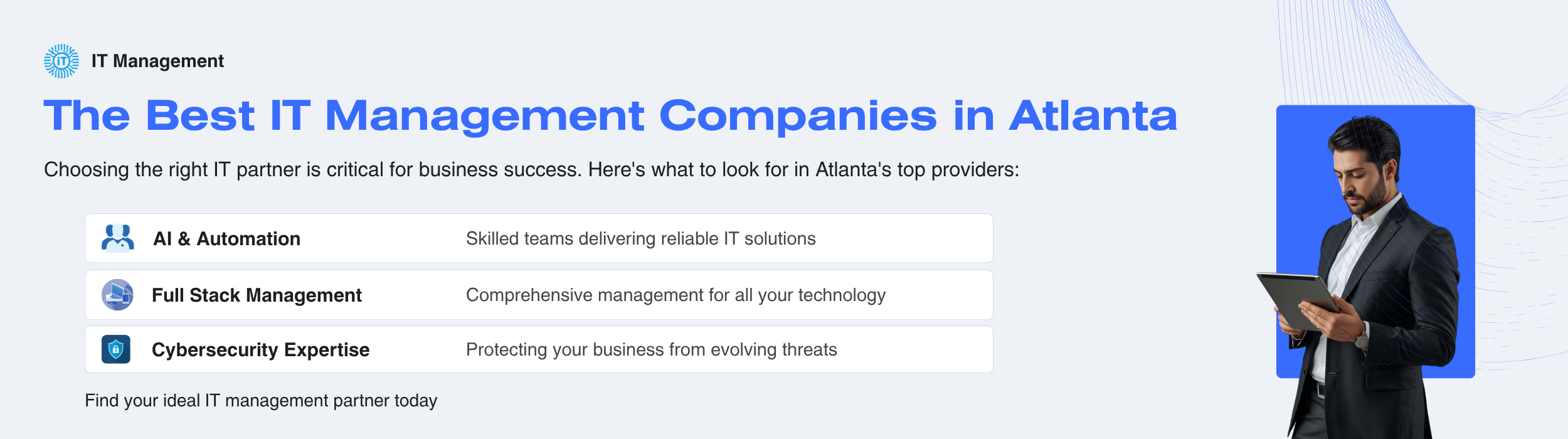
Best IT Management Firms in Atlanta: What to Look For

A practical guide for Atlanta businesses evaluating managed IT service providers

Atlanta’s technology sector is one of the fastest-growing in the country. With over 900 IT support providers operating in the metro area, choosing the right IT management company is one of the most consequential technology decisions your business will make. The wrong partner can cost you time, money, and security, while the right one can become a strategic asset.

This guide is written for executives, operations leaders, and HR directors at Atlanta-area companies who are evaluating managed IT service providers (MSPs) — whether for the first time or because an existing relationship isn’t working. We cover the criteria that matter, the red flags to watch for, and the questions you should ask before signing anything.

What Is an IT Management Company, and Do You Need One?

An IT management company — also called a managed service provider or MSP — takes responsibility for some or all your company’s technology operations. This can range from basic help desk support to full lifecycle management of your devices, employee identities, SaaS applications, security, and compliance.

You likely need one if:


  • Your internal IT team has too much to do to handle everything your business requires
  • You’re growing fast and onboarding new people is becoming a bottleneck
  • Employees are waiting too long to get devices, access, or support when they join or change roles
  • You’ve had a security incident or are concerned about having one
  • You need to pass a compliance audit (HIPAA, SOC 2, PCI, etc.) and need to support to complete that
  • Or you just have that nagging feeling that you don’t know what you don’t know regarding your IT and security
The Best In IT Management

The Atlanta IT Market: What You’re Navigating

Atlanta has a deep talent pool and a competitive MSP market, but that also means significant variation in quality. A few things to know before you start evaluating:

Size and stability matter. Many smaller IT shops have been acquired by private equity firms in recent years. While some acquisitions improve service, many result in staff turnover, service degradation, and an account rep who doesn’t know your business. Ask how long the company has been under current ownership and management.

“Break/fix” is not managed services. Some companies present themselves as MSPs but primarily respond to problems after they happen. True IT management is proactive — monitoring, patching, identity governance, and lifecycle management happen continuously, not when something breaks.

Atlanta’s geography requires local presence. If you have offices or employees inside the perimeter (ITP), in Buckhead, Midtown, or Downtown, or in key OTP corridors like Alpharetta, Sandy Springs, Duluth, or Marietta, verify your provider can actually reach you. Ask for specific on-site SLA commitments by location, not just a general metro-area claim.

Criteria for Evaluating an Atlanta IT Management Company

1. Technical Experience and Depth

Look for a company with demonstrable expertise on their website with engineers who have solved problems similar to yours. Key Questions:

  • What is the average tenure of their technical staff?
  • Do they have dedicated engineers or does every call go to a different person?
  • Can they show you case studies from companies your size and industry?

If your business uses Microsoft (and most do), Microsoft 365, Entra ID (formerly Azure Active Directory), Intune, and Defender expertise are baseline requirements. Ask specifically about each.

2. Industry Experience

IT management is not one-size-fits-all. A healthcare company has different compliance requirements than a law firm, which has different needs than a fast-growing tech startup. Look for a provider who has served companies in your industry and can speak to the specific challenges you face.

Industries with specific compliance requirements (healthcare, financial services, legal, government contractors) should prioritize MSPs with active clients in those sectors.

3. Automation and Modern Workflow

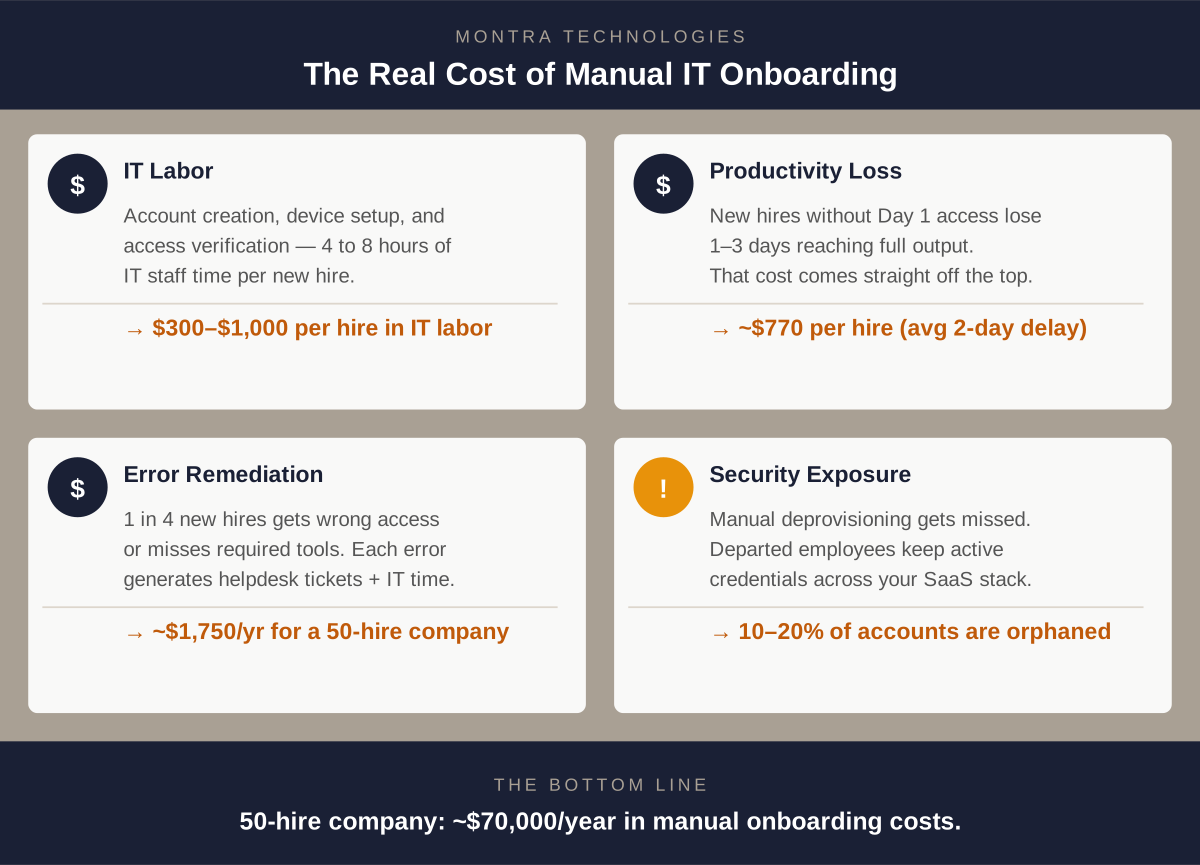
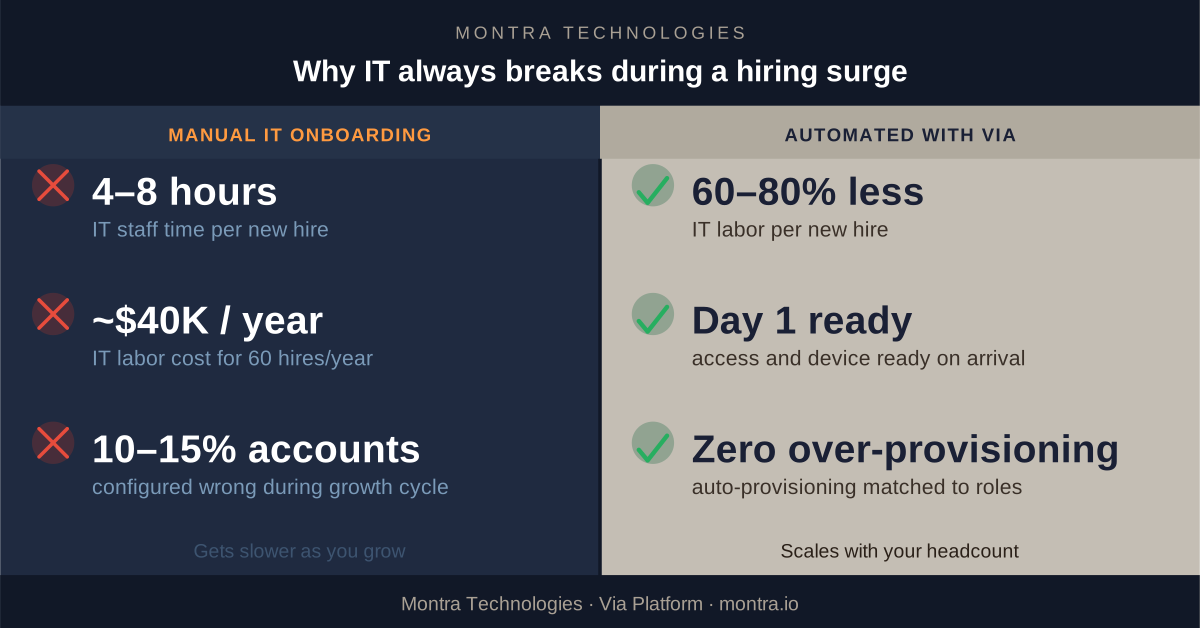
One of the clearest differentiators between a great MSP and a good one is how much manual work remains in their processes. When a new employee joins, does IT get notified by email and start manually creating accounts? Or does an automated workflow trigger the moment HR makes the change?

Automation matters for three reasons: it’s faster, it reduces errors, and it scales with your growth. If you’re hiring aggressively, a manual IT onboarding process will become a serious bottleneck. Ask any prospective MSP to walk you through exactly what happens step by step when a new hire starts on Monday. The answer will tell you a lot.

4. AI and Intelligent Tooling

The best IT management companies in 2026 are using AI and automation not just to market themselves, but to actually run better operations. This includes smart identity matching (automatically provisioning application access based on an employee’s role, department, and location), predictive device health monitoring, and AI-assisted security alerting that reduces noise and surfaces real threats.

Ask what AI capabilities are built into their platform, and ask for a demonstration. Vendors who are genuinely using AI can show you; those who are not will speak in generalities.

5. Security Credentials and Compliance Accreditations

Any MSP worth considering should be able to answer the following clearly and without hesitation:

  • Are you SOC 2 Type 2 certified? This means an independent auditor has verified their security controls — not just that they’ve filled out a questionnaire.
  • Can you sign a Business Associate Agreement (BAA) if we are subject to HIPAA?
  • What compliance frameworks do you actively support? (HIPAA, SOC 2, NIST, CIS Controls, FINRA, PCI, CMMC)
  • What does your own internal security posture look like?

An MSP that cannot clearly answer these questions about themselves is not positioned to help you with yours.

6. Geographic Coverage Across Metro Atlanta

Atlanta is large and traffic is notorious. Confirm specifically where your provider can deliver on-site support and what their SLA commitments are. Key areas to ask about: Midtown, Buckhead, Downtown, Perimeter/Dunwoody, Alpharetta, Sandy Springs, Roswell, Marietta, Duluth, Lawrenceville, and Peachtree City. If you have field locations or warehouses outside the core metro, ask about those explicitly.

A good benchmark: less than 4 hours for on-site response to critical issues within I-285, next business day for outer suburbs.

7. Pricing Transparency

Managed IT pricing in Atlanta typically runs $85 – $200 per user per month depending on the scope of services. Be skeptical of providers who won’t give you a ballpark without a lengthy sales process, and equally skeptical of providers whose pricing seems unusually low — that usually means something important isn’t included.

Look for tiered, clearly documented pricing that maps to actual service inclusions. Ask specifically: What is included at each tier? What triggers an overage or additional charge? What does onboarding cost?

8. Services Coverage: The Full Monty

A reactive help desk is the floor, not the ceiling. Modern IT management should cover:

  • Employee onboarding and offboarding (including device provisioning and SaaS access)
  • Device lifecycle management (procurement, imaging, deployment, monitoring, recovery, and retirement)
  • Identity and access management
  • SaaS application management
  • Security monitoring and compliance
  • End-user support

If a provider can only do some of these and you have to piece together the rest from other vendors, you’re adding complexity and risk rather than reducing it.

9. Approach: Proactive vs. Reactive

Ask any prospective MSP what percentage of their support tickets are proactively identified versus reactively reported by clients. The best providers catch most issues before you know they exist. If the answer is vague or they can’t give you a number, that’s a signal.

Also ask how they handle your technology strategy long-term: Do they offer annual IT planning? Quarterly business reviews? Or do they simply respond to what you send them?

Questions to Ask Before You Sign

About experience and stability:

  • How long has the company been in business under current ownership?
  • How long do your clients typically stay with you?
  • Can you provide three references from companies similar to ours in size and industry?
  • What is the average tenure of your technical staff?

About onboarding and offboarding:

  • Walk me through what happens when we hire someone new. What triggers who does what? How long does it take?
  • What happens the day an employee is terminated? How quickly is their access revoked across all systems? How do I know?
  • How do you handle device procurement and delivery for remote employees?

About device management and logistics:

  • What do you use to you remotely monitor and secure my devices?
  • Do you provide asset management software and services?
  • Are you able to proactively monitor device warranty information
  • Can I store spare devices securely with you?
  • Do you have processes for securely erasing and disposing of my old devices?

About security and compliance:

  • Are you SOC 2 Type 2 certified?
  • Can you sign a HIPAA BAA?
  • What security frameworks do your processes align with?
  • What happens if one of our devices is lost or stolen?
  • Have any of your clients had a security breach? What happened and what did you learn?

About technology and automation:

  • What platform do you use to manage identity and device lifecycle?
  • How much of your processes is automated vs. manual?
  • What AI capabilities are built into your service delivery?
  • Show me what your dashboard looks like for a company like ours.

About pricing and contracts:

  • What is fully included in your monthly per-user fee?
  • What triggers additional charges?
  • What does onboarding cost?
  • What are the contract terms and exit clauses?
  • Do you offer a free trial or pilot period?

About ongoing service:

  • Who is our primary point of contact?
  • What are your response time SLAs by issue severity?
  • How do you communicate planned changes or maintenance?
  • What does a quarterly business review look like with you?

What Good Looks Like: A Benchmark

The best IT management companies in Atlanta combine three things: enterprise-grade technology, automation- and AI-enabled service, and transparent business practices. They have clear pricing, proven compliance credentials, and can demonstrate how automation and AI make their service delivery faster and more reliable.

Take ourselves as an example. Montra Technologies is headquartered in Doraville, Georgia. We support local clients with locations from Peachtree City to Woodstock. Our AI agent handles many of our automated alerts as well as customer requests, which gives our clients faster and more service. Our Via platform automates identity and device lifecycle management by connecting directly to your HRIS and ATS. When HR adds a new hire, devices are assigned and application access is provisioned automatically. Montra is also SOC 2 Type 2 certified, HIPAA compliant, Inc. 5000-listed for two consecutive years, and a recipient of the 2025 TMC Future of Work Award. Our pricing is published transparently starting at $33/user/month, with plans that scale to full 24/7 SOC/SIEM coverage for regulated industries.

Responsive, AI-enabled, and secure – that’s what a high-quality Atlanta IT management company looks like in practice.

The Bottom Line

There are hundreds of IT management companies serving the Atlanta market. The difference between a good one and a poor one often isn’t visible until something goes wrong. Doing your homework upfront on credentials, automation capabilities, client retention, and pricing transparency, is the best investment you can make before signing a multi-year contract.

If you’d like to talk through your specific IT needs, Montra offers a free consultation with no obligation. Schedule a conversation here.

Montra Technologies is an Atlanta-based IT management company serving distributed workforces across the Atlanta metro area and throughout the US & Canada. Learn more at montra.io.

Montra Wins 2025 Future of Work Award for Via Workforce Manager

Montra Technologies Receives 2025 Future of Work Employee Experience Achievement Award


Via Workforce Manager recognized for advancing the modern workplace through employee-first innovation

ATLANTA, GEORGIA, (January 3, 2026) — Montra® Technologies announced today that TMC, a global, integrated media company, has named Via Workforce Manager as a recipient of a 2025 Future of Work Employee Experience Achievement Award.

Via Workforce Manager is a unified identity and device lifecycle management (UIDLM) platform designed for mid-market IT and managed service providers. Via automates onboarding, offboarding, SaaS access, device management, and logistics in a single system which eliminates information silos between systems for identity, applications, and assets.

“This recognition reinforces our belief that employee experience and security should never be at odds,” said Scott Ryan, CEO at Montra. “With Via, we’re helping HR eliminate the friction of identity and access setup so employees can be productive on day one, while IT maintains control, security, and compliance. We’re honored to be recognized for advancing the future of work.”

“It is my pleasure to recognize Montra with a 2025 Future of Work Employee Experience Achievement Award for its commitment to customer service by focusing on employee-first innovations,” said Rich Tehrani, CEO, TMC. “In the opinion of our judges and editorial team, Montra has proven that a focus on their valued Team Members is driving better business results,” added Tehrani.

The winners of the 2025 Future of Work Employee Experience Achievement Awards will be featured on TMCnet.

For more information about TMC, please visit www.tmcnet.com.

About Montra Technologies
Montra Technologies is a managed IT services and solutions company delivering secure, scalable technology operations for modern organizations. From identity and access management to device lifecycle management, SaaS governance, security, and compliance, Montra simplifies IT so businesses can focus on growth.

Montra combines decades of enterprise IT expertise with modern, intelligent automation to reduce risk, improve security, and enhance the experience with technology across modern workforces. Learn more at www.montra.io and follow us on LinkedIn and X.

About TMC
For more than two decades, TMC has honored technology companies with awards in multiple categories — each among the most respected recognitions in the communications and technology industries. Winners represent leading organizations advancing innovation and driving growth across their markets. Every recipient is a verified leader, setting the benchmark for excellence in their field.

In addition, TMC provides global buyers with valuable insights to make informed tech decisions through our editorial platforms, live events, webinars, and online advertising. Leading vendors trust TMC, thought leadership, and our events for branding, thought leadership, and lead generation. Our live events, like the ITEXPO #TECHSUPERSHOW, deliver unmatched visibility, while our custom lead generation programs and webinars ensure a steady flow of sales opportunities. Display ads on trusted sites generate millions of impressions, boosting brand reputations. TMC offers a complete 360-degree marketing solution, from event management to content creation, driving SEO, branding, and marketing success. Learn more at www.tmcnet.com and follow @tmcnet on Facebook, LinkedIn, and X.

TMC Contact:
Stephanie Thompson
Manager, TMC Awards
203-852-6800
sthompson@tmcnet.com

Montra Contact:
Monty Rachleff
Marketing Manager
404-665-9675
mrack@montra.io

###

Montra Achieves SOC 2 Type II Compliance

Montra Technologies Achieves SOC 2 Type II Compliance


Independent auditor confirms the operating effectiveness of Montra’s security and confidentiality controls

ATLANTA, GEORGIA — (September 2, 2025)Montra® Technologies today announces the successful completion of its SOC 2 Type II examination. This achievement reinforces the company’s commitment to security, confidentiality, and operational excellence for its customers.

Laika Compliance LLC conducted the independent audit. The firm evaluated the design and operating effectiveness of Montra’s controls over a six-month period, from February 1, 2025 to July 31, 2025. The examination covered the Trust Services Criteria for Security and Confidentiality, as established by the American Institute of Certified Public Accountants (AICPA).

The auditor found that Montra’s software and services description was fairly presented. Moreover, the controls operated effectively throughout the review period. As a result, the audit confirmed reasonable assurance that Montra met its service commitments and system requirements.

“This achievement reflects the discipline and rigor we bring to both our managed IT services and the Montra Via Platform,” said Matthew Singley, COO of Montra Technologies. “Our customers trust us with their data, systems, and users — which is mission-critical to their businesses. Achieving SOC 2 Type II demonstrates that our security controls are not just designed well, but that they operate effectively over time.”

What SOC 2 Type II Means for Customers

SOC 2 Type II compliance shows that Montra has implemented and maintained effective controls across key operational domains, including:

  • Logical and role-based access controls
  • Change management and secure software development
  • Vulnerability management and patching
  • Continuous monitoring and incident response
  • Data classification, retention, and secure disposal
  • Vendor risk management and oversight

Notably, the audit confirmed no exceptions across tested controls during the review period.

Montra delivers its services across multiple platforms and infrastructure layers. Furthermore, the company incorporates layered security measures including encryption in transit and at rest, multi-factor authentication for privileged access, network segmentation, intrusion detection, and continuous vulnerability scanning.

Strengthening Trust in Unified Identity and Device Lifecycle Management

This SOC 2 Type II compliance covers the Montra Via Platform. Via supports critical IT operations such as onboarding and offboarding automation, device lifecycle management, SaaS access management, security monitoring, and logistics orchestration.

Via is the company’s unified identity and device lifecycle management (UIDLM) platform. It brings together identity, device, application, and logistics data into a single system built for modern, distributed workforces.

By embedding security controls directly into identity and device workflows, Montra helps mid-market organizations reduce operational risk. Additionally, this approach minimizes human error and supports alignment with Zero Trust security principles.

“For many growing organizations, onboarding, offboarding, and device management are where operational risk quietly accumulates,” Singley added. “Consequently, SOC 2 Type II reinforces that our platform is built on a foundation of structured governance, strong internal controls, and continuous risk management.”

Ongoing Commitment to Security and Compliance

SOC 2 Type II is part of Montra’s broader commitment to industry-standard safeguards. These safeguards span administrative, technical, operational, and organizational controls, including HIPAA compliance.

In addition, Montra conducts annual risk assessments, quarterly vulnerability scans, and ongoing monitoring. Together, these practices ensure the company’s security posture evolves alongside emerging threats.

The SOC 2 Type II report is available to customers and prospective customers under NDA.

About Montra Technologies

Montra Technologies is a managed IT services and solutions company. The company delivers secure, scalable technology operations for modern organizations. From identity and access management to device lifecycle management, SaaS governance, security, and compliance, Montra simplifies IT so businesses can focus on growth.

Montra combines decades of enterprise IT expertise with modern, intelligent automation. As a result, the company reduces risk, improves security, and enhances the technology experience across modern workforces. Learn more at www.montra.io and follow us on LinkedIn and X.


Media Contact:

Monty Rachleff
Marketing Manager
Montra Technologies
+1-404-665-9675
mrack@montra.io

Identity Lifecycle Management for Fast-Growing Tech Companies: Challenges and How to Solve Them

In today’s fast-paced digital landscape, managing user identities efficiently and securely has become a cornerstone for business security and productivity. Identity Lifecycle Management (ILM) is a comprehensive approach that governs the creation, maintenance, and deletion of user identities across an organization’s IT infrastructure. As the digital footprint of businesses diversifies, ILM plays a crucial role in enhancing security, ensuring compliance, and improving operational efficiency.

ILM Cycle Diag

The market for Identity Lifecycle Management market was estimated at around $3-5 billion in 2023 with an expected CAGR of 12-14% over the next 5 years (Sources: Gartner, Allied, Fortune, Grand View). This growth is driven by increasingly stringent regulatory requirements like the General Data Protection Regulation (GDPR) and California Consumer Privacy Act (CCPA) . Additionally, demand is driven by escalating cybersecurity threats. In 2023, the estimated global cost of cybercrime was approximately $8.4 trillion, according to various industry reports. By 2025, this figure is expected to reach $10.5 trillion annually, as forecasted by Cybersecurity Ventures

Finally, the adoption of SaaS and Cloud technologies, the increasing amount of hybrid work, and the growth of IoT and connected devices, has created additional demand for ILM as organizations prioritize securing their digital assets and data no matter where their workforce may be. 

Security and Management Challenges in ILM

No matter what the industry, managing an effective ILM process presents some significant challenges to IT departments.

Complexity of Integration

Implementing ILM solutions can be a daunting task, especially when integrating with existing legacy systems. The intricacies involved in aligning ILM with various software applications and IT infrastructures demand substantial IT expertise and time. Organizations often face challenges in ensuring seamless data flow and synchronization across platforms, which can impede operational efficiency and increase vulnerability to security breaches.

Data Privacy Concerns

With the increasing focus on data protection and privacy regulations, such as GDPR, tech companies face the critical challenge of ensuring compliance. Managing vast amounts of personal and sensitive data requires robust privacy measures to prevent unauthorized access and data breaches. Failure to adhere to these regulations can result in severe penalties and damage to a company’s reputation.

Scalability Issues

As tech companies grow and their user bases expand, the scalability of ILM solutions becomes a pressing concern. Adapting these systems to accommodate new users and technologies necessitates continuous updates and infrastructure investments. Organizations must ensure their ILM strategies are flexible enough to scale efficiently without compromising performance or security. 

Unique Challenges Faced by Tech Companies in ILM

Technology companies encounter a distinctive set of challenges in Identity Lifecycle Management due to their inherently dynamic nature and rapid growth trajectories.

Rapid Expansion

One key issue is the onboarding and offboarding processes for employees, contractors, and partners, which are often more complex in tech industries due to the distributed, global workforce. Ensuring seamless and secure access management while accommodating remote work arrangements requires robust automation and real-time updating of identity databases.

Broad Software Integrations

Additionally, tech companies frequently integrate with a multitude of third-party applications, necessitating advanced inter-system compatibility and secure data sharing protocols to prevent unauthorized access and data breaches.

Software Development Challenges

Moreover, the fast-paced development cycles in tech companies introduce a continual flux of user roles and permissions that complicates identity governance. As tech companies strive to innovate and deploy new features rapidly, maintaining alignment between development teams and IT governance processes becomes critical. 

There is also the persistent challenge of balancing security with user productivity, as tech professionals often require access to a vast range of tools and environments. Successfully navigating these issues demands a tailored ILM strategy that is adaptable, scalable, and integrates seamlessly with evolving technologies.

Keys to Success in Setting Up ILM

The challenges of implementing a successful ILM program can be overcome by focusing on a few critical areas.

Automation

Incorporating automation into ILM strategies significantly enhances their effectiveness and efficiency. Automation facilitates the streamlined management of user identities throughout their lifecycle, reducing the manual workload on IT departments. This is particularly beneficial in handling repetitive tasks such as provisioning, deprovisioning, and role assignment, which are prone to human error if performed manually. 

By leveraging automated workflows, organizations can ensure that access rights are consistently updated in real-time, maintaining compliance with security policies and reducing the risk of unauthorized access. Furthermore, automation supports scalability by enabling the seamless addition of new users and systems without compromising the integrity or speed of identity management processes. Ultimately, adopting automation not only optimizes operational efficiency but also fortifies security postures, as policies can be enforced uniformly across the entire enterprise.

Upfront Planning

To navigate the complexities of ILM implementation, comprehensive planning is essential. A well-structured plan ensures that all aspects of the ILM process are covered, from data governance to system integration, facilitating a smoother transition and reducing the risk of disruptions. For example, a strong ILM process will include information gathered about each role in the company, so that when a new onboarding occurs, the new member of the workforce can have access to only the systems and services they need.

Continuous Monitoring and Improvement

The dynamic nature of cyber threats and technological advancements necessitates ongoing monitoring and improvement of ILM systems. Organizations must adopt a proactive approach, continually assessing and updating their ILM strategies to combat new threats and leverage emerging technologies. Regular training and awareness initiatives can also empower employees to recognize and respond to security challenges effectively. 

Partner with Montra for ILM Excellence

Identity Lifecycle Management is an integral component of modern IT strategies, offering substantial benefits in security, compliance, and operational efficiency. By addressing key challenges and implementing effective strategies, tech companies can maximize the advantages of ILM and drive long-term success.

Embarking on your ILM journey requires expertise and precision. Montra stands ready to guide your organization through the complexities of ILM deployment, ensuring robust security measures and seamless integration with your existing systems. Our unique software and our team of experts is committed to tailoring solutions that meet your unique needs, helping you achieve compliance and operational efficiency. Contact Montra today to learn how our solution can uniquely support you in securing and managing your digital identities effectively.

Reach out to us at info@montra.io or visit our website for more information on how we can help you succeed.