Checklist for IT Employee Offboarding

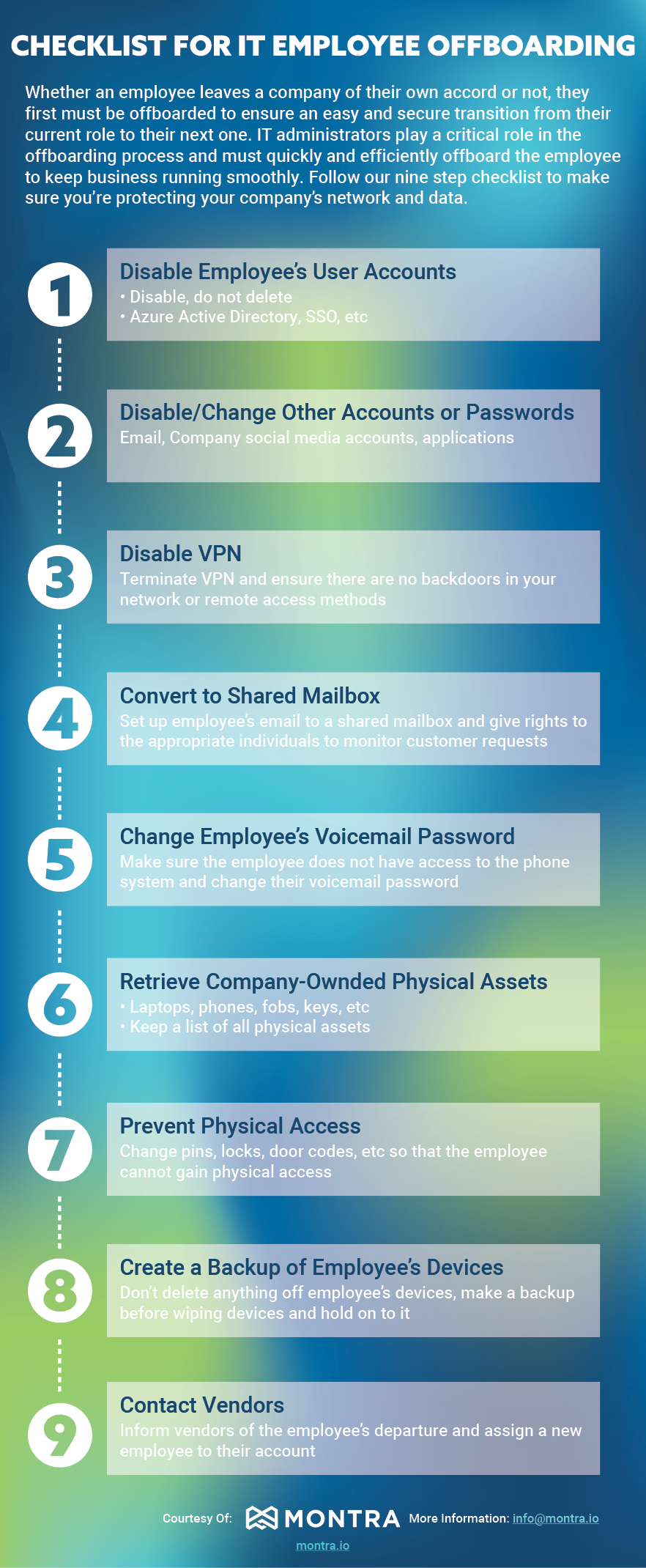
Whether an employee leaves a company of their own accord or not, they first must be offboarded to ensure an easy and secure transition from their current role to their next one. IT administrators play a critical role in the offboarding process and must quickly and efficiently off-board the employee to keep business running smoothly. Follow our nine-step checklist to make sure you’re protecting your company’s network and data.

The Montra IT Employee Offboarding Checklist

Whether an employee leaves voluntarily or not, IT administrators must quickly and efficiently offboard them to keep business running smoothly and data secure. Follow these nine steps:

  1. Disable Employee’s User Accounts — Disable, do not delete. This includes Azure Active Directory, SSO, email, company social media accounts, and applications.
  2. Disable VPN — Terminate VPN access and ensure there are no backdoors remaining in your network or remote access methods.
  3. Convert to Shared Mailbox — Set up the employee’s email as a shared mailbox and assign appropriate individuals rights to monitor incoming customer requests.
  4. Change Employee’s Voicemail Password — Ensure the employee no longer has access to the phone system and change their voicemail password.
  5. Retrieve Company-Owned Physical Assets — Collect laptops, phones, fobs, keys, and any other physical assets. Keep a running list of all items.
  6. Prevent Physical Access — Change pins, locks, and door codes so the employee cannot gain physical access to your facilities.
  7. Create a Backup of Employee’s Devices — Do not delete anything off the employee’s devices. Make a full backup before wiping and retain it.
  8. Disable or Change Other Accounts or Passwords — Address any remaining accounts or passwords not covered in earlier steps.
  9. Contact Vendors — Inform vendors of the employee’s departure and assign a new employee to manage those relationships.

7 Step Checklist for Secure and Reliable Laptop Imaging

Your company’s laptops are a valuable business tool that enables the success of your workforce. It contains important information and files that are necessary for your work. That’s why it’s important to have a setup and a backup plan for your laptop imaging. In this blog post, we will discuss the best practices for laptop imaging so that you can keep your company data private and secure. When onboarding an employee, it is essential to set up their device and make sure to securely delete everything if a previous employee had that device. Laptop imaging can vary from business to business, so it is important to include specific instructions when onboarding a new user. 

1. Start with a Fresh Image

It can be tempting for companies to try to skip the imaging process when deploying new or re-used laptops. By starting with a newly imaged device, companies can document updates and changes more effectively, and avoid accidentally duplicating bad software or private data. In addition, starting fresh provides an opportunity to review and improve upon existing processes. It may take some extra time up front, but the long-term benefits of starting from scratch are typically worth the investment.

2. Identify User Profiles

When it comes to information management, one size does not fit all. That’s why it’s important for companies to tailor their systems to the specific needs of each team or department. Accounting departments, for example, have very different needs than design centers. As such, it is often useful to create different master PC images for each department. This helps to optimize workflow and ensure that employees have the programs, permissions, and privileges they need to do their jobs effectively. While it takes a bit of effort to set up separate images for each department, the benefits can be well worth the investment.

3. Verify Device Compatibility

Not every PC Image will work for every workstation. Therefore, it’s crucial to consider things like computer type, hard drive capacity, RAM, graphics processing power, operating system, and compatible software before beginning. This is because something as simple as a system update can render some programs obsolete. By taking all of these factors into account, you can ensure that your Master Image will be compatible with all of the systems it needs to be used on. In doing so, you’ll save yourself a lot of time and headache in the long run.

4. Create a Master Image

With deployment criteria validated, IT technicians can initiate a Master Image. There are many programs available to facilitate the creation of a computer image, and IT professionals should determine which one is best suited for a company’s needs. Before deploying a PC image, technicians should patch the Operating System (OS) to ensure images are as up to date as possible. Next, technicians should install and update applications relevant to the target user’s system and configure appropriate permissions and privileges.

5. Maintain Drivers

Device drivers are programs that control devices connected to a computer. In most cases, devices are connected directly to the computer via cables, but they can also be connected wirelessly. Drivers allow the computer to communicate with the device and to use its features. For example, a printer driver allows the computer to send data to the printer so that it can print it. Drivers are generally specific to a particular make and model of device, and they need to be kept up to date to work correctly. When technicians update a computer’s operating system, they typically also update the device drivers. This ensures that all the devices will continue to work correctly with the new operating system. Technicians should double-check that all drivers are up-to-date and functioning correctly before updating any computer image. 

6. Audit Master Image Regularly

Companies should develop a process for keeping the master image optimized. A best practice is to schedule a monthly audit of master images to ensure programs, permissions, and privileges are functional and current. This practice helps minimize the number of system updates and configuration changes needed each time imaging is applied.

7. Document Changes

Companies should remain diligent about documenting changes or updates to any Master Image. Proper documentation can save IT departments hours of headaches by simply noting the date of image, base configuration, and changes since the last version. 

While this laptop imaging checklist only features the high-level steps for internal IT departments to consider, it should give you a general framework for simplifying the deployment of multiple devices. Organizations should reference this imaging checklist throughout their planning and strategy phases to develop realistic timelines and budgets. 

Laptop imaging is a vital part of keeping your company’s data private and secure. By following the best practices for laptop imaging, you can ensure that your data is protected in the event of an employee departure, hardware return, or other change of control incident. If you need help with setting up laptop imaging for your business, contact our experts today at sales@montra.io 

TAG Announces the Top 40 Innovative Technology Companies in Georgia

Media Contact:

Russ Davis – russ@tagonline.org

(404) 920-2023

TAG Announces the Top 40

Innovative Technology Companies in Georgia

ATLANTA (April 13, 2022) – Each year, the Technology Association of Georgia (TAG) unveils the Top 40 Innovative Technology Companies in Georgia. This year, there are actually 41, as two companies tied for a spot on this prestigious list.

TAG’S Top 40 Awards, sponsored by Amazon Web Services, Best Buy and Comcast Business, recognize Georgia-based technology companies for their contribution to innovation and economic growth within the state of Georgia’s technology sector.

“TAG is pleased to recognize these top technology companies that help positively impact Georgia’s innovation economy,” said Larry K. Williams, President and CEO of TAG. “By Elevating, Innovating and Activating strategies that support the vast technology ecosystem, these companies help advance our state’s position on the global technology stage.”

TAG accepted nominations for Top 40 earlier this year. Nominations came from individuals in their respective companies or from external public relations agencies. The TAG Top 40 committee, comprised of esteemed technology and investment leaders, presided over the judging of applications. Judges reviewed applications based on the company’s innovation; the market need that their innovation addresses; and how the innovation benefits the Georgia technology economy.

-More-

The 2022 Top 41 Innovative Technology Companies are:

• Atomic-6, LLC.

• Automation Intelligence

• Azalea Health

• Banyan Hills Technologies

• Carpool Logistics

• Clean Hands – Safe Hands

• ClickDimensions

• Cooleaf

• Curricula

• DataSeers

• FI Navigator Corporation

• FlowPath

• GoFan

• Inclusivv

• Intradiem

• Kobiton Inc.

• MacStadium

• Managr

• MapHabit, Inc.

• MaxRewards

• Montra

• NuGen Systems

• OneVizion

• Optimal Technology Corporation

• OXOS Medical

• QGenda

• RightData, Inc.

• RoadSync

• Safely

• SemiCab Inc.

• Sonar

• Southern Company

• eStreamly

• Synovus Financial Corp.

• TechSera, Inc.

• Verusen

• Vital4

• Vouch.io

• Voxie

• Ware2Go

• WasteWizer Technologies

Companies selected to the Top 40 will have the opportunity to showcase their company’s work at the Georgia Technology Summit’s exhibition April 26-27, 2022 at the Georgia World Congress Center in downtown Atlanta.

“This year’s Top 40 companies represent a wide range of technology industries that power Georgia’s innovation economy,” said Dennis Zakas, Georgia’s Top 40 Innovative Company Awards Chair. “Based on the quality of the winners and the history of the award, it’s likely that some of today’s Top 40 companies will be the unicorns of tomorrow.”

For more information about the 2022 Georgia Technology Summit and to register for the event, visit https://GeorgiaTechnologySummit.com. Follow the conversation on Twitter through #GTS2022.

-More-

About the Technology Association of Georgia (TAG)

TAG’s mission is to Connect, Promote, Influence and Educate Georgia’s technology ecosystem to advance the innovation economy. Through those four foundational strategies TAG serves the technology community, helping to support, grow and ignite tech leaders, companies and the overall Georgia economy.

TAG serves more than 30,000 members statewide through regional chapters in Metro Atlanta, Augusta, Columbus, Macon/Middle Georgia, and Savannah. TAG hosts more than 150 events each year and serves as an umbrella organization for 26 professional societies.

TAG provides networking and educational programs; celebrates Georgia’s technology leaders and companies, and advocates for legislative action that enhances the state’s economic climate for technology.

Additionally, the TAG Education Collaborative (TAG-Ed) focuses on helping science, technology, engineering and math (STEM) education initiatives thrive.

For more information visit the TAG website at www.tagonline.org. To learn about the TAG-Ed Collaborative visit www.tagedonline.org.

###

12 Cyber Readiness Strategies #7 and #8

In our last blog post, we discussed cyber readiness strategies: #5 Back-Up Everything and #6 Don’t Neglect Compliance. Continuing our series this week are discussing strategies #7 and #8, Continuous Network Intelligence and Security Awareness Training. In 2021 businesses suffered 50% More Cyberattack Attempts per Week in 2021 and as a business owner, it is not only important to continuously monitor your networks for any suspicious activity, but also to prepare employees for any type of cyber attack 

7. Continuous Network Intelligence

Technology is always changing and advancing, which can mean new vulnerabilities for your organization. Staying on top of these changes is critical to reducing the risk of a cyberattack. This is where continuous network intelligence comes in. By monitoring your network and systems continuously, you can quickly identify and patch any vulnerabilities. In fact, continuous monitoring is one of the best ways to detect a cyber-attack early. One of the strategies attackers will use is ransomware attacks. What is a ransomware attack? A ransomware attack is when an attacker encrypts your data and demands a ransom to decrypt it. These attacks can be devastating to businesses, as they can lose critical data and be forced to pay a ransom. To prevent these attacks, it is important to set up your network to detect access from outside sources. As soon as anyone outside your network enters, you will be able to kick them out before they can cause harm. If you don’t have monitoring tools in place already there are a few ways to start implementing continuous network monitoring: 

  • Use a network security solution that provides real-time visibility into your network traffic and activity. 
  • Keep systems up-to-date by continually watching for OS and application security updates and patching the systems as soon as reasonable. 
  • Conduct regular penetration testing to identify any weaknesses in your system. 

By continuously monitoring your network, you can quickly identify and patch any vulnerabilities. This will help reduce the risk of a cyber-attack and keep your business running smoothly. 

8. Security Awareness Training 

In addition to continuously monitoring your networks, it is also important to prepare employees for any type of cyber attack. This is where security awareness training comes in. Around 91% of breaches started with a phishing attack and 81% of cyber-attacks are related to stolen or weak passwords. By educating employees on the latest cybersecurity threats and how to prevent them, you can reduce the risk of a successful attack. There are a few things to keep in mind when creating a security awareness training program. 

  • Make it mandatory for all employees. 
  • Keep it up-to-date with the latest threats. 
  • Test employees regularly to ensure they are understanding the material. Examples of this include: 
  • Computer-based awareness training 
  • Phishing simulation exercises 
  • Awareness campaigns 
  • In-person security awareness training 
  • Monthly notifications or newsletters 

By following these tips, you can create a security awareness training program that will help keep your business safe. And by educating employees on the latest cybersecurity threats and how to prevent them, you can reduce the risk of a successful attack.  

These are just a few of the many precautions that should be taken to protect your business from a cyberattack. If you would like more information or have any questions, contact Montra at sales@montra.io


Building a Multi-Layer Security Strategy Infographic

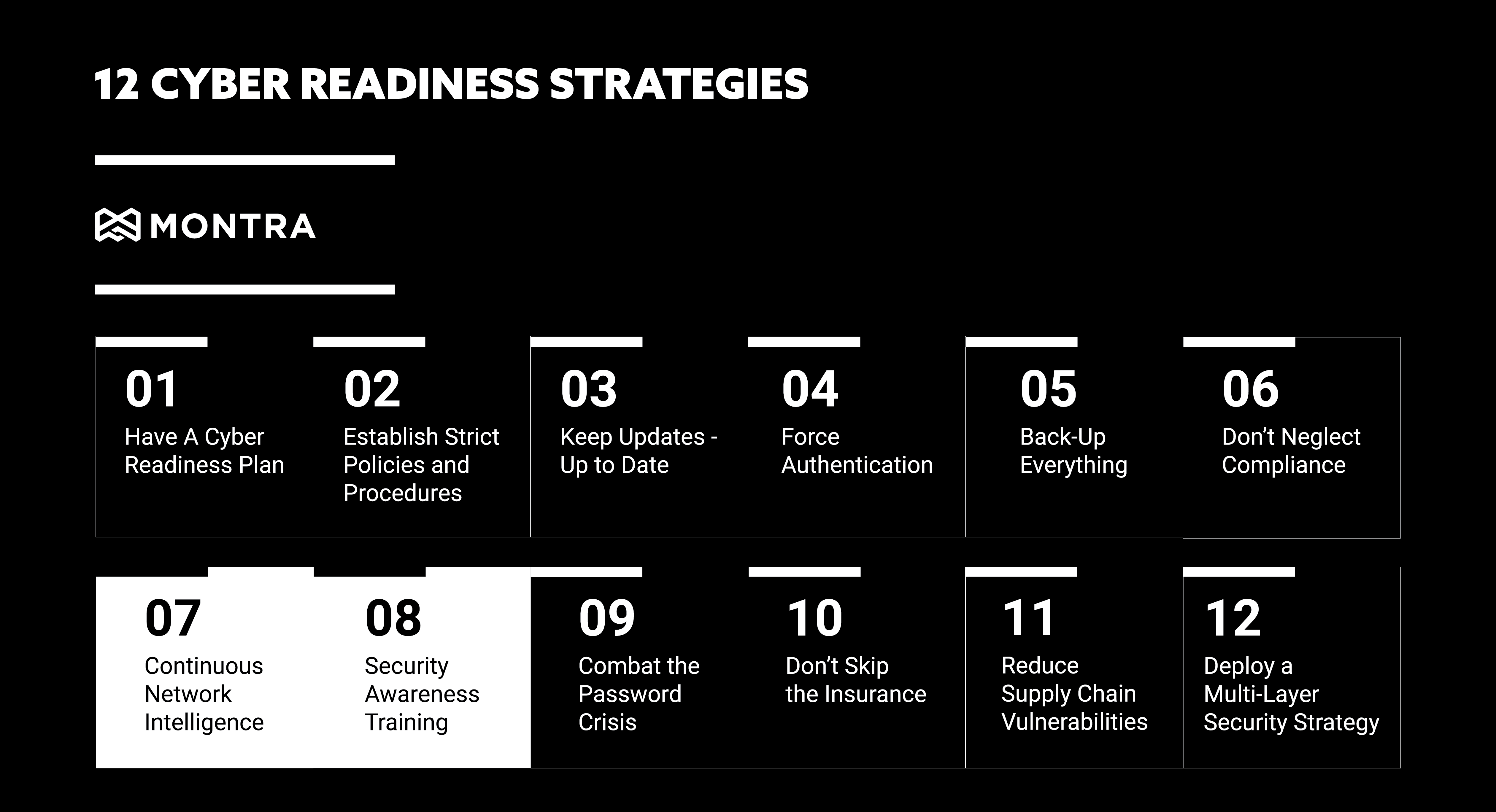
Montra’s 12-Strategy Multi-Layer Cybersecurity Framework

  1. Develop a Plan — Include prevention, continuity, and recovery strategies covering the 6 critical areas of cyber readiness.
  2. Establish Policies — Secure business operations with security-focused protocols that define the standards of business conduct.
  3. Keep Software Updated — Security patches address known vulnerabilities. Regularly update and patch all systems.
  4. Require Multi-Factor Authentication (MFA) — MFA provides additional security to identity management by requiring two or more forms of authentication.
  5. Back Up Everything — Implement a reliable backup process to ensure your data is always safe and recoverable.
  6. Don’t Neglect Compliance — Familiarize yourself with regulations that apply to your industry and develop a compliance plan.
  7. Combat the Password Crisis — Use strong, unique passwords and never share them. Use a password manager to help employees comply.
  8. Security Awareness Training — Train employees to protect against attacks and defend against data breaches.
  9. Reduce Supply Chain Vulnerabilities — Attacks can come through your supply chain. Identify and address those vulnerabilities.
  10. Continuous Network Intelligence — Keep your network secure with proper surveillance and cybersecurity monitoring protocols.
  11. Get Cyber Insurance — Cyber insurance can help cover the cost of recovery from an attack. Don’t skip it.
  12. Multi-Layer Security — This combined approach provides the basis for compliance with all major privacy and cybersecurity frameworks.

Building a Multi-Layer Security Strategy

Is your business ready to handle a targeted cyber-attack? Maybe you have been attacked and don’t even know it. According to the 2020 Thales Data Threat Report, 49% of US companies have already experienced a data breach. To help you become more proactive and effective at defending against cyber threats, we have created an infographic to provide you with the basis for compliance for 12 privacy and cyber security frameworks