
How Atlanta’s Fastest-Growing Companies Manage IT Without Slowing Down

There is a specific moment in every fast-growing company's journey when IT stops being infrastructure and starts being a constraint. It usually arrives quietly:

  • a new hire can't work on Day 1;
  • a security audit surfaces credentials belonging to someone who left 8 months ago; or
  • a finance review shows you're paying for 40 software licenses nobody is using.

By the time those symptoms appear, the underlying problem has been compounding for a while. Growth put pressure on IT processes designed for a smaller, more informal organization, and the processes didn't adapt fast enough.

We’ve seen this from both sides. As an Atlanta-based managed IT company named to the Inc. 5000 two consecutive years, Montra has lived the growth challenges we help our clients navigate. Here are the four IT problems that most reliably surface during rapid business growth and what the companies that handle them well are doing differently.

1. Rapid Hiring Growth

Hiring fast is the most visible sign of business health. It’s also the activity that most reliably exposes whether your IT processes scale.

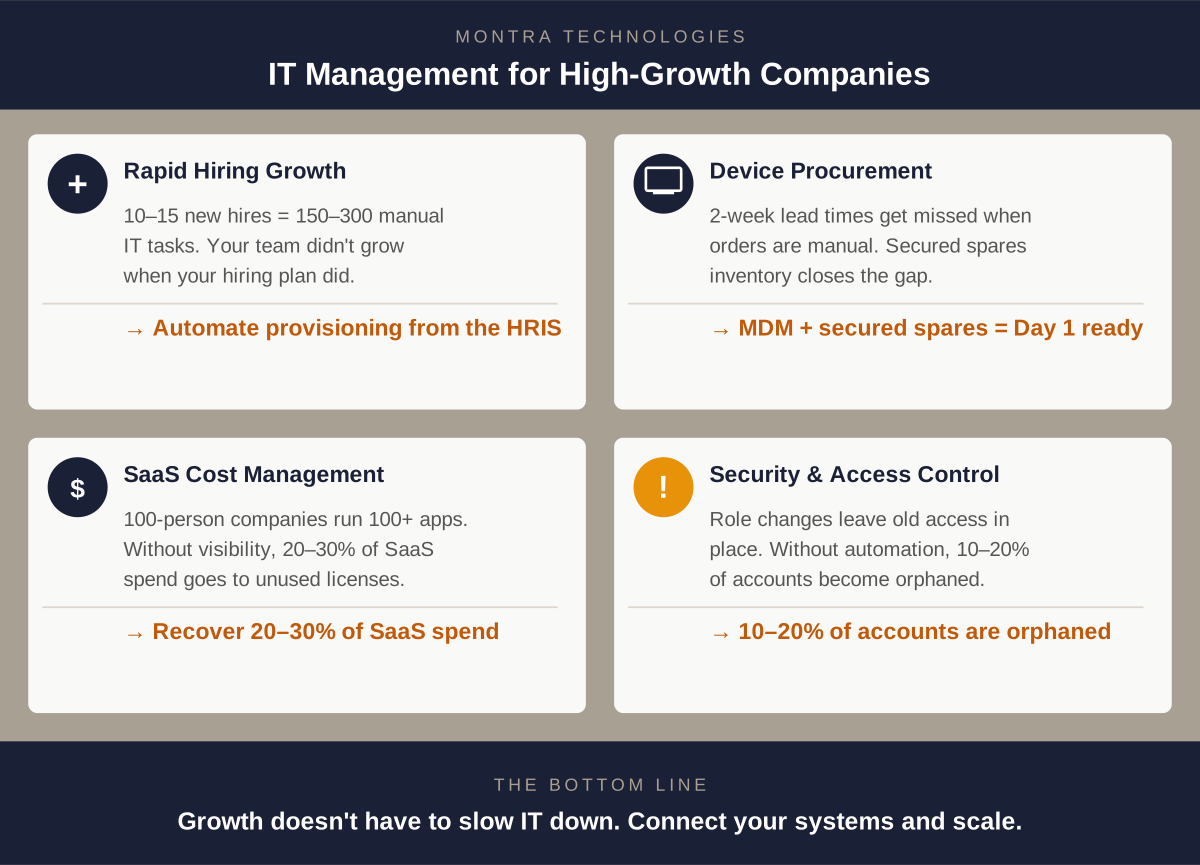
Manual IT onboarding is a fixed-labor process: each new hire requires someone in IT to create accounts, assign permissions, order a device, and verify access. When you're adding two or three people a month, that's manageable. When you're onboarding a cohort of ten or fifteen at once, you've created 150 to 300 individual manual actions that didn't exist last week, and your IT team didn't get bigger when your hiring plan did.

The companies that navigate rapid hiring without IT breaking down have one thing in common: provisioning is triggered by their HR system, not by a manual request. When a new hire record is created in the ATS or HRIS, it automatically kicks off account creation, license assignment, identity configuration, and device ordering with no IT staff executing each step manually. IT's job shifts from manually enforcing the standards to only reviewing the exceptions.

The result is Day 1 readiness at scale. The tenth new hire in a month takes the same IT labor as the first: almost none.The full cost breakdown of direct labor, lost productivity, error remediation, and security exposure is cover in The Real Cost of Manual IT Onboarding. For the specific failure patterns that show up during hiring surges, see Why IT Always Breaks During a Hiring Surge.

2. Accelerated Device Procurement and Deployment

Software provisioning can happen in seconds once it’s automated. Hardware can’t. A laptop still needs to be ordered, received, imaged with your security baseline, and shipped or handed off with a process that typically takes two weeks from purchase order to usable device.

That lead time is invisible during stable periods. During a growth phase, when hiring decisions are made fast and sometimes late, it becomes urgent. When someone submits a device request three days before a start date, the timeline doesn't work. The new hire arrives, borrows a colleague's machine, and spends their first week on hardware that isn't configured for them. That creates both a security and productivity problem.

Fast-growing companies solve this by automating the trigger. When the HRIS creates a new hire record, the device order is placed automatically instead of when someone remembers to file a ticket. Two weeks of lead time requires two weeks of notice. When the system handles the request, you always have it.

These lead times can be reduced significantly by maintaining an inventory of spare devices. Spares serve double duty: they cover new hires when procurement timing is tight, and they replace devices that are inevitably broken, lost, or stolen. But a spares program is only as good as the systems behind it. Devices in unsecured storage create their own risk as hardware can quietly "walk away." And without accurate counts tied to your device management platform, you won't know inventory is running low until someone needs a laptop and there isn't one.

The right setup is secured storage with real-time inventory visibility: serial numbers tracked, condition logged, and automated reorder thresholds so procurement happens before you run out, not after.

The other piece is deployment infrastructure. Companies managing 50 or more devices need a mobile device management (MDM) platform that pushes a standardized security configuration to any device automatically. Zero-touch enrollment means a new laptop can ship directly to a remote employee and configure itself on first boot with no IT hands required. At 100+ employees, this isn't a nice-to-have; it's the only way to maintain consistent security across a distributed, growing workforce.

The same infrastructure handles the full device lifecycle: warranty tracking, refresh schedules, and retrieval when someone leaves. Companies that manage this well don't lose track of $1,500 laptops during a period of high attrition.
Fast Growing 4 It Issues

3. Managing Growing SaaS Costs

The average 100-person company runs more than 100 SaaS applications. Companies growing from 50 to 150 employees often double their SaaS spend before anyone notices how much they're paying or whether the licenses are actually being used.

Manual SaaS management during a growth phase produces three predictable problems:

  • Over-provisioning: everyone gets the premium tier because it's faster to grant broad access than to evaluate what each person actually needs.
  • License accumulation: seats get purchased for new hires but never recovered when people leave or change roles.
  • Shadow SaaS: departments move fast and buy tools without going through IT, creating a parallel software stack that finance and security don't know about.

For a 100-person company, the combination of unused licenses, over-provisioned tiers, and untracked applications typically represents 20 to 30 percent of total SaaS spend. These costs don't show up as waste in any single line item and don't get caught without active visibility.

The fix is visibility paired with automation. A SaaS management platform gives IT a single view of every application, every license, and actual usage data by user. When that's connected to your identity provider, license assignment and recovery happen automatically: access is granted when someone joins a role and recovered when they leave it. The question of "who actually needs the Salesforce Enterprise license" gets answered by usage data, not assumptions.

Growing companies that get SaaS management in place consistently find they can consolidate vendors, right-size tiers, and recover budget that gets redirected to tools people actually use.

4. Balancing Security and Access

Growth creates access sprawl. Not through negligence. It's the natural result of people changing roles, getting promoted, transferring departments, and leaving, all at a rate that outpaces manual access management.

The pattern looks like this: a new hire is provisioned with the access template for their role. Six months later, they're promoted. IT grants the additional access the new role requires. The previous role's access stays in place, because removing it wasn't part of the ticket. A year later, they're managing a cross-functional team and have accumulated access from three different roles some of which they haven't touched in months.

When that person eventually leaves, the deprovisioning request covers whatever anyone still remembers they had. The rest lingers.

This is how companies in rapid growth mode end up with significant over-provisioning and active credentials belonging to people who left months ago. The industry benchmark puts orphaned accounts at 10 to 20 percent of SaaS application instances at companies without automated deprovisioning. In regulated environments like healthcare, financial services, and government contracting, that's not just a security risk, it's a compliance exposure that shows up in audits.

Fast-growing companies that manage this well implement role-based access control (RBAC) enforced at the system level, not just as a guideline. Access templates define exactly what each role gets. Promotions and transfers trigger a role change in the HRIS, which automatically adjusts access removing what the previous role required and granting what the new role needs. Departures trigger immediate, cross-application deprovisioning.

The companies that have this infrastructure in place stop dreading security audits, because the audit trail is generated automatically and access always reflects current reality.

What This Looks Like as a System

These four challenges: hiring at scale, device deployment, SaaS cost management, and access control, aren't separate problems. They're interconnected symptoms of the same underlying issue: IT processes built for a smaller organization that haven't kept pace with complexity of the business.

The fix isn't hiring more IT staff. It's connecting your IT systems to your business systems like the HRIS and ATS, so that routine work happens automatically and your team focuses on decisions that require human judgment.

Montra built the Via platform to solve exactly this for mid-market companies in real growth phases. Via connects to your ATS, HRIS, identity provider, MDM, and ticketing system, to automate the full employee IT lifecycle: onboarding, device management, SaaS access, and offboarding, from a single platform. When your HR system adds a person, Via handles everything downstream. When HR removes them, Via handles that too.

For Atlanta companies on a growth trajectory, whether you're adding 20 people a year or 200, Via is how IT stays ahead of the org chart instead of falling behind it.

Ready to see what this looks like for your organization? We're happy to walk you through it.


Montra Technologies is an Atlanta-based managed IT and automation company. We help mid-market organizations manage workforce technology, device lifecycle, SaaS access, and security compliance through the Via platform and services built for scale. Named to the Inc. 5000 two consecutive years and recognized multiple times by Channel Futures as an MSP 501 company.
The Real Cost of Manual IT Onboarding

Most companies know that manual IT onboarding is slow. Fewer have done the math on exactly how much it costs.

The direct labor cost of an IT administrator spending 4 to 8 hours per new hire creating accounts, ordering devices, and setting up access is visible and measurable. But it's probably the smallest part of the real number. When you add up lost new-hire productivity, error remediation, helpdesk ticket volume, and the security exposure from accounts that don't get configured correctly, the true cost of manual IT onboarding is often two to three times higher than the IT labor line alone.

This post walks through that math. We'll cover each cost category, give you benchmarks to work with, and show you what a realistic automation ROI looks like for a growing company.

The Direct Cost: IT Labor per Hire

Let's start with what's easy to quantify.

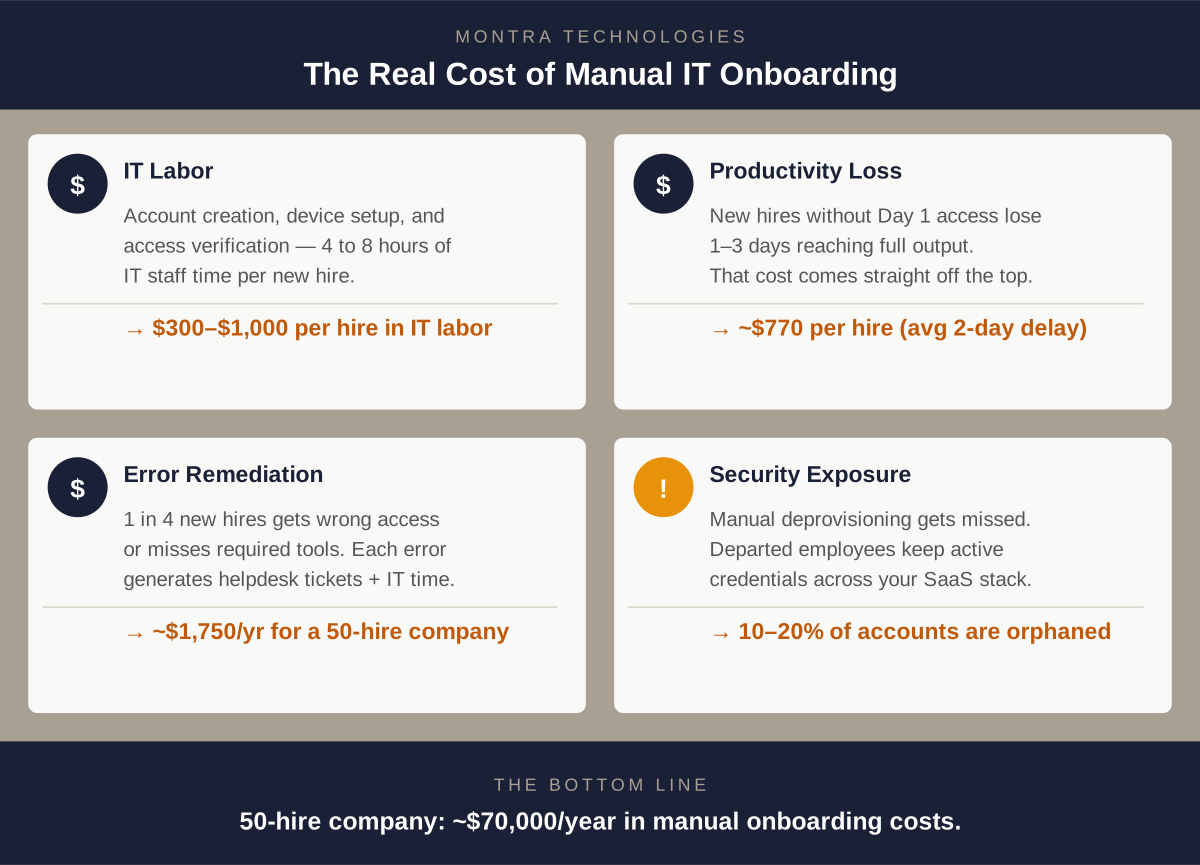
A complete manual IT onboarding — account creation across all business applications, device ordering and configuration, identity provider setup, license assignment, and access verification — takes an experienced IT administrator 4 to 8 hours per new hire under normal conditions. In a hiring surge, when multiple onboardings are running simultaneously, the number often rises because task-switching and batching reduce efficiency.

Using a fully-loaded IT staff cost of $75 to $125 per hour (salary plus benefits, overhead, and tools), the math looks like this:

  • At 4 hours / $75/hr: $300 per hire
  • At 6 hours / $100/hr: $600 per hire
  • At 8 hours / $125/hr: $1,000 per hire

For a company hiring 50 people per year at the midpoint, that's $30,000 in direct IT labor on new hire setup — before anything goes wrong.

The Indirect Cost: Lost New-Hire Productivity

This is where the number gets significantly larger, and where most companies have no estimate at all.

When a new employee cannot access the systems they need on Day 1, they are not productive. They sit in orientation. They shadow a colleague. They set up their desk. Some of them — especially technical hires who expected to hit the ground running — have a negative first impression that affects their engagement.

Research on new hire time-to-productivity consistently shows that incomplete system access on Day 1 delays full productivity by one to three days, depending on the role. For a knowledge worker earning $80,000 per year (roughly $385/day in compensation cost), a two-day delay in productivity costs the company approximately $770 per hire — not counting the cost of the colleague whose time was consumed helping them navigate their first week.

For a company hiring 50 people per year, that's another $38,500 in productivity loss, on top of the IT labor cost.

The Error Cost: Fixing What Was Configured Wrong

Manual provisioning has an error rate. The wrong application template gets applied. The wrong security group gets assigned. A license for a required application doesn't get added until someone asks for it two weeks in.

Each error creates a helpdesk ticket. Each ticket takes IT time to diagnose and resolve — typically 30 to 90 minutes per ticket. In studies of IT onboarding processes at mid-market companies, between 20 and 35 percent of new hires generate at least one access-related helpdesk ticket in their first two weeks, with an average of 1.4 tickets per affected hire.

For a company hiring 50 people per year with a 25% error rate and 1.4 average tickets at 60 minutes each:

  • 50 hires × 25% error rate = 12.5 affected hires
  • 12.5 × 1.4 tickets = 17.5 tickets
  • 17.5 × 1 hour × $100/hr = $1,750 in remediation labor

That's smaller in absolute terms, but it also doesn't count the cost to the new hire themselves — the frustration, the time lost waiting for the fix, and the signal it sends about how the company operates.

The Security Cost: Accounts That Shouldn't Exist

Here's the cost category that is hardest to quantify and potentially most expensive.

Manual IT provisioning fails at the end of the employee lifecycle just as reliably as it does at the beginning. When someone leaves — whether voluntarily or through a reduction in force — deprovisioning their access requires the same manual steps as provisioning it. Under the pressure of an active transition, those steps frequently get missed or delayed.

The industry benchmark: orphaned accounts (active credentials belonging to departed employees) affect approximately 10 to 20 percent of SaaS application instances at companies without automated deprovisioning. For a company with 80 SaaS applications and 200 employees with 15% annual attrition, that's potentially 30 departures per year with incomplete deprovisioning — and each orphaned account represents an active attack surface.

The cost of a security incident attributable to orphaned credentials varies widely, but the IBM Cost of a Data Breach report consistently puts the average breach cost for companies under 1,000 employees at $3M to $5M when fully loaded (investigation, remediation, regulatory, reputational). Even if the probability of an incident from orphaned accounts is low in any given year, the expected cost is not.

For compliance purposes, the cost is more concrete: HIPAA fines for access control violations range from $100 to $50,000 per violation, depending on the level of negligence. SOC 2 findings related to access provisioning and deprovisioning have derailed audits and client relationships.

The Full Picture: What Manual Onboarding Actually Costs

Pulling together the quantifiable costs for a company hiring 50 people per year:

Cost Category Annual Estimate
Direct IT labor (6 hrs × $100 × 50 hires) $30,000
Lost New-hire Productivity (2 days × $385 × 50 hires) $38,500
Error Remediation (help desk tickets) $1,750
Total Quantifiable Cost $70,250


And that's before any security incident — which, if it happens, would dwarf all of the above.

The Automation Math: What Changes and by How Much

Automated IT onboarding — triggered by your HRIS, executed by a connected IT platform — reduces each of these cost categories differently.

IT Labor: Automation handles account provisioning, license assignment, identity configuration, and device queuing automatically, with no IT administrator manually executing steps. IT review time drops to exceptions only. Typical labor reduction: 65 to 80 percent per hire.

New-hire productivity loss: When provisioning happens automatically at the moment of hire record creation, access is ready before the employee's first day. Productivity loss from access delays drops to near zero. Devices ship on schedule because the order is placed automatically. Typical improvement: 80 to 90 percent reduction in Day 1 access issues.

Error Rate: Role-based access templates, enforced by a system rather than recalled by a person, eliminate the most common class of provisioning errors. Typical error rate reduction: 70 to 85 percent.

Deprovisioning: Automated deprovisioning, triggered by HRIS termination events, closes accounts immediately and consistently — not when someone remembers to do it. Orphaned account exposure drops to near zero for connected applications.

Applied to the same 50-hire company:

Cost Category Manual Automated Savings
IT Labor $30,000 $8,400 $21,600
New-hire Productivity Loss $38,500 $5,775 $32,725
Error Remediation $1,750 $350 $1,400
Total $70,250 $14,525 $55,725


That's a rough annual savings of $56,000 for a company hiring 50 people per year — before the security risk reduction is counted.

What Does Automation Cost?

Managed IT automation through a platform like Via is typically priced per user per month as part of a broader IT management agreement. For a 200-person company, full automation of identity and device lifecycle management — including HRIS integration, role-based provisioning, device management, and automated deprovisioning — is generally included within a managed IT services agreement in the range of $85 to $150 per user per month.

But the relevant comparison isn't automation cost vs. zero — it's automation cost vs. the labor, productivity loss, and risk that manual processes accumulate. For most growing companies, the math favors automation significantly.

Run Your Own Numbers

The inputs that matter most are: how many people you hire per year, your average IT staff cost, and your average new-hire compensation. Plug those into the calculator below to see what your current manual onboarding is likely costing — and what automation would change.

IT Onboarding ROI Calculator
Estimate what manual IT onboarding costs your company — and what automation saves.
New hires per year 50
IT staff fully-loaded hourly rate $125 / hr
IT hours per manual onboard 6 hrs
Average new hire annual salary $80,000

Annual cost — manual
Estimated annual savings
Cost per hire — manual
Cost per hire — automated
Cost category Manual Automated Savings
IT labor
Lost new-hire productivity
Error remediation
Total
Cost reduction with automation
Estimates use industry benchmarks: 72% IT labor reduction, 85% new-hire productivity-loss reduction, and 80% error rate reduction with HRIS-connected automated onboarding. Security risk reduction from automated deprovisioning is not included. Actual results vary. Talk to Montra about your specific numbers →


The Bottom Line

Manual IT onboarding has a real cost that extends well beyond the IT administrator's time. When you account for lost new-hire productivity, error remediation, and security exposure from incomplete deprovisioning, the number for a 50-person-per-year hiring company is typically in the range of $50,000 to $80,000 annually.

Automation doesn't eliminate all of that — but it eliminates most of it, and it does so while also improving the experience for the new hire, reducing security risk, and freeing IT to focus on work that actually requires human judgment.

If you'd like to understand what automated onboarding would look like for your company specifically, we're happy to walk you through it.


Montra Technologies is an Atlanta-based managed IT service provider and automation company. Our Via platform connects directly to your HRIS and identity provider to automate employee onboarding, offboarding, and access management — for mid-market companies managing real growth. Named to the Inc. 5000 two consecutive years and recognized by Channel Futures as an MSP 501 company.
IT Onboarding Cost Graphic

Why IT Breaks During a Hiring Surge (And How to Fix It)

Growth is supposed to feel good. You've won the clients, you've gotten the budget approved, and you're finally adding headcount. And then, just weeks into the hiring surge, one of your new hires sends you a Slack message: "Hey‚ I still can't get into [the CRM / the ERP / the whatever]."

You check with IT. They're aware. They're working on it. There are a lot of new people right now.

This is one of the most predictable failure patterns in business technology, and it happens at companies of every size from 30-person startups adding their first team to 500-person firms opening a second office.The root cause is almost never the people in IT. It's the way IT is structured. And once you understand what breaks IT and why, fixing it becomes a lot more straightforward to fix.

What Actually Breaks (and When)

IT doesn't fail randomly during a hiring surge. It fails in specific, predictable ways and usually in the same sequence, at the same points in the onboarding process.

The Provisioning Backlog

Every new hire needs account access. Email. The core business applications. The VPN. The project management tool. The CRM. The communication platform. The industry-specific software. Depending on your stack, that's anywhere from 8 to 80 separate accounts, each requiring a manual action by someone in IT.

When you're hiring one or two people a month, this is manageable. When you're onboarding a cohort of 10 or 15 at once, you've just created a 150-to-300-item manual task list that didn't exist last week. Your IT team didn't get bigger when your hiring plan did.

The result: provisioning gets batched. Not everything gets set up before day one. New hires spend their first day, and sometimes their first week, waiting for access.

The Role-Access Mismatch

Even when accounts get created on time, they often get created wrong. Manual provisioning relies on whoever is doing the setup knowing what a specific role actually needs access to. That knowledge lives in someone's head or a spreadsheet, but not in a system.

The wrong template gets applied. The new marketing manager gets the same permissions as the last marketing coordinator. The new finance analyst gets access to systems she doesn't need and misses one she does. These mismatches aren't caught until someone asks why they can't do something, or worse, until a security audit surfaces over-provisioned accounts six months later.

The Equipment Delay

Hardware has a lead time problem that software doesn't. A laptop needs to be ordered, received, imaged with your security configuration, and shipped or handed of. This is typically a two-to-three-week process if everything goes right. When a hiring decision is made late, or the request doesn't get submitted until an offer is accepted, the timeline doesn't work.

New hires show up without a computer. They borrow a colleague's device. IT scrambles to find something in inventory that may or may not have current software. The employee's first impression of your company is that you didn’t care to be ready for them.

The Offboarding Residue

Hiring surges eventually end. Sometimes they reverse. And when someone leaves during or after a growth period, the same manual process that struggled to get them set up now has to undo everything. Accounts that don't get deprovisioned promptly are a security liability, and in regulated industries, they're a compliance liability.

A company that grew from 80 to 130 employees in 18 months and then had some attrition can easily have 10 to 15 orphaned accounts sitting in various SaaS applications: people who left six months ago but still have active credentials.

Why IT Teams Aren't the Problem

Most IT administrators who are overwhelmed during a hiring surge are competent, hardworking people who are simply dealing with a process problem. Manual provisioning is slow not because the people doing it are slow, but because the process requires human attention for every step of every new hire.

When your IT team is managing 12 new hires at once plus normal helpdesk volume, triage is inevitable. Something doesn't get done on time. That's not a people failure. It's a capacity model that doesn't scale with growth.

The companies that handle hiring surges without IT breakdowns aren't doing it with better IT people. They're doing it with a different kind of process.

Via AI Flow Conditional Access

What a Fixed Version Looks Like

The companies that solve this problem consistently have one thing in common: IT provisioning is triggered by your HR system, not by a manual request.

Here's what that means in practice.

When a new hire record is created in your HRIS (i.e., your system of record for people)‚ that event automatically kicks off a structured workflow in your IT platform. The role associated with that hire maps to a predefined access template: the exact set of applications, permissions, and security policies appropriate for that job function. Accounts get created. Licenses get assigned. Your identity provider gets updated. The device order gets queued.

By the time IT sees it, the routine work is already done. IT's job becomes exception-handling: reviewing edge cases, approving access outside the template, handling requests that don't fit the standard workflow. The 150-item manual task list becomes a short list of things that actually require human judgment.

For equipment, the same trigger creates a device order and kicks off the imaging and configuration workflow automatically the moment the hire record is created. Two to three weeks of lead time means you need two to three weeks of advance notice. When the system creates the order automatically at the point of hire, you have that notice. When a human has to remember to submit a form, you often don't.

For offboarding, termination in the HRIS triggers the reverse: immediate deprovisioning across all connected applications, device return initiated, access logs closed. The accounts don't linger because there's no human step that can be delayed or forgotten.

The Numbers Are Hard to Ignore

The math on manual vs. automated IT onboarding is worth doing explicitly.

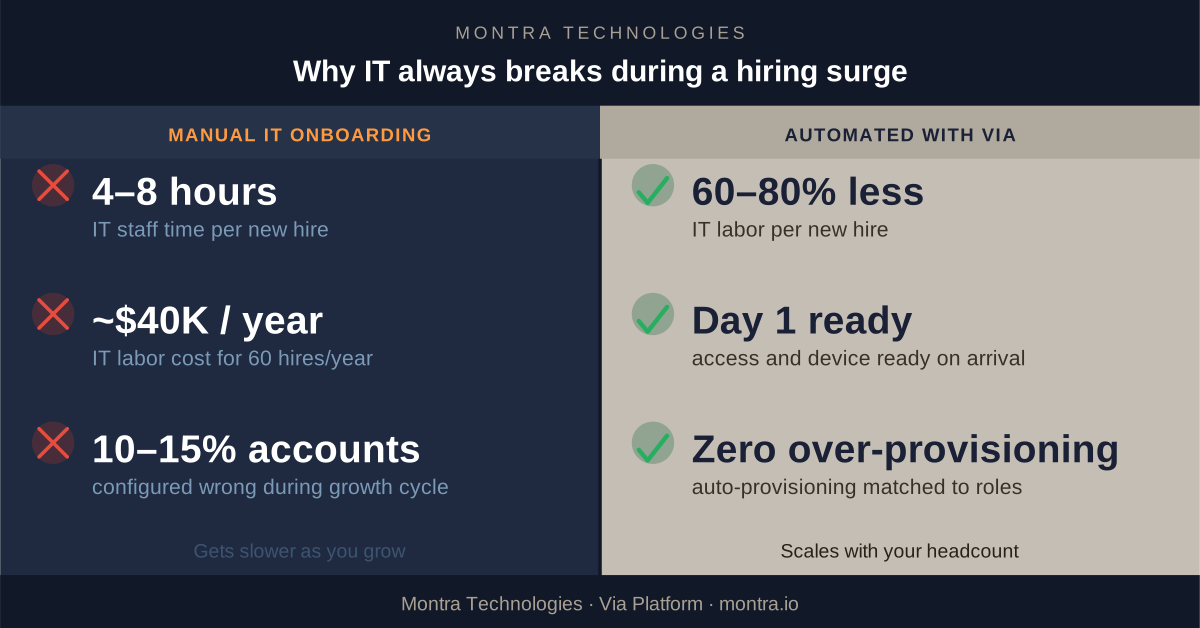
A typical manual onboarding process, which includes accounts creation, device ordering and configuration, access verification, new hire orientation on their setup‚ takes 4 to 8 hours of IT staff time per person. At a fully loaded IT staff rate of $100 to $150 per hour, that's ~$750 per new hire, just in IT labor.

For a company hiring 60 people in a year, that's ~$40,000 in IT labor on new hire setup alone. That’s before counting the helpdesk tickets generated by the mistakes, the productivity lost by employees who couldn't work on day one, and the security exposure from access that wasn't provisioned or deprovisioned correctly.

Automated onboarding, run through a platform connected to your HRIS, reduces IT labor per hire by 60 to 80 percent. The savings accumulate fast. More importantly, the errors‚ the mismatched access levels, the late equipment, and the orphaned accounts‚ largely disappear.

What to Look for in a Solution

Not all IT automation is the same. If you're evaluating options, here's what matters:

  • HRIS integration is non-negotiable. The trigger for IT provisioning must be a real-time event in your HR system, not a form someone fills out. If the two systems aren't connected, the delay and manual handoff come back.
  • Role-based access templates need to be configurable. Your company has roles that don't look like anyone else's. The platform needs to let you define exactly what each role gets and enforce it consistently, every time.
  • The system needs to handle the full lifecycle, not just onboarding. Promotions change access needs. Transfers between departments do too. Offboarding has to be as automated as onboarding, or you've only solved half the problem.
  • Reporting and audit trails matter. In a regulated industry, you need to be able to demonstrate that access was granted correctly and revoked promptly. A system that acts but doesn't log is a compliance problem waiting to happen.


How Montra Handles This

Montra built the Via platform specifically for companies experiencing this kind of growth. Via connects directly to your HRIS and identity provider to automate the full employee IT lifecycle from a single place.
When your HR team creates a new hire record, Via reads it, maps the role to your access templates, provisions accounts across your connected applications, queues the device order, and updates your identity policies automatically, before the first human in IT is even aware of the hire.

When someone leaves, Via initiates immediate deprovisioning, triggers the device return workflow, and closes out the access logs with a full audit trail. For Atlanta-area companies that are growing fast‚ hiring 20, 50, or 100 people a year‚ Via is the reason IT doesn't become the bottleneck. The provisioning scales with your headcount because it's automated. The 10th hire in a month takes the same amount of IT labor as the first: almost none.

If your company is heading into a growth phase and you're already feeling the strain on your IT team, this is the right time to look at what automated onboarding actually looks like in practice. We're happy to walk you through it.

Montra Technologies is an Atlanta-based managed service provider and IT automation company. We help mid-market companies manage workforce technology, device lifecycle, SaaS access, and security compliance through our Via platform‚ built for scale and powered by agentic AI. Named to the Inc. 5000 two consecutive years and recognized by Channel Futures as an MSP 501 company.

See how Via can handle onboarding automatically for you.

Best IT Management Firms in Atlanta: What to Look For

A practical guide for Atlanta businesses evaluating managed IT service providers

Atlanta's technology sector is one of the fastest-growing in the country. With over 900 IT support providers operating in the metro area, choosing the right IT management company is one of the most consequential technology decisions your business will make. The wrong partner can cost you time, money, and security, while the right one can become a strategic asset.

This guide is written for executives, operations leaders, and HR directors at Atlanta-area companies who are evaluating managed IT service providers (MSPs) — whether for the first time or because an existing relationship isn't working. We cover the criteria that matter, the red flags to watch for, and the questions you should ask before signing anything.

What Is an IT Management Company, and Do You Need One?

An IT management company — also called a managed service provider or MSP — takes responsibility for some or all your company's technology operations. This can range from basic help desk support to full lifecycle management of your devices, employee identities, SaaS applications, security, and compliance.

You likely need one if:


  • Your internal IT team has too much to do to handle everything your business requires
  • You're growing fast and onboarding new people is becoming a bottleneck
  • Employees are waiting too long to get devices, access, or support when they join or change roles
  • You've had a security incident or are concerned about having one
  • You need to pass a compliance audit (HIPAA, SOC 2, PCI, etc.) and need to support to complete that
  • Or you just have that nagging feeling that you don’t know what you don’t know regarding your IT and security
The Best In IT Management

The Atlanta IT Market: What You're Navigating

Atlanta has a deep talent pool and a competitive MSP market, but that also means significant variation in quality. A few things to know before you start evaluating:

Size and stability matter. Many smaller IT shops have been acquired by private equity firms in recent years. While some acquisitions improve service, many result in staff turnover, service degradation, and an account rep who doesn't know your business. Ask how long the company has been under current ownership and management.

"Break/fix" is not managed services. Some companies present themselves as MSPs but primarily respond to problems after they happen. True IT management is proactive — monitoring, patching, identity governance, and lifecycle management happen continuously, not when something breaks.

Atlanta's geography requires local presence. If you have offices or employees inside the perimeter (ITP), in Buckhead, Midtown, or Downtown, or in key OTP corridors like Alpharetta, Sandy Springs, Duluth, or Marietta, verify your provider can actually reach you. Ask for specific on-site SLA commitments by location, not just a general metro-area claim.

Criteria for Evaluating an Atlanta IT Management Company

1. Technical Experience and Depth

Look for a company with demonstrable expertise on their website with engineers who have solved problems similar to yours. Key Questions:

  • What is the average tenure of their technical staff?
  • Do they have dedicated engineers or does every call go to a different person?
  • Can they show you case studies from companies your size and industry?

If your business uses Microsoft (and most do), Microsoft 365, Entra ID (formerly Azure Active Directory), Intune, and Defender expertise are baseline requirements. Ask specifically about each.

2. Industry Experience

IT management is not one-size-fits-all. A healthcare company has different compliance requirements than a law firm, which has different needs than a fast-growing tech startup. Look for a provider who has served companies in your industry and can speak to the specific challenges you face.

Industries with specific compliance requirements (healthcare, financial services, legal, government contractors) should prioritize MSPs with active clients in those sectors.

3. Automation and Modern Workflow

One of the clearest differentiators between a great MSP and a good one is how much manual work remains in their processes. When a new employee joins, does IT get notified by email and start manually creating accounts? Or does an automated workflow trigger the moment HR makes the change?

Automation matters for three reasons: it's faster, it reduces errors, and it scales with your growth. If you're hiring aggressively, a manual IT onboarding process will become a serious bottleneck. Ask any prospective MSP to walk you through exactly what happens step by step when a new hire starts on Monday. The answer will tell you a lot.

4. AI and Intelligent Tooling

The best IT management companies in 2026 are using AI and automation not just to market themselves, but to actually run better operations. This includes smart identity matching (automatically provisioning application access based on an employee's role, department, and location), predictive device health monitoring, and AI-assisted security alerting that reduces noise and surfaces real threats.

Ask what AI capabilities are built into their platform, and ask for a demonstration. Vendors who are genuinely using AI can show you; those who are not will speak in generalities.

5. Security Credentials and Compliance Accreditations

Any MSP worth considering should be able to answer the following clearly and without hesitation:

  • Are you SOC 2 Type 2 certified? This means an independent auditor has verified their security controls — not just that they've filled out a questionnaire.
  • Can you sign a Business Associate Agreement (BAA) if we are subject to HIPAA?
  • What compliance frameworks do you actively support? (HIPAA, SOC 2, NIST, CIS Controls, FINRA, PCI, CMMC)
  • What does your own internal security posture look like?

An MSP that cannot clearly answer these questions about themselves is not positioned to help you with yours.

6. Geographic Coverage Across Metro Atlanta

Atlanta is large and traffic is notorious. Confirm specifically where your provider can deliver on-site support and what their SLA commitments are. Key areas to ask about: Midtown, Buckhead, Downtown, Perimeter/Dunwoody, Alpharetta, Sandy Springs, Roswell, Marietta, Duluth, Lawrenceville, and Peachtree City. If you have field locations or warehouses outside the core metro, ask about those explicitly.

A good benchmark: less than 4 hours for on-site response to critical issues within I-285, next business day for outer suburbs.

7. Pricing Transparency

Managed IT pricing in Atlanta typically runs $85 – $200 per user per month depending on the scope of services. Be skeptical of providers who won't give you a ballpark without a lengthy sales process, and equally skeptical of providers whose pricing seems unusually low — that usually means something important isn't included.

Look for tiered, clearly documented pricing that maps to actual service inclusions. Ask specifically: What is included at each tier? What triggers an overage or additional charge? What does onboarding cost?

8. Services Coverage: The Full Monty

A reactive help desk is the floor, not the ceiling. Modern IT management should cover:

  • Employee onboarding and offboarding (including device provisioning and SaaS access)
  • Device lifecycle management (procurement, imaging, deployment, monitoring, recovery, and retirement)
  • Identity and access management
  • SaaS application management
  • Security monitoring and compliance
  • End-user support

If a provider can only do some of these and you have to piece together the rest from other vendors, you're adding complexity and risk rather than reducing it.

9. Approach: Proactive vs. Reactive

Ask any prospective MSP what percentage of their support tickets are proactively identified versus reactively reported by clients. The best providers catch most issues before you know they exist. If the answer is vague or they can't give you a number, that's a signal.

Also ask how they handle your technology strategy long-term: Do they offer annual IT planning? Quarterly business reviews? Or do they simply respond to what you send them?

Questions to Ask Before You Sign

About experience and stability:

  • How long has the company been in business under current ownership?
  • How long do your clients typically stay with you?
  • Can you provide three references from companies similar to ours in size and industry?
  • What is the average tenure of your technical staff?

About onboarding and offboarding:

  • Walk me through what happens when we hire someone new. What triggers who does what? How long does it take?
  • What happens the day an employee is terminated? How quickly is their access revoked across all systems? How do I know?
  • How do you handle device procurement and delivery for remote employees?

About device management and logistics:

  • What do you use to you remotely monitor and secure my devices?
  • Do you provide asset management software and services?
  • Are you able to proactively monitor device warranty information
  • Can I store spare devices securely with you?
  • Do you have processes for securely erasing and disposing of my old devices?

About security and compliance:

  • Are you SOC 2 Type 2 certified?
  • Can you sign a HIPAA BAA?
  • What security frameworks do your processes align with?
  • What happens if one of our devices is lost or stolen?
  • Have any of your clients had a security breach? What happened and what did you learn?

About technology and automation:

  • What platform do you use to manage identity and device lifecycle?
  • How much of your processes is automated vs. manual?
  • What AI capabilities are built into your service delivery?
  • Show me what your dashboard looks like for a company like ours.

About pricing and contracts:

  • What is fully included in your monthly per-user fee?
  • What triggers additional charges?
  • What does onboarding cost?
  • What are the contract terms and exit clauses?
  • Do you offer a free trial or pilot period?

About ongoing service:

  • Who is our primary point of contact?
  • What are your response time SLAs by issue severity?
  • How do you communicate planned changes or maintenance?
  • What does a quarterly business review look like with you?

What Good Looks Like: A Benchmark

The best IT management companies in Atlanta combine three things: enterprise-grade technology, automation- and AI-enabled service, and transparent business practices. They have clear pricing, proven compliance credentials, and can demonstrate how automation and AI make their service delivery faster and more reliable.

Take ourselves as an example. Montra Technologies is headquartered in Doraville, Georgia. We support local clients with locations from Peachtree City to Woodstock. Our AI agent handles many of our automated alerts as well as customer requests, which gives our clients faster and more service. Our Via platform automates identity and device lifecycle management by connecting directly to your HRIS and ATS. When HR adds a new hire, devices are assigned and application access is provisioned automatically. Montra is also SOC 2 Type 2 certified, HIPAA compliant, Inc. 5000-listed for two consecutive years, and a recipient of the 2025 TMC Future of Work Award. Our pricing is published transparently starting at $33/user/month, with plans that scale to full 24/7 SOC/SIEM coverage for regulated industries.

Responsive, AI-enabled, and secure – that's what a high-quality Atlanta IT management company looks like in practice.

The Bottom Line

There are hundreds of IT management companies serving the Atlanta market. The difference between a good one and a poor one often isn't visible until something goes wrong. Doing your homework upfront on credentials, automation capabilities, client retention, and pricing transparency, is the best investment you can make before signing a multi-year contract.

If you'd like to talk through your specific IT needs, Montra offers a free consultation with no obligation. Schedule a conversation here.

Montra Technologies is an Atlanta-based IT management company serving distributed workforces across the Atlanta metro area and throughout the US & Canada. Learn more at montra.io.

Montra Wins 2025 Future of Work Award for Via Workforce Manager

Montra Technologies Receives 2025 Future of Work Employee Experience Achievement Award


Via Workforce Manager recognized for advancing the modern workplace through employee-first innovation

ATLANTA, GEORGIA, (January 3, 2026) — Montra® Technologies announced today that TMC, a global, integrated media company, has named Via Workforce Manager as a recipient of a 2025 Future of Work Employee Experience Achievement Award.

Via Workforce Manager is a unified identity and device lifecycle management (UIDLM) platform designed for mid-market IT and managed service providers. Via automates onboarding, offboarding, SaaS access, device management, and logistics in a single system which eliminates information silos between systems for identity, applications, and assets.

“This recognition reinforces our belief that employee experience and security should never be at odds,” said Scott Ryan, CEO at Montra. “With Via, we’re helping HR eliminate the friction of identity and access setup so employees can be productive on day one, while IT maintains control, security, and compliance. We’re honored to be recognized for advancing the future of work.”

“It is my pleasure to recognize Montra with a 2025 Future of Work Employee Experience Achievement Award for its commitment to customer service by focusing on employee-first innovations,” said Rich Tehrani, CEO, TMC. “In the opinion of our judges and editorial team, Montra has proven that a focus on their valued Team Members is driving better business results,” added Tehrani.

The winners of the 2025 Future of Work Employee Experience Achievement Awards will be featured on TMCnet.

For more information about TMC, please visit www.tmcnet.com.

About Montra Technologies
Montra Technologies is a managed IT services and solutions company delivering secure, scalable technology operations for modern organizations. From identity and access management to device lifecycle management, SaaS governance, security, and compliance, Montra simplifies IT so businesses can focus on growth.

Montra combines decades of enterprise IT expertise with modern, intelligent automation to reduce risk, improve security, and enhance the experience with technology across modern workforces. Learn more at www.montra.io and follow us on LinkedIn and X.

About TMC
For more than two decades, TMC has honored technology companies with awards in multiple categories — each among the most respected recognitions in the communications and technology industries. Winners represent leading organizations advancing innovation and driving growth across their markets. Every recipient is a verified leader, setting the benchmark for excellence in their field.

In addition, TMC provides global buyers with valuable insights to make informed tech decisions through our editorial platforms, live events, webinars, and online advertising. Leading vendors trust TMC, thought leadership, and our events for branding, thought leadership, and lead generation. Our live events, like the ITEXPO #TECHSUPERSHOW, deliver unmatched visibility, while our custom lead generation programs and webinars ensure a steady flow of sales opportunities. Display ads on trusted sites generate millions of impressions, boosting brand reputations. TMC offers a complete 360-degree marketing solution, from event management to content creation, driving SEO, branding, and marketing success. Learn more at www.tmcnet.com and follow @tmcnet on Facebook, LinkedIn, and X.

TMC Contact:
Stephanie Thompson
Manager, TMC Awards
203-852-6800
sthompson@tmcnet.com

Montra Contact:
Monty Rachleff
Marketing Manager
404-665-9675
mrack@montra.io

###