Device Protection 101: Safeguarding Businesses through Effective Device Monitoring

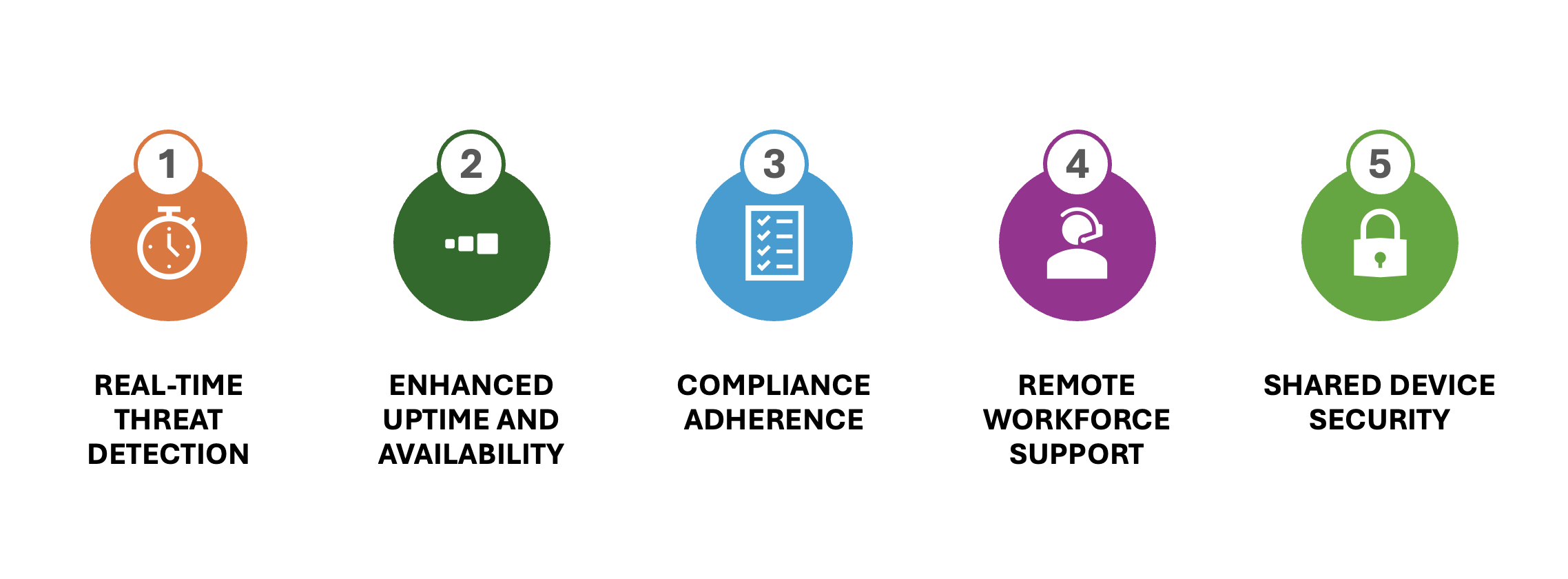
In today’s digital age, businesses are increasingly reliant on technology to optimize business operations and stay competitive. One crucial aspect often overlooked is device monitoring, which plays a pivotal role in ensuring uptime, availability, security, and compliance. Let’s delve into the top 5 ways monitoring devices can elevate your business’s protection levels and empower your workforce, especially those working remotely or sharing devices.
1. Real-Time Threat Detection

Effective device monitoring provides real-time alerts for any suspicious activities or potential security breaches. By promptly identifying threats, businesses can take immediate action to mitigate risks, safeguard sensitive data, and maintain uninterrupted operations. For instance, malware infections are a common threat that can be detected early with proper monitoring systems. Malware can corrupt files, steal sensitive information, and disrupt normal business activities.

Another example is phishing attacks, where malicious actors attempt to deceive employees into providing confidential information or access to secure systems. Monitoring solutions can identify and flag unusual login attempts or access patterns, preventing unauthorized access and potential data theft. Additionally, Distributed Denial of Service (DDoS) attacks, which aim to overwhelm a system with traffic to render it unusable, can be identified promptly. Monitoring traffic patterns can help in recognizing such attacks early, allowing businesses to respond quickly and maintain service availability.

2. Enhanced Uptime and Availability

Monitoring devices proactively detect performance issues, hardware malfunctions, or network disruptions that could lead to downtime. By addressing these issues before they escalate, businesses can ensure continuous operation, minimize productivity losses, and deliver reliable services to customers.

Consider a company that relies heavily on its e-commerce platform, particularly during peak shopping seasons like Black Friday or the holiday period. During such times, any downtime or performance hiccup can result in significant revenue losses and damage to customer trust. With proactive monitoring in place, this company can receive alerts about potential server overloads or degraded performance well before it affects the end users.

If the monitoring system detects an unusual spike in server load, it can trigger an alert to the IT team. This enables them to take immediate action, such as scaling up resources or balancing the load across multiple servers, thereby ensuring that the platform remains robust and capable of handling high traffic volumes. By addressing these issues preemptively, the company not only maintains uptime and availability but also safeguards its reputation and customer satisfaction.

3. Compliance Adherence

Small businesses face regulatory requirements and industry standards that mandate data protection and privacy measures. Device monitoring aids in maintaining compliance by tracking access controls, data handling practices, and security protocols, thereby helping businesses avoid penalties and uphold trust with clients.

For instance, businesses that process credit card transactions must comply with the Payment Card Industry Data Security Standard (PCI DSS). PCI DSS sets forth stringent guidelines for securing payment card data, which include requirements for maintaining a secure network, protecting cardholder data, implementing strong access control measures, and regularly monitoring and testing networks. Device monitoring becomes instrumental in meeting these requirements by continuously tracking network activities and ensuring that firewalls, intrusion detection systems, and other security measures are functioning correctly.

To illustrate, consider a small retail business that conducts both online and in-store sales. This business must ensure that credit card information is processed securely and that any data stored is protected against breaches. Device monitoring solutions can help the business continuously oversee its payment processing systems, flagging any instances of unauthorized access or deviations from security protocols. For example, if there’s an attempt to access payment data outside normal business hours, the monitoring system can immediately notify IT staff, allowing them to investigate and respond swiftly.

Similarly, organizations in the healthcare sector must adhere to the Health Insurance Portability and Accountability Act (HIPAA), which mandates the protection of patient health information (PHI). Under HIPAA, healthcare providers are required to ensure the confidentiality, integrity, and availability of all electronic PHI they create, receive, maintain, or transmit. Device monitoring assists in compliance by ensuring that access to PHI is appropriately controlled and by providing audit trails that can be reviewed during compliance checks.

For example, a clinic using electronic health records (EHR) can leverage device monitoring to track all access to patient information, ensuring that only authorized personnel have access to PHI. If a monitoring system detects an unusual login attempt or an unauthorized attempt to alter patient records, it can alert the compliance officer immediately, thereby mitigating potential breaches and maintaining HIPAA compliance.

4. Remote Workforce Support

With an increasing number of employees working remotely, monitoring devices become essential for managing dispersed teams and ensuring secure connections. By offering remote monitoring capabilities, businesses can oversee employee devices, enforce security policies, and support seamless collaboration regardless of location.

For example, consider a marketing agency with employees working remotely across different time zones. By implementing robust device monitoring solutions, the agency can ensure that all remote devices comply with security protocols, regardless of the employees’ locations. The monitoring system can enforce the use of VPNs for secure connections, regularly check for software updates, and verify that antivirus programs are up to date.

Specifically, if an employee’s device shows signs of potential malware infection or is missing critical security updates, the monitoring system can flag these issues for immediate resolution. This proactive monitoring not only secures the company’s sensitive client data but also enables employees to work without interruptions caused by security breaches or system failures. Consequently, the agency can maintain high productivity levels and safeguard client information, ultimately leading to a more efficient and secure remote work environment.

5. Shared Device Security

For businesses utilizing shared devices, monitoring becomes critical in tracking user activities, managing access permissions, and preventing unauthorized usage. By implementing device monitoring solutions, businesses can protect confidential information, promote accountability among users, and maintain the integrity of shared resources.

Consider a hardware store in which multiple employees are accessing computer systems for design, configuration, quote and ordering of home goods and services. These shared devices pose a unique security challenge due to the constant flux of user activity and the diverse purposes for which they are used. By implementing robust device monitoring solutions, the store can significantly enhance the security of these shared computers.

For instance, device monitoring can track user logins and logouts, ensuring that each user session is properly accounted for and that any anomalies are promptly flagged. If the monitoring system detects an unusual pattern, such as multiple failed login attempts or an extended period of inactivity followed by a sudden surge in activity, it can alert the IT staff to investigate potential security breaches or misuse.

Furthermore, monitoring can manage access permissions to restrict certain activities by unauthorized users. For example, administrative settings should only be accessible to store staff, preventing employees from installing unapproved software or altering system configurations. This level of control helps to maintain the integrity of the shared devices and protect against the installation of malicious software.

Additionally, the system can enforce automatic sign-outs after a period of inactivity, reducing the risk of a user’s session being hijacked by the next person who uses the device. By continuously scanning for vulnerabilities and ensuring compliance with security protocols, the monitoring solution safeguards company and customer data while maintaining a secure usage environment.

By leveraging device monitoring in such a setting, the store can ensure a safer, more secure experience for all patrons while protecting the integrity and functionality of its shared resources.

In Conclusion

By prioritizing device monitoring strategies, businesses can fortify their defenses, optimize operational efficiency, and foster a secure work environment for all employees. Embracing proactive monitoring practices is not just a measure of protection but a strategic investment in long-term sustainability and growth.

For further insights and detailed information supporting the importance of device monitoring in small business settings, you can refer to the following reputable sources:

1. Cybersecurity and Infrastructure Security Agency (CISA)

2. National Institute of Standards and Technology (NIST)

3. Data Privacy Regulations Overview

4. Remote Work Best Practices Guide

5. Device Monitoring Solutions Comparison

Stay informed, stay protected, and optimize your business with the right tools for effective device monitoring. Your business deserves the best defense against evolving digital threats. If you want to discuss this with an expert, please contact Montra at info@montra.io or +1-404-665-9675.
Four Ways to Revamp IT Rollout Efficiency for Retail

The process of rolling out new technology into your stores. It’s a flawless and simple joy, right? It starts as a clear and easy plan on a spreadsheet but ends up a messy series of poorly timed shipments and badly configured devices, leading to a lot of emails creating inefficiency and frustration. Ever found yourself marveling at how your best laid plans are dashed against reality? Or how your implementation partners vanish into thin air during deployments? Or perhaps you’ve witnessed the “budget bloat” that happens when inefficiency in your rollout creates delays and re-work that are blamed on ‘supply chain issues’. Fear not, weary retailers, there exists a better way to manage this process.

Bringing Order to the Chaos

Retailers, in their steadfast effort to modernize, encounter a formidable challenge. Implementing new technology across numerous stores is comparable to managing a complex array of IT equipment, each with unique configuration requirements. The hurdles are abundant, much like the frequent issues with point-of-sale systems or wifi. These include discrepancies in deployment times, lost shipments, and the perennial “it worked fine in testing” dilemma.

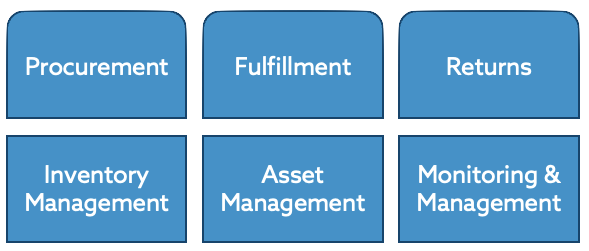
We believe that an integrated approach that links inventory management, asset management, remote management & monitoring and shipping logistics, into a single platform is the only way to maximize the efficient management of IT assets in a dispersed environment like retail.

This enables retailers to pull four important factors into control in the management of their IT rollouts:

1. Track Procurement and Warehousing

Before any rollout begins, it’s crucial to efficiently catalog and organize all your devices. You may be doing this in a spreadsheet or maybe an asset manager, but you need to manage the workflow also. Even a small rollout can become overwhelming without proper organization, and many devices need to be ordered in advance to ensure availability when needed. Without systematic tracking, finding everything during the shipping phase can be time-consuming.

Montra’s device lifecycle platform, Via, addresses these challenges effortlessly. Designed specifically for IT, Via enables seamless tracking from procurement to deployment. It keeps tabs on software revisions, warranty dates, and service ticket history. By integrating with your ordering and shipping processes, Via simplifies procurement and warehousing complexities, ensuring every device is accounted for and ready for use.

For warehousing, Via allows you to track devices down to the pallet or individual shelf location. You can even track devices by serial number and manage IT asset details like software versions and hardware warranties. The platform also supports creating bundles and setting kitting requirements for interdependent devices. Any rollout process can be initiated within Via or through service management platforms like Salesforce Service or ServiceNow.

2. Monitor Shipping Centrally

Once devices are ready to go, the shipping process often turns into a disorganized mess of tracking numbers across multiple carriers. Whether you are shipping a bundle of devices to a single store, or a fleet of devices across multiple stores, using spreadsheets to track all your shipments can quickly get out of control.

With Via you can initiate and track all shipments from one location. You can ship bundles of devices with the same ease as a single unit. You can also specify requirements for pre-configuration or kitting prior to shipment, and you can even indicate whether an installer is needed on site to meet the devices.

Once devices are shipped, they can be tracked directly in Via with real-time updates from UPS or FedEx fed directly into the system – even across multiple accounts numbers. No more tracking packages across multiple carriers and various carrier accounts.

3. Monitor Devices in the Stores

Ensuring ongoing performance and swiftly addressing failures are critical aspects of IT efficiency in retail. Once devices are deployed, they should be continuously monitored for security and availability. Real-time surveillance allows for the immediate detection of security issues or system failures, ensuring that any problems can be addressed before they escalate.

Via integrates device monitoring with logistics and asset management to greatly improves response efficiency. Knowing the origin, duration, imaging history, and spare inventory of each device throughout its lifecycle streamlines issue resolution.

This integrated approach not only reduces resolution and response times but also minimizes downtime and employee time spent on technology issues rather than customer service. This leads to an enhanced customer experience, increasing sales and promoting repeat visits. A single, system of record for devices, like Via, also eliminates the need to maintain multiple databases of devices for warehousing, for device monitoring and for asset management.

4. Manage Returns and Spares

Furthermore, when it comes to the inevitable hiccups that require a system to be returned or replaced, Montra Via also streamlines this process. The platform’s efficient returns processing mechanism simplifies the logistics of initiating the return of a failed device and ordering a replacement from the spares inventory with minimal disruption. Designed for standard returns or cross-shipped ones, Via reduces downtime, ensuring stores quickly receive the correct equipment with an accurate configuration. By making returns processing seamless, Montra Via protects retailers from the potential chaos caused by device malfunctions, thus maintaining high operational standards and customer satisfaction.

Montra Via also helps you manage your spares inventory with a separate inventory account for spares systems and parts. Importantly you can see set reorder alerts, see versions and updates, as well as warranty dates. This help makes certain that your spares are up to date and ready if a return is required.

As retail continues to get more tech-enabled, implementing Montra Via for your IT logistics is akin to upgrading from a cash register to a modern POS system. Cost efficiency, faster deployment, better uptime, streamlined cybersecurity, efficient inventory management, and improved spare device storage aren’t just aspirations; they are your new reality.

Retailers, elevate your tech rollout game now. Life is too short for inefficient IT deployments. Join those who refuse to accept the status quo, empowered by the revolutionary capabilities of Montra Via. Your future self—and your bottom line—will thank you.

Three Obstacles to Better IT Onboarding and How to Avoid Them

In the dynamic realm of organizational onboarding, anything that improves the new hire experience reigns supreme. Discover how embracing advanced IT onboarding solutions can mitigate common onboarding challenges, paving the way for seamless integration of new employees into the workforce.

 Uncovering Onboarding Obstacles

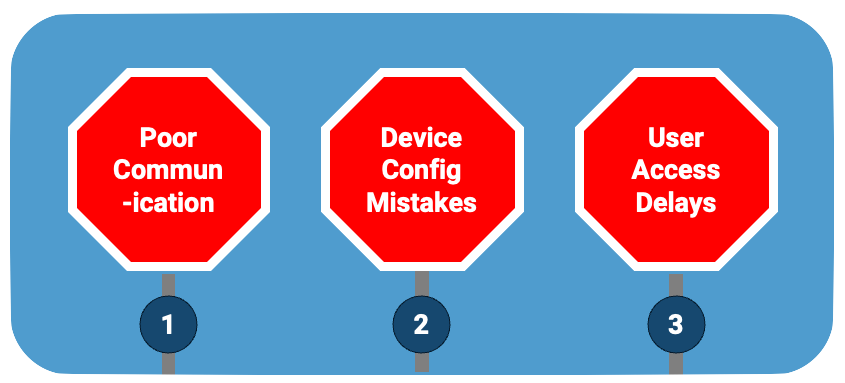
There are three common IT obstacles that all companies face when trying to optimize the onboarding experience of their new hires. Overcoming these hurdles should be a key goal for all HR and IT organizations.

1. Communication Gaps Between HR and IT Departments

One of the primary hurdles faced during onboarding is the disconnect between HR and IT departments. HR is often caught up in all of the legal and compliance requirements for onboarding a new team member and does not notify IT until the last minute about a new hire. This lack of communication often leads to delays in device setup and access provisioning, hindering new hires from swiftly becoming productive to their roles.

Picture a scenario where a new employee eagerly starts their first day working from their home office, only to find their email and application accounts non-existent, and no device delivered for their work. Basic miscommunication between HR and IT leaves them feeling unimportant to the company while valuable time is lost in the onboarding process.

2. Mistake-prone Device Procurement and Provisioning

Device procurement and provisioning tends to be a mistake-prone process and therefore stands as another impediment to efficient onboarding. Lengthy lead times for hardware procurement add risk to any mistakes being made, and the constant change on hardware models and availability make it difficult to order correctly. Additionally, provisioning of devices is often filled with mistakes in the software that is loaded as well and the account that is setup for the device.

We have all seen the situation where a newly hired person awaits hours or days for an outdated device to be configured on their first day. This delay not only frustrates the employee but also sets a suboptimal tone for their journey within the organization.

3. Slow Access Granting to SaaS Applications

Restricted access to crucial SaaS applications adds complexity to the onboarding experience. It is very common that new hires go weeks without access to some applications due to broken processes that could streamline the the granting of user access. Without immediate provisioning of necessary tools, new team members struggle to engage fully with their responsibilities, hampering overall productivity.

How often have you seen it where a new team member has no idea what is happening because this are not receiving communication or updates within critical business applications. They often find out negatively that they have missed a deadline or update in their first few weeks by no fault of their own. It can be frustrating and de-motivating for a new hire when they are just getting started in their new role.

Flattening Obstacles with a Modern Solution

Modern IT onboarding solutions offer a paradigm shift in onboarding processes by automating and expediting critical workflows. The right solution can break down the obstacles to great IT onboarding with an integrative approach that drastically reduces setup timelines, ensuring workers are functional immediately.

1. Connect HR and IT

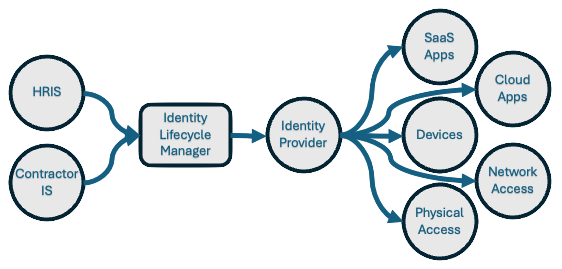
All companies have at least two systems of record for workforce identity – the HRIS which is run by HR and the Identity Provider, which is run by IT. Connecting these systems together is critical to better HR-IT communication. The systems should be connected both in workflow automation like onboarding and offboarding of workers, as well and the data that is stored in those systems like address, emails, and phone numbers.

Connecting HR and IT systems and processes is nuanced and must be implemented well. For instance, if all sales team members are supposed to have access to the CRM, then HR and IT must be in lockstep about what departments are considered sales especially during org changes and restructurings.

2. Automate Procurement and Provisioning

With automation, organizations can minimize human errors and ensure that new hires have the necessary equipment and access from Day One. This entails leveraging technology to streamline device ordering, setup, and delivery. Best practices for procurement may include maintaining an inventory of pre-configured devices ready for deployment, significantly reducing the lead times for new hires.

Furthermore, automation in provisioning allows IT departments to seamlessly install required software, security protocols, and configurations ahead of time. Best practices also involve creating standard setups for various roles within the company customized to the specific needs and job functions of each worker. Auto-provisioning should also include automatic updates and patches to software, ensuring that all devices remain secure and up to date.

3. Implement Profile-based Application Provisioning

Automated application account provisioning should be based on user information such as title, department, location, and employment type. Provisioning in this way is a significant leap forward in operational efficiency. This approach leverages predefined roles and permissions templates that align with specific job functions within an organization. For instance, an employee with a VP title in the marketing department can automatically determine their access to the budgeting system as well as the CRM they need from Day One. This method not only accelerates the onboarding process but also minimizes the risk of human error in granting access to sensitive company resources.

Furthermore, automation can adapt to the dynamic nature of modern workplaces, where remote work and flexible office locations are becoming the norm. By incorporating location and employment type into the provisioning process, IT departments can ensure that employees have access to location-specific groups and applications, while also making certain that remote contractors, for instance, do not have access sensitive data that cannot cross international boundaries. Through automating SaaS application account provisioning, companies can achieve a more secure, efficient, and adaptable IT infrastructure that supports their evolving needs.

Elevating Onboarding Experiences

In conclusion, the adoption of an advanced IT onboarding solution is a significant stride towards optimizing the IT onboarding process for any organization. By addressing communication gaps, expediting device setups, and templating application access, organizations can provide a seamless onboarding journey that empowers new hires to excel from day one. Embracing modern IT onboarding isn’t just about operational efficiency—it’s about fostering a culture of innovation, agility, and success in the ever-evolving organizational landscape.

Montra, an Atlanta-based IT management company, helps growing companies solve exactly these three problems with Via — our platform that connects directly to your HRIS and automates onboarding from day one.


About the Author

Scott Ryan is a seasoned executive with over 25 years in the IT infrastructure and media technology industries. His experience spans across entrepreneurship, leadership, and strategic planning, having led or assisted in leading the successful exit of multiple companies. Scott is a frequent speaker and panelist at industry events, investment conferences and podcasts. He lives in Atlanta with his wife and two children.

About Montra Technologies

Montra Technologies is the innovator of identity and device management solutions for modern IT management. Modern IT management puts identity at the center of security and provisioning for all services and devices being used by employees. Montra’s platform is directly integrated with a company’s current HR and IT software for seamless, automated management of people and devices, regardless of location. Montra is trusted by some of the world’s most recognizable brands which use Montra’s innovative platform to improve the efficiency and security of their identity and device operations. The company was founded by industry experts with decades of technology leadership. Recognized by Channel Futures as an MSP to Watch and listed on the Inc. 5000, Montra is a Signature member of the ATDC at Georgia Tech.

What Is Identity Lifecycle Management? A Practical Guide for Modern IT Teams

In today’s digital landscape, where data breaches and cyber threats are prevalent, businesses are increasingly focusing on Identity Lifecycle Management (ILM) to safeguard their sensitive information and ensure secure access control.

For instance, an Atlanta-based professional services firm implemented Via and received a 2x reduction in onboarding time and a 3x reduction in onboarding and offboarding mistakes within the first two months. They have improved the experience for their new employees who are getting productive faster, and they are reducing their security and compliance risks by ensuring “zombie” accounts aren’t left open after a departure.

Understanding Identity Lifecycle Management

The Identity Lifecycle

Identity Governance enables organizations to strike a delicate balance between productivity – ensuring swift access to necessary resources for individuals entering the organization – and security – determining adjustments in access rights as per changes in employment status.

At the core of Identity Governance lies Identity Lifecycle Management, a crucial component for effectively managing digital identities. Scaling up governance successfully requires the modernization of the infrastructure supporting identity lifecycle management in applications. The objective of Identity Lifecycle Management is to streamline and automate the entire digital identity lifecycle process for individuals associated with an organization.

Identity Lifecycle Management encompasses the processes and technologies used by organizations to manage the lifecycle of user identities within their systems. It involves creating, maintaining, and revoking user access rights throughout the user’s journey with the organization:

  • Onboard: When a person requires access, applications require an identity. Hence, a new digital identity might need creation if not already existing.

  • Transfer: When someone transitions across boundaries necessitating adjustments to their digital identity by adding or removing access authorizations.

  • Offboard: When someone no longer requires access, it’s necessary to revoke access. Subsequently, the identity may become unnecessary for applications except for audit or forensic purposes.

Benefits of Implementing Identity Lifecycle Management

Implementing ILM offers several benefits to businesses including:

  • Security Enhancement: By enforcing access controls, it bolsters security measures to restrict sensitive data and system access solely to authorized users.

  • Administrative Efficiency: The solution simplifies user access management tasks, minimizing the chances of human error and unauthorized entry.

  • Compliance Maintenance: Additionally, ILM aids organizations in adhering to regulatory standards like GDPR and HIPAA, ensuring continued compliance.

Addressing Challenges with Identity Lifecycle Management

Businesses face challenges such as ensuring rapid onboarding and offboarding processes, and maintaining a balance between security and user convenience. ILM addresses these challenges by providing automated workflows for user provisioning and deprovisioning, role-based access control, and continuous monitoring of user activities.

Implementing Montra Via for Efficient Identity Lifecycle Management

To streamline the ILM process and ensure compliance, companies can leverage cutting-edge solutions like Montra Via. Via offers advanced features such as automated onboarding and offboarding of users, profile-based provisioning of user accounts on over 350 applications, direct integration with identity providers like Microsoft Entra and HR systems like ADP Workforce Now. By implementing Via, organizations can improve operational efficiency, enhance security, and reduce compliance risks.

Tips for Creating a Successful Identity Lifecycle Management Strategy

Creating and maintaining a successful ILM strategy requires more than just great software. Businesses need to change their processes and make certain their people have what they need to be successful. Any businesses should consider the following tips:

  • Balance Security and Accessibility: Strive to find a balance between stringent security measures and user-friendly access controls to ensure that users will follow the processes they should.

  • Security Awareness Training: Provide comprehensive training to employees on security best practices, data protection protocols, and the importance of adhering to ILM policies.

  • Rights Monitoring: Regularly monitor user access rights, review permissions, and conduct audits to identify and address any security vulnerabilities.

  • Seek Guidance: Keep abreast of industry trends, regulatory changes, and emerging technologies to adapt your ILM strategy accordingly. And if you need, find partners that can help you stay current.

By following these best practices, businesses can establish a robust Identity Lifecycle Management framework that safeguards critical assets, mitigates risks, and fosters a culture of proactive cybersecurity.

In conclusion, Identity Lifecycle Management plays a crucial role in modern business operations by ensuring secure and efficient management of user identities. By adopting advanced solutions like Montra Via and adhering to best practices, organizations can effectively navigate the complexities of identity management and safeguard their digital assets.

For more information about Montra, please contact us at info@montra.io.

Sources

Send Them on Their Way: The Benefits of Automating Your IT Offboarding Process

Saying goodbye can be tough, especially when it comes to offboarding employees. There’s paperwork to collect, access to revoke, and a multitude of other tasks to complete. And, let’s be honest, no one wants to waste their time on a process that’s notorious for being bureaucratic and time-consuming. But what if I told you that automating your IT offboarding process doesn’t have to be a headache? In fact, it can be one of the smartest things you do for your organization. Here are just a few benefits of automating your IT offboarding process.

A 2019 study by the Society for Human Resource Management (SHRM) found that the average cost per employee for manual offboarding is approximately $15,000, a significant expenditure considering that the Bureau of Labor Statistics reports a median tenure of 4.2 years for employees. By automating the IT offboarding process, organizations can reduce this cost by up to 50%, according to an Oxford Economics study. Furthermore, a survey by ITProPortal found that 89% of IT professionals agree that automation significantly reduces the risk of human error in the offboarding process, enhancing data security.

Save Time and Money

Manually offboarding an employee can be time-consuming. It requires searching for and revoking access to various systems, collecting company equipment, and completing paperwork. However, by automating the offboarding process, companies can save time and cut costs. Without automation, IT and HR teams can spend hours manually removing access to various systems and returning equipment. With automation, however, these tasks can be completed quickly and accurately, freeing up staff to focus on more strategic tasks.

A study by Nintex reveals that HR professionals spend an average of 49 minutes on a single manual offboarding task. This duration can escalate when considering the multiplicity of systems and access privileges an employee might have. Indeed, a survey by the Ponemon Institute found that 62% of respondents who had left their job retained access to their former employer’s systems, implying the failure of manual processes to thoroughly revoke access. The same study highlights that automated offboarding could mitigate this risk by 85%.

When it comes to cost savings, a report by the Aberdeen Group found that organizations with automated offboarding processes experienced 60% lower administrative costs and 12% lower overall turnover costs. Furthermore, an IBM study showed that automation can reduce the time spent on administrative tasks by up to 20%, freeing HR teams to focus on strategic business initiatives.

Reduce Risk

Offboarding is a risk management issue, and failing to do it correctly could result in costly data breaches and compliance issues. When offboarding is manual, it can be challenging to ensure that access to all applicable systems and data is revoked. Automation ensures that all appropriate systems and data access are terminated, reducing the risk of data breaches and the potential for compliance violations.

According to a study conducted by the Ponemon Institute, the average total cost of a data breach in the United States is $8.19 million, a figure that underscores the financial risks associated with improper offboarding. Additionally, the Verizon 2020 Data Breach Investigations Report found that 30% of all data breaches involved internal actors, highlighting the critical importance of properly revoking system access upon employee departure. Automating the offboarding process can mitigate such risks. According to a survey by ITProPortal, 73% of IT professionals believe automation significantly reduces the risk of data breaches during offboarding. Furthermore, IBM’s Cost of a Data Breach Report 2020 found that companies that had fully deployed security automation saved $3.58 million compared to those with no automation. These statistics clearly illustrate the financial benefits and risk mitigation potential of automating the IT offboarding process.

Simplify the Process

Most IT and HR teams dread the offboarding process because it can be complex, with several steps that need to be completed in the correct order. With automation, this process can be streamlined, and tasks can be completed simultaneously, which makes offboarding less daunting for HR and IT staff.

Research further supports the simplification benefits of automation. According to a report by Deloitte, 65% of organizations cite complexity as the most significant barrier when it comes to offboarding employees. Gartner reports that automation can reduce the number of steps in the offboarding process by up to 60%, significantly simplifying the task for IT and HR teams. Furthermore, a survey by ServiceNow found that organizations that have automated their offboarding process experienced a 50% reduction in HR inquiries related to offboarding, further underscoring the efficiency and clarity that automation brings to the process.

Boost Employee Morale

While it’s not often highlighted, automation of the offboarding process can significantly improve the morale of existing employees. A study by the Society for Human Resource Management (SHRM) found that workers tend to feel disengaged and less productive when they see their colleagues go through a messy or disorganized offboarding process. Automating this process ensures it’s handled professionally and efficiently, which can boost the morale and productivity of your remaining team members.

In a recent survey conducted by KPMG, it was discovered that companies that automate their offboarding process see a 50% reduction in the time it takes to offboard an employee. Furthermore, according to a report by the Ponemon Institute, businesses that automate their offboarding process have seen a 30% decrease in the occurrence of data breaches related to former employees. These statistics underscore the significant benefits of automating the IT offboarding process.

Enhance Security

It’s easy for former employees to take sensitive company information with them if their offboarding process isn’t done correctly. Automating the process ensures that all data and system access is removed, reducing the chances of sensitive information being accessed or shared without authorization.

Automation significantly reduces the risk associated with human error in the offboarding process. According to a report by Symantec, human error accounted for 27% of data breaches in 2019. Automating your IT offboarding process can prevent such lapses by ensuring that each step is performed accurately and consistently. In fact, a study conducted by Ipsos found that organizations that have automated their offboarding process reported a 60% decrease in data breaches related to former employees. Such statistics underscore the importance of automation in maintaining data security during the offboarding process.

Ensure Compliance

Various regulations and compliance requirements mandate proper offboarding of employees. Manual processes can be error-prone, leading to violations of compliance policies. By automating the offboarding process, organizations can more easily achieve compliance and avoid penalties.

For instance, according to a report by the Ponemon Institute, non-compliance costs 2.71 times the cost of maintaining or meeting compliance requirements. This statistic clearly illustrates the financial implications of non-adherence to compliance policies during the offboarding process. Moreover, a study conducted by Osterman Research found that 67% of organizations have suffered a data breach as a result of employees having inappropriate access to company data, underlining the compliance issues associated with improper offboarding. By automating the offboarding process, companies can significantly reduce such risks. Indeed, a survey by ITProPortal revealed that 75% of IT professionals believe that automation significantly reduces compliance risks during offboarding.

In Conclusion

Offboarding processes can be burdensome on HR and IT departments, but automation can make it a lot easier and more efficient. By streamlining the process, automating can save time, reduce risk, simplify the process, enhance security, and ensure compliance. Don’t be daunted by the seemingly complex IT offboarding process. With the help of automation, you can streamline the process and enjoy a more efficient HR system while at the same time being confident that your compliance requirements are always being ticked off.