3 Reasons Why Microsoft Teams Matters

The shift to hybrid work has made Unified Communications as a Service (UCaaS) one of the fastest-growing technology sectors. In Q1 2021 the UCaaS user base grew by 46% from the first quarter of 2020 according to a recent Synergy Research Group report. 

UCaaS brings together voice and video calls, meetings, and messaging functionalities that a hybrid workforce requires on a platform that can be accessed from the cloud. It effectively delivers the collaboration and communication tools of their office to wherever they work. 

In looking at the UCaaS space, there is one product that is really shaking up the market right now. That is Microsoft Teams. We think there are three reasons for this: 

1. Teams is Now the Second Largest UCaaS App 

2. Identity for Teams is Deeply Integrated with Microsoft 365 

3. Built Like a Modern IT App, not an Aging Telecom System 

1. Teams is Now the Second Largest UCaaS App 

Microsoft Teams is the fastest-growing business application in Microsoft’s history. The usage of Teams has grown tremendously during the pandemic. As reported by the Business of Apps website, the daily active users for Teams expanded 894% during the first few months of the COVID-19 lockdown. 

Teams has rapidly established itself as the internal collaboration platform of preference for many businesses, becoming the new way to work for more than 145 million daily users. Many large organizations around the world are using Microsoft Teams: 124 organizations have more than 100,000 users of Teams, and nearly 3,000 organizations have over 10,000. 

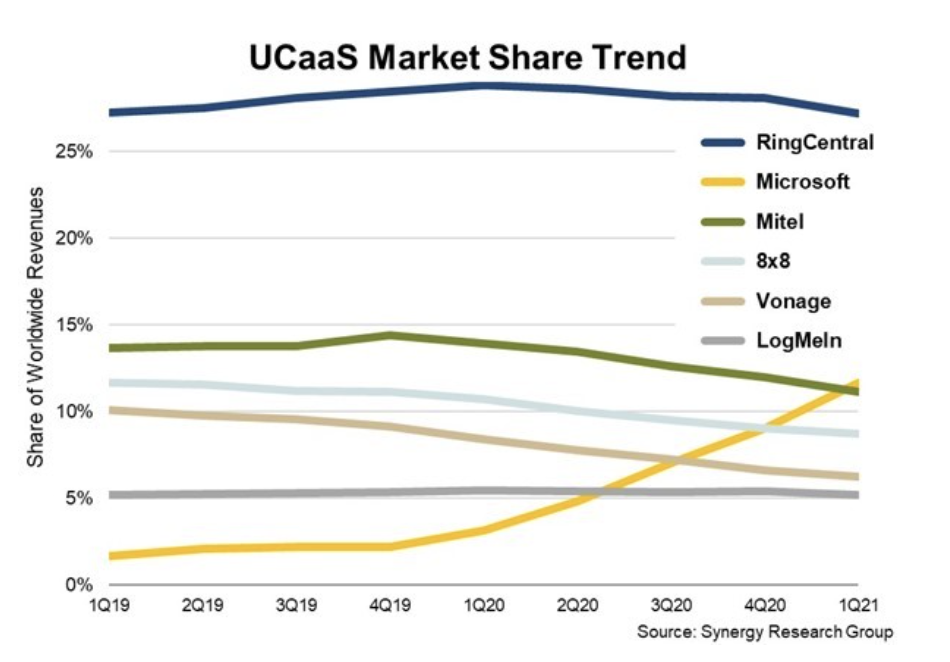
In 2019 Microsoft’s Skype for Business had a negligible share of the UCaaS market. By integrating what is now called Teams Phone into Teams, it turns Teams into a powerful UCaaS platform for both internal and external communication. This has vaulted Microsoft’s UCaaS market position from outside the top five to number two in just 12 months, easily overtaking many established UCaaS providers. Included as part of the Microsoft 365 subscription, there’s no incremental cost for Teams Phone.  

For all these reasons, the growth of Teams Phone currently has no hindrances. 

2. Identity for Teams is Deeply Engrained with 365 

All of the Teams capabilities use the common user identity that is a part of Microsoft 365. This seemingly benign capability enables truly powerful unified communications experiences. 

This unified identify simplifies group work with multiple easy-to-use channels of communication from group chats to video seminars. Multiple teams groups can be set up in a click or two, organizing conversations – whether chat, voice, or video – to make them easier to follow, and notifications can be set to pop up on-screen. File sharing is also deeply integrated and the same identity that controls file access rights is also part of the Teams experience. 

Remote meetings that are as effective as being in-person 

  • PowerPoint Live in Microsoft Teams: Entirely new PowerPoint presenting experience exclusive to Microsoft Teams that benefits both presenters and attendees. As a presenter, you can lead meetings while having access to your speaker notes, slides, meeting chat, and participants. As attendees, you can view slides at your own pace and use Slide Translate to see the slides in your own language.
3. Built Like a Modern IT App, not an Aging Telecom System

Microsoft Teams is encroaching on the traditional territory of VoIP solution providers like Cisco, Avaya, and others. Microsoft partners are positioning Teams Phone as a way to replace an existing PBX system, or cut costs from more expensive VoIP providers. 

Built more like an IT Application than a telecom system, Teams make sit easy for your IT department and employees to work faster, smarter, and better together. Teams is designed with a simple and intuitive user interface, making it easy to learn for your employees. Administration of Teams is handled in an IT-friendly way that is familiar to IT professionals, who can often find traditional telephony services to be arcane and antiquated. 

This modern, IT-centric approach leads to some direct feature advantages for Teams Phone users. Calling, for instance, is integrated directly into the flow of devices and applications of modern workers. Enabling features such as: 

  • Easily transfer calls: Teams Phone now offers the ability for you to transfer a call from your computer to a mobile device or vice versa, without interrupting the call. 
  • Apple CarPlay: Apple CarPlay support for Teams enables users to join calls and meetings using your vehicle’s built-in controls or hands-free using Siri. 
  • “Better together” device experience: The “better together” experience means that Teams devices now complement each other, allowing users to answer a call, mute or unmute, and end the call on either the device or the Teams client. 
  • Spam call identification: Teams Phone uses advanced industry techniques to identify likely spam calls, allowing users to avoid unnecessary interruptions to your day by spam calls. 
  • Walkie-talkie for desk phones: Connect quickly with colleagues with a push-to-talk function available on desk phones. 

This IT centricity does not come at the expense of traditional telephony features and integrations including: 

  • Operator Connect: Operator Connect, enables customers to simply connect your operator-based public switched telephone network (PSTN) service into Teams with a managed experience, now extending the ability to enable PSTN calling in Teams to three great options. 
  • Teams Phone Calling Plans: Teams Phone Calling Plans offer a simple way to deploy calling in Teams without on-premises equipment, available in 33 markets. 
  • Bring Your Own Contact Center: Teams Phone integrates with your existing contact center solution, and Microsoft’s connected contact center program provides a new level of validation from rigorous third-party testing to ensure seamless and reliable integration. There are now 8 certified contact center solutions with an additional 14 in the certification process. 

For IT departments, Teams Phone eliminates complexity and cost of managing a legacy set of telephony systems and services from their operations. Replacing legacy on-premises phone systems with a UCaaS solution such as Teams Phone has a clear, strategic business advantage, but the transition to cloud-based telephony can be challenging. This is largely because the start point for many organizations is a disparate array of legacy on-premises hardware and a patchwork of carrier relationships across all their sites and countries. 

Need a Partner? 

Transitioning your company’s communication to Microsoft Teams Phone is relatively straightforward but enlisting a partner that has done it before can assure that you have a smooth and successful transition. Talk to us today to learn how your company can also take advantage of this modernization in communications. 

Device RMA Process Infographic

Journey to a Great RMA Process

When making and selling computers, phones, tablets, IoT, or other devices, you know that eventually some of your devices will get returned. Handling the returns in a systematic manner will help your company to keep your business running smoothly. Click to download our Device Return Materials Authorization Process Infographic for our view of what puts your company on a road to a better device RMA process

6 Steps to Great RMAs for Your Devices

If you are in the business of making and selling computers, phones, tablets, IoT, or other devices, you know that eventually some of your devices will get returned. If your devices are being used in critical applications for your customers, you know how hard it can be to process returns well. Handling the returns in a systematic manner will help your company to keep your business running smoothly while ensuring your customer satisfaction numbers do not take a hit. 

What is Return Materials Authorization? 

Return materials authorization (RMA) is part of the process of a customer returning a device back to the manufacturer to get the unit fixed or replaced. On the manufacturer’s side, it is processed by verifying the device returned properly and initiating appropriate actions to troubleshoot, repair, or reimage, the device. This process includes data collection, return eligibility verification, software troubleshooting, reimaging, or issuing a replacement. 

Ultimately, an RMA process exists to make the return seamless to the customer and cost-effective for the manufacturer. However, not all RMA processes are created equal, and there benefits to understanding best practices for device RMAs is different than other product types. Without the right process in place, companies tend to spend an unnecessary amount of time on returns. A well-designed and automated process will help reduce the risks and increase the overall efficiency. 

It is also important to establish expectations for warranty terms, follow-up actions, and return policies. Implementing such a systematic process will also help in keeping track of the various defects across categories and suppliers while leading to quick resolution of issues. 

What is a Device and Why is the RMA Different? 

What we mean by a device is typically anything with a smart chip, some firmware or software, and the ability to communicate over the Internet. Devices are typically covered by warranties and the RMA process is primarily executed when some part or all the device stops working. This is as opposed to something like clothing, in which RMAs are typically executed for an unliked or defective item. The RMA process for devices is inherently more complex and includes data collection, warranty eligibility verification, cross-shipping of devices, and troubleshooting and repairing of returned devices. 

6 Best Practices for the Device RMA Process 

An effective device RMA process can improve the reputation of your company and keep your customers up and running when your devices are being used in important applications. With the right process in place, you will be ready when inevitable defects and returns occur, so your customers can be served quickly and cost-effectively. Here are some of the best practices that can be put in place to create an efficient device RMA process: 

1. RMAs Should Be Integrated to Customer Systems 

If you transact the rest of your business online, then you or your customer should be able to initiate an RMA online also. At a minimum, a good RMA process will include a platform that you or your customer can use to initiate an RMA. In the best case, your RMA process should be directly integrated into the systems and processes you already use. If you use Salesforce Service, for instance, you should be able to generate an RMA request from that application. Once the process has started, RMA updates should flow back to your system also. 

2. Make the RMA Simple to Track 

It must be an easy task for your and your customers to log and track the return requests. It is always good to keep the customer informed at each stage of the process. This makes the entire process clear, easy to track, and provides the customer with confidence in the process. 

Since most devices have serial numbers, your RMA process should use them. By also capturing accurate address information directly from a CRM, your RMA system should generate shipping labels and schedule a pickup of the device from the customer’s site. Efficiencies such as these eliminates time and possible errors that manual RMA processes routinely incur. 

3. Priority Returns Need Cross-Shipping 

When customers deploy your devices into mission-critical applications, they usually expect limited or no downtime when an RMA is being processed. This requires cross-shipping of a working device to the customer site to replace the RMA’d unit before it is shipped back. This may seem simple, but to execute this process well some important things need to happen: 1) the customer site information needs to be accurate; 2) return labels need to be included outbound, and 3) the RMA’d device should be able to fit in the box being used to ship the replacement unit. That requires accurate information about the field unit to get it right! 

4. Return Reasons Must Be Validated 

Your customers may have any number of reasons for returning a device. It may be a hardware issue, software issue, or it may be damaged from weather or third parties. However, as is often the case with complicated devices, the customer’s rationale for returning the device often does not match the actual condition of the device upon return. When the device arrives at the return center, workers must examine and boot the device to verify the return reason matches the actual issue. In best practices, both return reasons are logged for future reviews of the RMA process. 

5. Allow Manual Intervention 

Automation is great and most parts of an RMA process can be automated, but without human oversight at important steps in the process. It is easy to get the process out of control. Certain RMA processes allow the end-customer to initiate urgent returns without approval of the manufacturer. These kinds of returns require oversite during the process, if possible, and certainly after the process to make certain that the returns were truly needed. Inventory in the RMA system and in the warehouse can get off count quickly. Best practices require regular human inventory counts to look for discrepancies. 

6. Proactively Await the Returned Product 

Once a notification of a returned device or devices is in process, best practices have the return team preparing for the returned device(s) before arrival. This may include verifying parts inventory of known replacement parts, or for large returns, preparing space and time to process the returns en masse. If the devices include RFID tags or scannable marks, those IDs should be fed to the receiving system before they arrive to streamline the process and avoid exception handling. 

Download our Device Return Materials Authorization Process Infographic Here. 

Need a Partner to Help? 

Finding the answer to RMA management can seem daunting, but Montra is here to help. With our Via Device Lifecycle Manager software, you can automatically track and manage your devices from fulfillment to field repairs, to RMAs and warranty tracking. Talk to us today to learn how this invaluable tool and the team that backs it can help your business optimize and streamline the way you handle all the lifecycle processes for your devices.

3 Things an Employee Information Manager Needs 

Too many systems, too many self-service portals. How many times a month are you or your employees being asked to update information in one of your systems – addresses, phone numbers, personal emails, bank information, emergency contacts – who has time to update all the systems everywhere. 

Just think about it: 

  • Employees Move 
  • Employees Change Phone Numbers 
  • Employee Families Change 
  • Employees Learn New Skills 
  • Employees Get New Experience 
  • Employees Can Be Working from Anywhere 
  • Employees Work Flexible Hours 

So, every time an employee does work for a new customer, or moves, or changes job title, then they would need to update every system that tracks that. Most people don’t even know what systems hold their info, much less have the time to make changes. And with more dynamic information like where they are working for the day or are the currently online, keeping multiple systems up-to-date completely breaks down. 

Why do we have this problem? 

The problem is that there isn’t really a system of record for employee information in most companies. Instead, there are many systems of record. What most companies have today typically looks like the following: 

  • HRIS: maintains employee information for HR, benefits, pay, employee reviews, etc. For good reasons, it is usually a very limited access system. The employee address and/or bank info is always correct in the HRIS because people like to get paid. 
  • Email System: Email is so central to modern work-life, that the email provider tends to be the default system IT uses for employee information. The email is always correct here and that is usually about all. 
  • Employee Directory: Some companies will either license an inexpensive employee directory or have an internal person develop one. The information in them tends to get stale quickly, because it is yet another system to keep updated. 
  • LinkedIn: While not a system that companies need to license, almost every employee has a LinkedIn account. LinkedIn tends to be a reliable place for employee experience and skills and sometimes clubs, hobbies, and other interests. 
  • CRM Systems: Customer Relationship Management (CRM) systems like Salesforce are widely implemented and often used by any employee that touches the customer whether sales, marketing, support, etc. Because of this, the employee information inside the CRM has become a de facto system of record for contacting employees. Emails and phone numbers tend to stay accurate but other important info like job title, location, skills and experiences, tend to get stale fast. 
  • Slack: You may not think of this as an employee information system, but it does have information in it like “I’m logged in” and “I am actively working”. Slack and other services like Teams are also ways to contact an employee that are faster and easier than email. 
  • Other Functional Applications: Just about every department in a company has at least one system of record to assist them with all their work. Any user of these systems must have an account, and usually the developers of those systems have added deeper employee info that is either necessary or helpful for their application. The challenge is that these applications are often not broadly used and the employee information gets outdated and therefore the features in the app that rely on that information become less helpful. 

3 Functions an Employee Information Systems Provides 

What companies really need is a centralized repository of employee information with three primary functions: 

1. Employee Self-Service: Allow employees to update their own information easily and reliably 

2. Secure Employee Directory: A great benefit of having reliable employee information, is that the information can then be shared internally. That said, there is far more information in the HRIS than should be published for all employees. A good employee information manager needs to have privacy settings that allow the proper handling of employee data.  

3. APIs Everywhere: If the Employee Information System is going to stay valuable, it needs to have APIs to as many systems the affect employees as possible. This list can be long but should include the HRIS, Email, Slack/Teams, Phone Systems, Device Managers, Finance, CRM, and Employee Notification Systems. 

It cannot be understated how important having accurate employee information available to all people and systems within a company is – especially as we move into a continually hybrid working work. Great companies will stop treating employee knowledge as tribal information exchanged between employees close to one another and will instead treat employee info the way they treat customer info – as strategic corporate asset to be treated with care and importance it should have. 

Want to learn more about managing your employee information better? Contact us and we can tell you about the software and services Montra provides to get you on your own journey to great Employee Information Management. sales@montra.io 

12 Cyber Readiness Strategies #3 and #4

3. Keep Updates – Up to Date

While software updates often introduce new or enhanced features into your apps, programs, and systems, they also install security and performance fixes known as patches. Undiscovered defects or flaws can leave your systems exposed. Cybercriminals will exploit any vulnerability or security gap they find. Keeping your systems updated is vital for keeping your business cyber-ready. 

Failure to Patch systems results in a breach. Of the companies who reported that their business experienced one or more data breaches in the past year, 57% confirmed that these breaches probably occurred because a patch was available for a known vulnerability but not applied. 

Why are Security Patches Important? Security patches address known vulnerabilities within software systems. Once these flaws or weaknesses become known, cybercriminals begin looking for ways to exploit them. The sooner a security patch is installed, the faster your business can restore protection and security against threats associated with vulnerabilities. Below are the five effective elements for applying security patches: 

1. Automate. With an automated system, analyzing and deploying patches can be as easy and provide significant time savings. 

2. Plan your approach. Group systems by department, location, etc. to better handle your environment and more productively manage patches. 

3. Test patches. Don’t just push out patches before testing them. All patches should be thoroughly lab-tested.

4. Know the configurations. Make sure you synchronize and validate your development, test, and development patch configuration settings. 

5. Maintain patch levels. Be proactive and schedule scans on a daily or weekly basis to analyze the environment and deploy all critical patches.  

Learn more about system updates and patches with our infographic, or contact Montra to see how we can automate and optimize your system patching process. sales@montra.io 

4. Enforce Multi-factor Authentication (MFA)

Threat of cyberattack has never been greater. According to the Verizon Data Breach Investigations Report, nearly 80% percent of all data breaches are due to lost, weak, or stolen passwords. And a recent study by Omdia/Ovum, 76% of employees report experiencing regular password problems. Verifying user identity and managing access to your business data has never been more important. 

One-level security or single-factor authentication is no longer enough. Even the strongest passwords are vulnerable to theft or exposure. Requiring more than one method to authenticate user identity or access permissions can reduce or eliminate the risk of stolen or unauthorized credentials being utilized. 

Using Multi-factor Authentication (MFA) makes gaining access to resources more secure and less vulnerable to credential theft. MFA provides enhanced security to identity management by requiring two or more forms of authentication. Mobile devices which support push notifications or texts, can be used for one-time passcodes, or third-party authenticator applications such as Google Authenticator or Microsoft Authenticator can be used to generate one-time passcodes also. 

MFA must be implemented to meet the security requirements to achieve and prove compliance for most regulatory bodies such as HIPAA, PCI DSS, GDPR, NAIC, NIST CSF, CMMC, ISO 27001, CCPA, NY SHIELD Act, GBLA, SOX and more. 

Get cyber-ready by setting up all your accounts with MFA today. Download our infographic for more information on MFA and password hygiene. If you want to understand how Montra can help you set up all your accounts, contact us at sales@montra.io.