Secure Your NextGen 911 Network

Protecting America's NextGen 911 Networks 

NextGen 911 systems allow Public Safety Answering Point (PSAPs) and public safety agencies to deliver a more responsive service that saves lives -- yet these systems come with increased security risks due to their expanding cyber-attack surface.

Hackers and cybercriminals are increasingly targeting emergency response networks throughout the country. According to recent reports, more than 40 attacks in the last three years have targeted 911 dispatch centers. However, these attacks could increase as traditional 911 networks transition to NextGen 911, which enables receipt of video, text, and other data from the public over various computer networks.

Top Threats NextGen 911

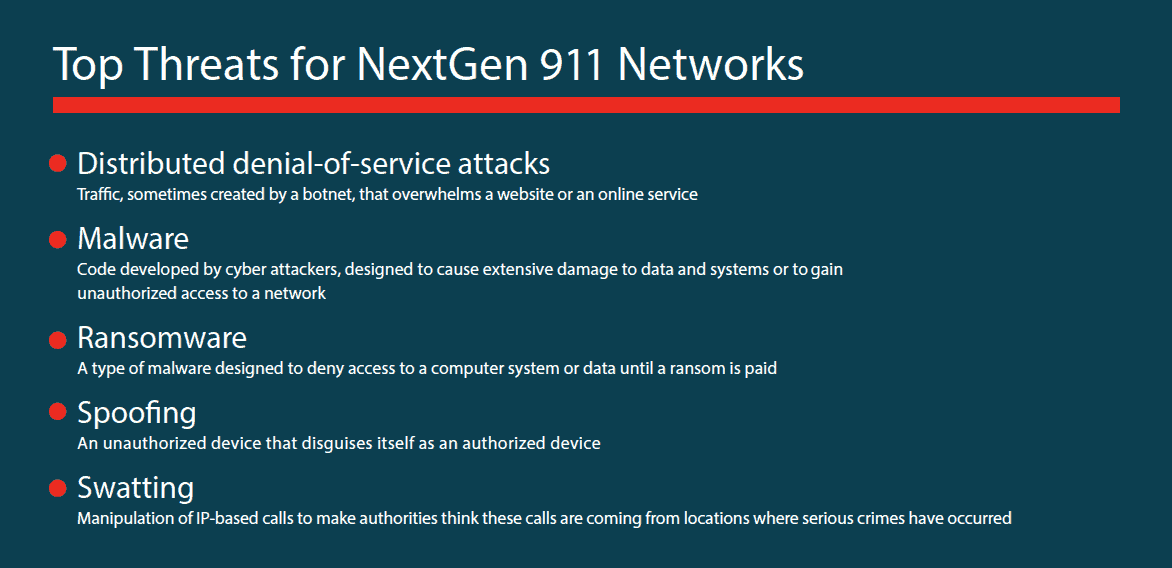
Security risks include denial of service attacks, malware, ransomware, spoofing, and swatting that can overrun the service provider or infrastructure. By securing Message Session Relay Protocol (MSRP) messages, agencies can make their systems more secure and reduce the likelihood that a denial of service, malware, or other cyberattacks occurs. 

Below are the top 4 things you can do to protect against these attacks:

  1. Perform security inspections on MSRP messages before entering in these systems 
  2. Limit the rate of messages as automated solutions can generate signals much faster than a human can type, which can overwhelm NextGen 911 systems and block emergency calls
  3. Implement Denial of Service (DoS) attack prevention software
  4. Implement privileged access management (PAM) software and policies to limit the potential damage from a security breach

Cybersecurity is essential to public safety and ensuring that NextGen 911 system.  To learn more download the infographic.


4 Tips for Ensuring Compliance in the Cloud in 2020

Cloud Computing is well understood as a great method for increasing the speed of deployment and agility of managing IT infrastructure. For these reasons, the migration to and utilization of Cloud Computing continues to grow in both large enterprises and small businesses. However, this move towards increased use of the cloud – especially public cloud services – has increased the pressure for greater data protection regulations across the globe.

Unless you work for a very large organization that can cost justify developing and maintaining a private cloud infrastructure, utilizing Cloud technologies will mean relying on one or more public Cloud Service Providers (CSPs).39percent-of-IT-Decision-Makers-Consider-Themselves-Responsible

Recent high-profile data breaches have brought the risks associated with storing personally identifiable information (PII) into the limelight (i.e., the 2017 Equifax breach, the 2019 CapitalOne breach). Yet, the question of who is ultimately responsible for regulatory compliance remains a significant area of confusion. According to a recent study, only 39 percent of IT decision-makers considered themselves responsible for the compliance of data stored on cloud services. This is an incredibly dangerous mindset to possess, as by law, the ultimate responsibility for regulatory compliance remains firmly in the hands of the data owner – not the CSP.

Which Compliance Regulations Matter in the Cloud

The cybersecurity and data privacy compliance regulations that affect your company are dependent upon the industries in which you operate. Examples include federal government (FedRAMP), manufacturing (GMP), healthcare (HIPAA), real estate (CFPB), and financial services (FINRA, NYDFS). So, which regulatory requirements do you have to worry about in the cloud? The simple answer is the same ones that apply to your business already. Depending on your company’s industry, geographic location, and business function, this could be a range of compliance regulations, including:

  • National Institute of Standards and Technology (NIST)
  • General Data Protection Regulation (GDPR)
  • California Consumer Privacy Act (CCPA)
  • Health Insurance Portability and Accountability Act (HIPAA)
  • Financial Industry Regulatory Authority (FINRA)
  • Payment Card Industry Data Security Standard (PCI-DSS)
  • Federal Information Security Management Act (FISMA)
  • Sarbanes-Oxley Act of 2002 (SOX)

It is important to understand how your data and processes within your cloud service are affected by all of the applicable regulations, including data storage and retention policies, user access and password policies, and Most of these compliance frameworks require periodic testing of your IT operations, as well as ongoing monitoring to ensure constant It is important to understand the requirements While the responsibility for maintaining compliance lies solely within your organization, you don’t have to take on this burden completely alone. The good news here is that a consultant or managed IT services provider can guide you through the compliance challenges to meet the necessary laws and regulations.

When it comes to ensuring that your cloud operations will be in compliance with the regulatory requirements of your business, here are a few key tips…'

4 Tips for Ensuring Compliance in the Cloud

1. Realize a Compliant Provider Will Not Make You Automatically Compliant

Depending on which regulation you are subject to, you may be required to use a cloud service provider that is certified with those regulations. But it is important to note that using a compliant provider does not in and of itself make your business compliant automatically. You still have to use the service in a compliant manner; it is your responsibility to ensure the provider maintains regulatory controls on an ongoing basis. And you still have to maintain compliance for your own IT operations which connect to the cloud service provider.

2. Know Where Your Data Will be Stored

Some compliance regulations have geographic restrictions on where certain types of data can be stored and processed. For example, the European Union Data Protection Directive requires personal data to remain within the borders of the EU or a third-party country that offers adequate protection based on their previously defined security standards. This can pose a very large challenge if your CSP operates data centers and stores your data around the world. There is good news here: being aware of this caveat is a large part of the battle. All reputable cloud service providers are aware of this issue and offer geographical nodes that customers can select for their data to reside in as a part of their service offering.

3. Understand Access Control

A large portion of regulatory IT compliance stems from ensuring proper controls are in place over who has access to what data in the system. During a compliance audit, you must be able to prove the level of access that each user has and how those various levels are maintained. Your CSP must be able to provide you with documentation outlining how the implement separation of duties for administrative functions. They must also be able to provide clear documentation showing which users had access to which systems when, and what data and systems were able to be accessed by each user.

4. Know Your Service Level Agreement (SLA)

Regardless of what compliance regulations you are subjected to, don’t assume your CSP’s terms and conditions will satisfy your requirements alone. You should know the details and fine print of your cloud services contract inside and out. Again – the sole responsibility of compliance in the cloud is ultimately up to you, not your provider. Your SLA should be very clear on roles and responsibilities, incidence response execution, and data breach remediation. Everything in the SLA must be in accordance with the regulations governing your business. The finer points of an SLA are able to be negotiated with the service provider before signing. Just don’t wait until you have signed to realize that all your bases are not covered.

The good news about ensuring compliance within your Cloud environment is that legitimate service providers will be able to provide the right service for you to meet your governing regulations. That said, you need to know how to apply the regulations properly to how you are using the cloud service. If you are concerned about your regulatory compliance in the cloud services you are using, we recommend bringing in a 3rd party IT service provider, such as Montra.

Montra’s cloud experts can examine your current cloud operations, navigate you through the best options for establishing full compliance, as well as monitoring your compliance over time.

For more information about how Montra can help with your cloud compliance, contact us today.


10 Ways to Stay Safe As We Return to Work

In the last week or so the national conversation has shifted from sheltering in place to returning to work. Slowly and carefully, but we are opening back up. Now is the time to remain vigilant to the constant threats to your business from ransomware and malicious attacks.

In a recent article, Google stated that since January it has seen a 350% increase in phishing attacks, and they saw more than 18 million daily malware and phishing emails related to COVID-19 scams just in the past week. That’s on top of the more than 240 million daily spam messages it sees related to the novel coronavirus.

And it is not just companies that are getting overwhelmed. According to their own report, the FBI fielded 2,047 ransomware complaints in the U.S. in 2019. In response the crushing load of root cause investigations, the FBI has turned to corporate leaders and cybersecurity insurance carriers to better understand how to stop ransomware attacks.

The best course of action, is to proactively protect your organization from being attacked successfully. Making certain of that is a complex problem that is specific to each company, but we have created some quick tips to help you remember how to keep cybercriminals out of your IT operation.

10 Tips to Keep Cybercriminals Out

  1. Get the Facts. Stay away from the rumor mill and use information from reliable sources to make business decisions in chaotic times.
  2. Think Twice before Clicking Links. Make sure staffers are on the lookout for suspicious links that can lead to ransomware.
  3. Be Suspicious of Unexpected Attachments. Ensure users only open attachments from proven, trusted sources no matter how “official” that attachment looks.
  4. Automate Compliance. Have one less thing to worry about by choosing a dynamic web portal system that keeps track of everything.
  5. Protect those Passwords. Encourage safe password practices like using a password manager and not writing them on sticky notes.
  6. Beware of Strange Networks. Make staffers aware of the dangers of logging in from insecure public and home WiFi networks andhow to use them safely.
  7. Use Two-factor Authentication. An extra layer of security keeps passwords and data safe.
  8. Keep an Eye on the Bad Guys. Monitor the Dark Web to watch for company data so a problem can be addressed before it becomes a crisis.
  9. Stay Current on Threats. Work with a responsive partner that’s on top of today’s challenges.
  10. Ask for Help. Consult a security expert to plan effective strategies and get innovative solutions.

10 Tips to Keep Cybercriminals Out

So, while we seek continued improvements in our collective situations both professional and personal, continue to keep your guard up against ransomware and malicious attacks on your IT operation.

If you would like to learn more about how Montra can help you with these or other security threats, please contact us at info@montra.io.


Windows 7 End of Life

When Windows 7 reaches End of Life on January 14, 2020, Microsoft will no longer patch security holes or fix any bugs that come up in their popular operating system. This means if you are one of the millions of users still on the decade-old operating system, it is time to start planning how to move on.

Without a doubt, Windows 7 has been incredibly successful and popular since it first launched on July 22, 2009. According to StatCounter, 17.91% of US-based desktops were still running the decade-old operating system through the end of 2019.

StatCounter-windows_7_users_December_2019

However, in the light of the success of Windows 10, it only makes sense that Microsoft dedicate their resources to improving the new OS.

Now don’t worry. If you are using Windows 7 now, we are not saying that when you turn on your PC on January 15 it won’t work. You will still be able to use Windows 7 after it has reached End of Life status. However, just because you can use it, doesn’t mean that you should.

Windows 7 End of Life: What it Means for Your Security

Security implications of any operating system reaching End of Life are without a doubt one of the biggest concerns that need to be taken into consideration. In the past, Microsoft has commonly released “booster” security patches leading up to an OS reaching its EOL date in an effort to improve security one last time. However, once those last patches are released hackers have free reign to try and attack the systems.

It’s important to remember that the overwhelming majority of cyberattacks are not targeted, but rather they simply occur wherever a hacker could successfully gain access. Hackers are opportunists, and they choose the easiest target. Outdated operating systems have long been a resource for hackers who can leverage previously known vulnerabilities and expand upon them to gain access to a system. We saw this happen with WannaCry and Windows XP fans who held on after EoL. With 17.91% of nearly a billion Microsoft users worldwide still operating on Windows 7, hackers will have plenty of incentive to try and exploit the operating system once Microsoft releases their final patches.

The facts are clear. The sooner you can get away from Windows 7, the better.

Windows 7 End of Life: What’s Next? 

If you are looking to make a decision on what to migrate to from Windows 7, you have several options, including:

  • Migrate to Windows 10
  • Migrate to a Linux OS such as Ubuntu
  • Migrate to MacOS

All of these options come with pros and cons. We recommend working with IT experts, such as Montra, to decide which course is best for your business needs.

If you are trying to decide what your best option is for moving off of Windows 7, reach out to our experts today for a consultation.


Tips for Managing Your Sprawling IT Infrastructure in 2020

IT Sprawl is a phenomenon that has risen significantly in small and mid-market businesses over the past several years. This growth can largely be attributed to two factors: rapid cloud services adoption and digital transformation initiatives. Across every industry, cloud services have spread like wildfire due to their ability to increase agility and cost-efficiency. Meanwhile, digital transformation projects have put technology in the middle of almost every business function. These combined factors have led to companies having to deal with some level of the hybrid technical environment.

It is well known that hybrid environments are great for small, growing businesses. Their “best of both worlds” approach to technology adoption allows IT to leverage cloud-based applications while keeping sensitive information on-premises. However, hybrid environments do come with their challenges as well. Over time applications and workflows are added by individual users or departments. This lack of centralization leads to IT teams having a sprawled environment that is difficult (if not impossible) to manage.

Struggling to keep up with the sprawl of hybrid technical infrastructures is nothing new to technology professionals. While the concerns are not new, figuring out how to effectively deal with these challenges is still a top priority for IT teams. According to the 2019 Solarwinds IT Trends Report, 48% of IT professionals plan to prioritize skill development of Hybrid IT Deployment Monitoring and Management within the next 3 to 5 years.

As your organization heads towards the final planning phases for 2020, now is the perfect time to consider if a sprawling IT infrastructure is hindering your business or IT Department. So, what can be done to help you get control over the sprawling technical infrastructure within your organization? Here are our tips:

6 Tips for Managing your Sprawling IT Infrastructure in 2020

Audit Your Environment More Often

The first step to getting your IT environment under control is to conduct a full audit of your systems and applications. Knowing what all is in your environment is the only way to understand how different IT components affect larger business processes. After all, how can you possibly fix a problem if you do not know it exists? Your audit should catalog every cloud service you are using, every server or VM, every network component, and every device. This process should lead to the creation of an inventory of all the technology used in your business and specifically what each component is used for. From this process you should be able to begin to understand:

  • Which services and components are redundant?
  • Which are not aligned with your business and technology strategy?
  • Which are outdated or no longer supported?
  • Which are lightly if ever used?

Prioritize Network Visibility Across the Sprawl

Maintaining network control in a modern, spread-out environment is significantly more complicated than on a local area network. One of the best ways to maintain a level of control over IT Sprawl is to have visibility throughout your entire network. Full network visibility will enable you to know what devices are on your network and what applications are being installed. We recommend partnering with a company, like Montra, who can integrate your various management platforms into a single, comprehensive solution that provides you with end-to-end visibility from a single platform.

Standardization leads to Better Hybrid Management

An easy way of minimizing the burden of sprawling IT management is to standardize the components within your environment. Use as few server, computer, router, VM, etc. types as possible. Once these various types have been decided, consolidate your IT environment to eliminate as many of the others as possible. This will lead to decreased maintenance as IT has fewer components to manage. In the long run, IT employees will achieve additional efficiencies as they become specialists in keeping only a specific number of types of IT components running at their best.

Establish Policies for Deploying New Cloud Applications

It is unlikely an employee will stroll into work with their own server. However, the same cannot be said for cloud and other web-based applications. All too often a cloud-based application enters a company’s environment at the request of a single employee. These services undergo little-to-no vetting and are often duplicated or redundant to applications already in use. An easy way to combat this is to enforce authorization procedures for the selection and implementation of new technologies. These procedures should align to the company’s larger strategic goals and make sure applications fit the “bigger picture.” When properly enforced, these procedures should reduce new or duplicate applications from entering the environment.

Consider Full Lifecycle Cost of New Products

It’s common for businesses to find cheaper technical solutions more appealing than slightly more expensive, yet more efficient, counterparts. However, cheaper solutions can come at their own cost. Choosing cheaper equipment can affect maintenance, power efficiency, and management costs which are not considered in the initial investment. Maintaining these various inefficiencies only gets more complicated as infrastructure grows. When expanding IT components on your network make sure you consider the full lifecycle cost of each product and not just the upfront cost.

Be Cautious of “Jack of all Trades” Hiring

You probably have great experts on your team. However, experts in managing servers may not be able to provide the best insight consolidating your cloud. Modern hybrid business infrastructures are composed of a wide range of technologies and systems. This makes it very difficult to find a generalist that can properly support a mid-sized IT infrastructure. Often times the best result comes from bringing in an outside team of experts. These team members can often better serve as your internal IT team by providing deeper expertise in particular IT specialties. Bringing in additional resources increases the level of specialization of each component within your network. Additionally, an outside team provides you with an “outsiders perspective” that is often helpful in determining the actual validity of a specific service or component even if it is associated with a specific, high-maintenance user.

If you are interested in learning more about managing your sprawling IT infrastructure, contact our experts today.


Do You Need Dark Web Monitoring?

Data and information security has been a top priority of businesses for years. Firewalls, password policies, and user right limitations help control information flow in and out of your company. Digital credentials such as user names and passwords enable you and your employees to access your business systems and data as well as online services in a way that protects the business from hackers. Passwords are definitely helpful but they are hardly a fool-proof security practice in the world of cyber security. According to Verizon’s 2017 Data Breach Investigations Report, 81% of hacking-related data breaches involve the use of a weak or stolen password. When using stolen credentials, cyber criminals essentially have a digital key to the front door of your network, making all of your other security precautions worthless. These credentials are often purchased on the Dark Web, and if you aren’t monitoring your company domain your data and your client’s data could be sold to the highest bidder long before you realize there has been a data breach. In this post we will take a deep dive into the Dark Web to discuss:

  • What is the Dark Web?
  • Why is Dark Web Monitoring Important to Your Business?

What is the Dark Web?

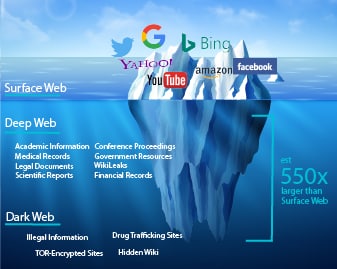
Beneath the surface of the visible information accessed and indexed in Search Engines lies the Deep Web. The Deep Web is a massive sublayer of the Internet that is not indexed (and therefore hidden) in search engines such as Google, Bing, or Yahoo. Within this hidden universe lives a nefarious community called the Dark Web.Dark Web Diag Many estimate that the Dark Web is 550 times larger than the Surface Web and growing. It’s actually difficult to know for sure how big the Dark Web is. The Dark Web operates differently than the Internet we see every day, or “Surface Web.” Users on the Dark Web use secure browsers, such as Tor, that render their identity and location untraceable. This is accomplished by routing web page requests through numerous proxy servers around the globe which makes IP addresses unidentifiable. The ability to operate anonymously makes the Dark Web an ideal marketplace for stolen data and illegal activity. Experts  estimate that as much as 50% of the data on the Dark Web is illegal or illicit material. In short, it is the last place you want to find your company’s sensitive data. Unfortunately, digital credentials are among the most valuable assets on the Dark Web. An article by CSO from IDG reports that login credentials to a $50,000 bank account could go for $500 while a Netflix premium account login can go for around $6. These risks are not all aimed at personal information and accounts. A 2019 study, Into the Web of Profit, by Dr. Michael McGuires at the University of Surrey shows that the number of dark web listings that could harm an enterprise has risen by 20% since 2016. This can be disastrous for your company.

Why is Dark Web Monitoring Important to Your Business?

Luckily, it is possible to scan the Dark Web and detect credential theft before cybercriminals have the opportunity to hack your system. Our monitoring solution combines human and Dark Web intelligence with search capability to identify, analyze, and proactively monitor your organization’s compromised or stolen data. We can search for stolen email addresses, passwords, and other confidential data in:

  • Private Sites
  • Botnets
  • Peer-to-Peer Networks
  • Internet Relay Chat (IRC) Channels
  • Black Market Websites
  • Social Media
  • Hidden Chatrooms

Montra’s Dark Web services monitor your data and notify you immediately when sensitive information is found on the Dark Web. Then, our team will remediate the situation before any identity theft, data breaches, or other crimes occur. In addition to Dark Web Monitoring, Montra provides employee training, phishing simulation, and Identity Theft protection. This insures your business’ sensitive data is secure. Interested in learning more about our Dark Web Security Services? Download our datasheet