Tis the Season for Cyberthreats: 3 Ways to Keep Your Device Secure Over Turkey

It’s that time of year for travel, visiting family, eating too much, and rushing around for last-minute errands and gifts. It is a hectic and wonderful time but if you are like me, it is also when you are trying to fit work into different locations, times, and levels of sobriety.  

It is easy to be distracted in this season. Cyber attackers know this and you should be rightfully concerned. 

Here are a few ways to keep you and your devices safe as you find yourself in new workplaces during the holidays. 

1. Watch Where and How You Connect 

Whether you are connecting on your parents’ wifi or from the closest Panera, you will be connecting differently and probably less securely than your normal home office. If your mom’s wifi doesn’t have “one of those silly passwords”, then you need to protect your presence on that connection: 


  • If your company has a VPN, you should use it. Or consider a paid VPN service. 
  • Keep your laptop firewall always running. Windows and Mac both have this built-in. 
  • Set yourself in stealth mode if you can. 
  • Make sure you have updated antivirus (AV) or endpoint detect and respond (EDR) software installed 
  • On your mobile device, use a security app like what AT&T and Verizon provide for free. 
  • If you want to be the safest, skip the wifi and tether your laptop to your phone with security app running.  

If you follow these basic steps, you should be safe at your closest coffee shop to “get some work done” while enjoying some peace and quiet.  

2. Think About How You Are Mixing Your Work and Personal Tasks 

You are going to be doing a lot more personal tasks on your laptop than you normally do. This could lead to exposure on shopping sites, gaming sites, or elsewhere, which opens you to new threats. Be mindful of where that search for “adult sized Elf costume” or “Thanksgiving movies on Netflix” is taking you. Also keep in mind that if you are connected to your company VPN, you are traversing company property and are subject to their acceptable use policy. Tread carefully. 

To help keep your focus, you might consider using one browser for your personal stuff and one for your work. Or if your browser supports tab groups, you can group your personal and work tabs separately. If you keep your screen organized, you are less likely to be confused by a popup or email request that is really a phishing attempt. 

3. Be Aware of Who is Using Your Device 

It’s easy to leave your laptop open on the table after you’ve found that recipe for leftover turkey melts. While you are searching your mom’s fridge for gruyere, your weird Uncle Steve might ask to “check his fantasy team.” You and your uncle might have a different idea of what a fantasy team is, and you could get the leftover spyware and bloatware that his surfing has put on your laptop. 

A few items to help you with your potentially “over-shared” device: 

  • Make certain your device quickly locks when not in use. This is easy on phones, but on laptops you may want to set it to the minimum setting for the holidays. 
  • Close your devices and put them away if you won’t be using them for a while. Not that anyone is going to do anything to them, but gravy in the keyboard is just as problematic as privacy loss. 
  • If your device is running the Jackbox game or your phone someone got volunteered to play Heads Up!. Just make certain that you get it back at the end of the game. It is easy after a few glasses of wine to forget that your work laptop with all your year-end data is still sitting by the fire when midnight rolls around. 

 So while your uncle or cousin may not be trying to hack your device themselves, they are not going to be as concerned as you about what sites they visit and what fun new games they download. It is the season of giving, but I think you should be a bit selfish with your devices. 

Stay safe and stay private this holiday season!

CMMC Compliance Infographic

CMMC & Cloud Compliance

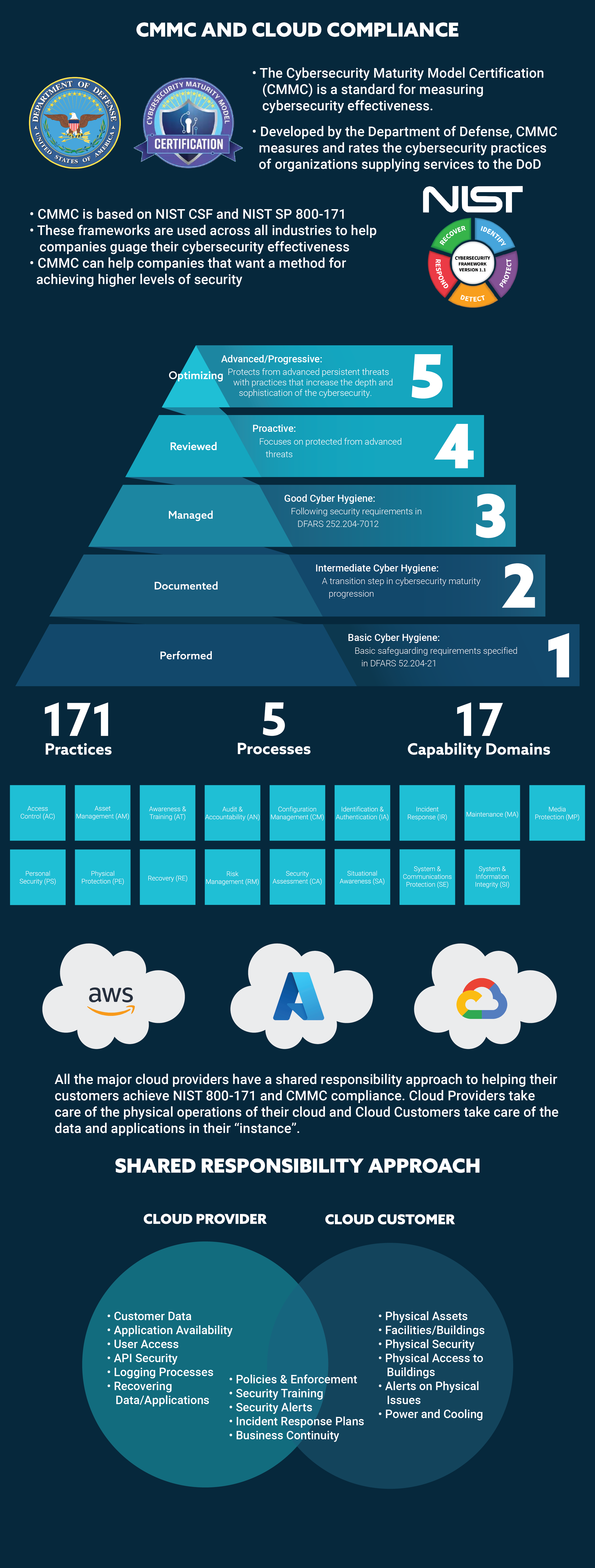
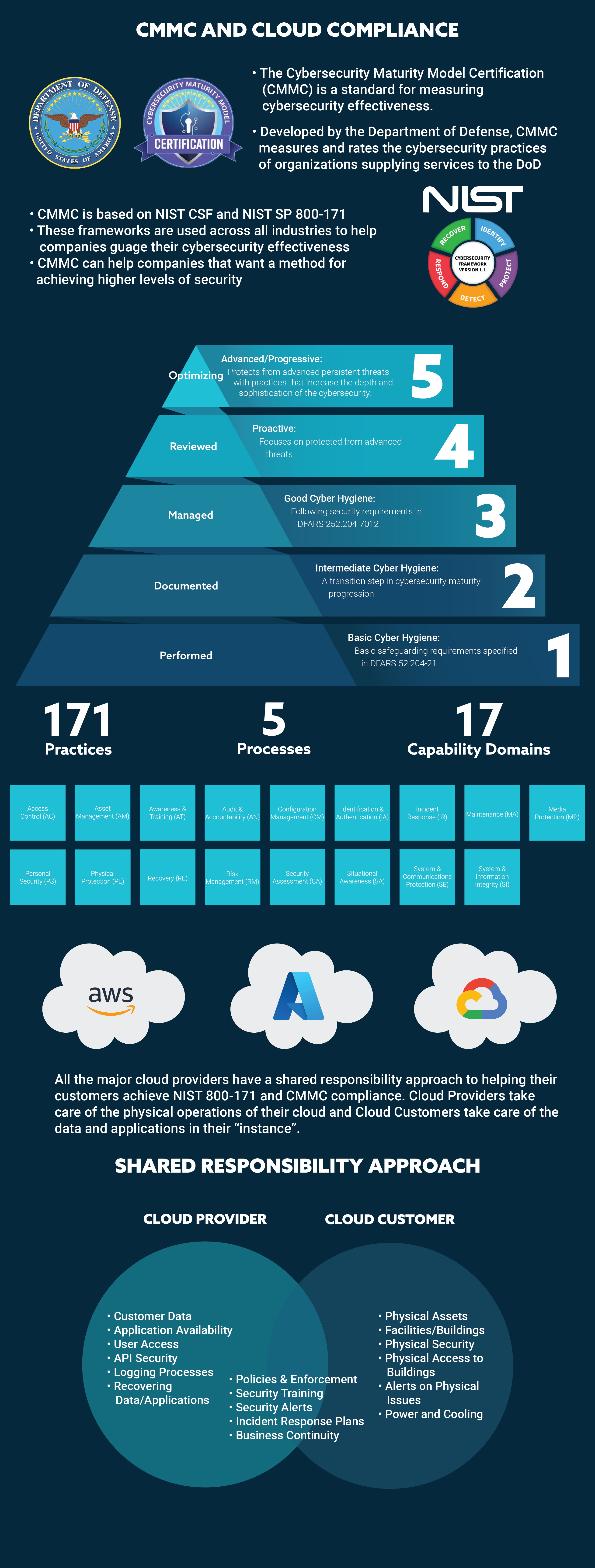
The Cybersecurity Maturity Model Certification (CMMC) is a new and still developing standard for measuring a company’s cybersecurity effectiveness.  CMMC is simply divided into five levels to allow organizations to put measures in place to reach the minimum cybersecurity necessary to protect customer data. The key to success is breaking the compliance process into smaller pieces and setting goals for achieving each level. Working with a company that can help you manage the project and work through implementing the needed security standards can make the process much easier and the likelihood of the success of the program much higher. Click to download our infographic to learn more.

CMMC and Cloud Compliance for Mid-Market Companies

The Cybersecurity Maturity Model Certification (CMMC) is a new and still developing standard for measuring a company’s cybersecurity effectiveness. It has been developed by the Department of Defense to measure and rate the cybersecurity practices of the Defense Industrial Base (DIB) who are supplying services to the DoD. 

While the CMMC only applies to DoD contractors, it is based on NIST CSF and NIST SP 800-171. These NIST frameworks are used across all industries to help companies gauge their cybersecurity effectiveness. CMMC combines NIST and other standards into a unified standard for cybersecurity, which can be applied to any company that wants to method for achieving higher levels of cybersecurity over time. 

CMMC is simply divided into five levels to allow organizations to put measures in place to reach the minimum cybersecurity necessary to protect customer data. The addition of a third-party audit organization (3PAO) certification provides proof that any organization working to achieve a certain CMMC level has the proper security measures in place.  

The five maturity levels range from “Basic Cybersecurity Hygiene” to “Advanced/Progressive.” Each maturity level includes progressively more demanding process and practice requirements to achieve the certification level. 

Click To Download

Most mid-market and SMB companies will never need to go beyond Level 3 in the CMMC model unless they are doing work for the Federal government or another customer that maintains highly sensitive data and processes.  

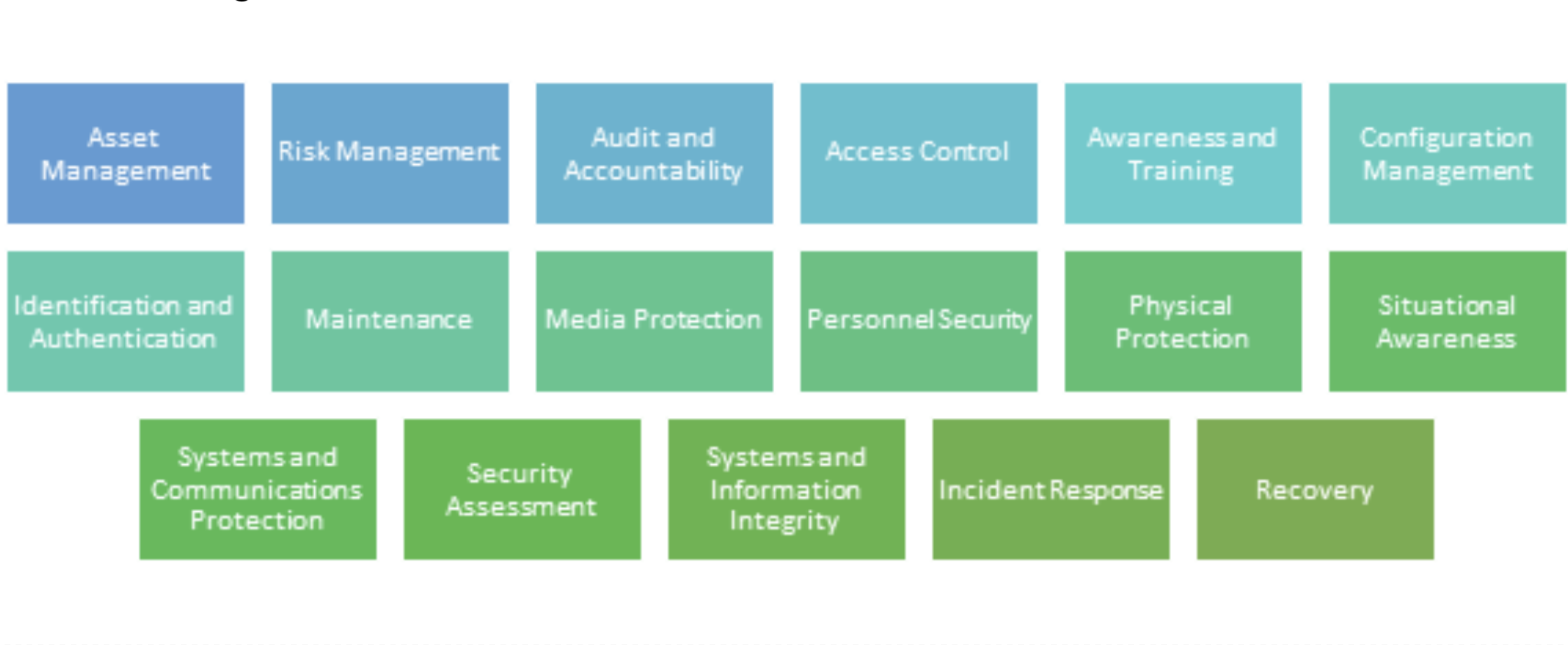
In addition to the level, there are 171 practices and 5 processes across the five levels of CMMC maturity. These practices and processes are organized into 17 capability domains to make them more manageable. 

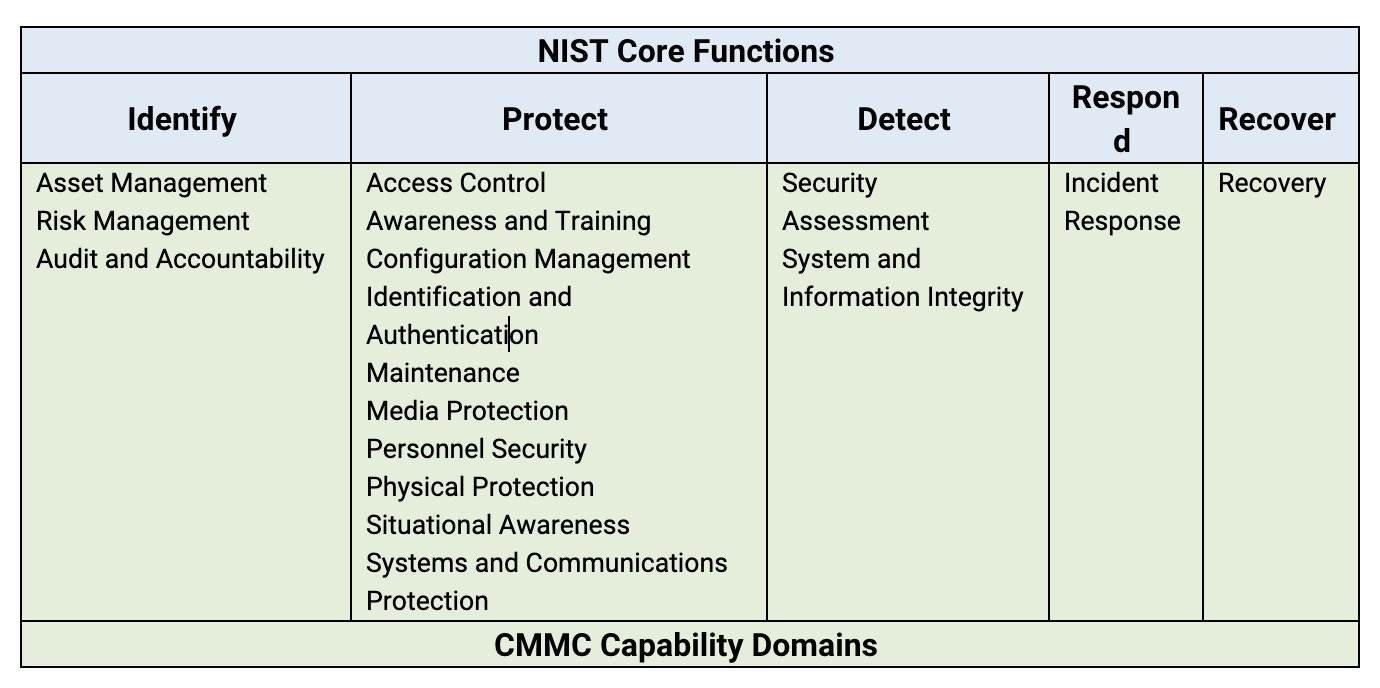
Looking at the number of practices and the capability domains can seem daunting. Since the CMMC and NIST are highly related, you can organize the CMMC Capability into the NIST Core Functions and then think about how you manage your cloud compliance to the CMMC levels by the functions. 

CMMC and the Cloud 

Since most mid-market companies are moving or have moved all their IT operations to the cloud, it is helpful to think of the CMMC in that context. If you move all your IT operations to the cloud, do you even need to worry about cybersecurity maturity? The answer is “yes”, but the good news is that the cloud and SaaS providers with whom you work will take on much of the cybersecurity burden and make achieving higher levels of CMMC easier. 

Looking at the following table, you can see that moving to the cloud allows a company to “outsource” much of its burden of CMMC requirements to the cloud provider. It is important as you look at a cloud or SaaS provider to know whether they are CMMC compliant themselves. You can use this as a framework to analyze whether they are following the necessary steps to be a partner in your CMMC success. 

CMMC compliance of cloud operations is very achievable for mid-market companies. The key to success is breaking the compliance process into smaller pieces and setting goals for achieving each level. Working with a company that can help you manage the project and work through implementing the needed security standards can make the process much easier and the likelihood of the success of the program much higher. 

5 Reasons Why Employee Information Management is Hard

1. HR, Finance and IT All keep their own Databases 

Employee information is kept by many groups within a company. It starts with information gathered by HR during the recruiting and hiring process. Finance also maintains employee information for payroll or equity information, and IT keeps employee information for user credentials for email, single sign-on (SSO), employee notifications, and other core IT services. These groups all maintain their employee information for different reasons and in different systems. 

Most of the information, though, is redundant and often incomplete. This quickly leads to a drift in information accuracy as the information in the systems are inevitably not maintained in the same way and same time. 

2. The data is sensitive to store and access 

Employee information is inherently sensitive and private, whether it is medical, financial, phone numbers, personal email, or home address. Employees expect a certain level of privacy in the way their information is handled by their employer. If the data is not stored and shared properly, this can lead to an unhappy employee at best and a legal and financial issue at worst.  

3. No Single Group Owns Employee Information 

Like a lot of information of other types within a company, no one completely “owns” employee information. HR is the logical owner of a lot of employee information, but IT is usually information security so it owns employee credentials to all or most systems and applications within the company. Similarly, finance also maintains sensitive stock ownership information that logically belongs with them. This creates complexity in how and where employee data is maintained. Mobile numbers and personal emails, for instance, are typically stored in every system that asks for employee information. When conflicts inevitably arise, which data is correct? 

4. Employee information changes rapidly 

Every time an employee moves, changes banks, changes their personal email, works on a new customer, gains a new certification or skill – their information changes. As employees come and go from a company, their information needs to be added and removed also. The number of small changes per employee and across all employees adds up quickly and different systems get of out sync rapidly. Traditional approaches create multiple portals or web forms for “Change of Address”, “Bank Change”, “Password change” – employees get overwhelmed with too many places to update the same information and usually only update what is easy and necessary. 

5. Regulations and compliance are tough to navigate 

There are a number of other regulations that govern employee data including the Health Insurance Portability and Accountability Act (HIPAA), the Americans with Disabilities Act, the Fair and Accurate Credit Transactions Act (FACT Act) and the Fair Credit Reporting Act (FCRA). Most people think of General Data Privacy Regulation (GDPR) and California Consumer Privacy Act (CCPA) are privacy regulations for consumer data but they apply to employee data also. There are also regulations covering employee data privacy that are in the law-making process in state governments across the U.S. Tracking these regulations and implementing the information systems that follow the regulations puts tremendous pressure on updating all the disparate systems and services used by a company. 

What to do? 

Companies need to declare an owner of the employee information repository and the rules for which groups have access to what parts of the repository data. This reduces the cost complexity of maintaining the information and can enable the ROI of applications that are important but hard to justify – such as an employee mass notification system. 

Technically, implementing a hybrid integration layer (HIL) that consolidates data and applies dynamic transformations and security policies provides the basic infrastructure needed to put the company policies and processes into operation. An effective implementation includes connectors to all the systems used by HR, IT, finance, and any other group using the employee information. It also should provide the capability for employees to review and update their own information, while also enabling others within the company to securely and privately access data to enable better collaboration and information sharing across the company. 

Montra Ranked #48 in 2021 NextGen 101 Managed Service Providers To Watch

NextGen 101 Honors Montra as an Industry Leading Managed Services and Technology Provider 

 NextGen Honors 101 Industry Leading Managed Services and Technology Providers. Selected from 2021 Channel Futures MSP 501 

ATLANTA, September 30, 2021 — Montra has been named as one of the world’s premier managed service providers on the prestigious Channel Futures 2021 NextGen 101 rankings. 

 The 2021 NextGen 101 winners were selected from applications submitted for the 2021 Channel Futures MSP 501. Channel Futures is pleased to name Montra Solutions as number 48 on the 2021 NextGen 101 list 

For the 2nd year running, MSPs from around the globe completed an exhaustive survey and application this spring to self-report product offerings, annual total and recurring revenues, profits, revenue mix, growth opportunities and company and customer demographic information. The NextGen 101 list recognizes MSPs with annual recurring revenues under 20% of total revenue. While these partners offer managed services, they’re also resellers, system integrators, and shops that do project work. 

“We are pleased to be included again in this prestigious group. It is a great confirmation that the work our team has done to serve our customers. Montra is providing unique and much needed software to automate critical IT processes,” said Scott Ryan, CEO, Montra Solutions. “And we are excited to bring this innovation to our customers to help them utilize technology the way they have been promised they can.” 

“The NextGen 101 is designed specifically to honor partners dedicating resources to building out their practices — all while maintaining the integrity of their core businesses”, said Allison Francis, editor and content producer at Channel Partners and Channel Futures. “Given that these companies represent the future of the technology channel and IT industry, the Channel Futures NextGen 101 are the most-watched of all organizations in the channel today”. 

The NextGen 101 list honors industry-leading managed services providers who have shown promise through the leading-edge information technology solutions they offer. Many of the honorees business models place emphasis on generating revenue from the cloud, security, devices, unified employee communication, among others. 

The complete 2021 NextGen 101 List is available at Channel Futures.  


Background 

The 2021 NextGen 101 list is based on data collected by Channel Futures. Data was collected online from March 1 through May 24th 2021. The MSP 501 list recognizes top managed service providers based on metrics including recurring revenue, profit margin, and other factors.  The NextGen 101 list honors industry-leading managed services and technology providers who are driving a new wave of growth through the innovative solutions they deliver for customers. 

 About Montra Solutions 

Montra Solutions is a managed IT services provider that has developed modern software to deliver enterprise-grade services to businesses of any size. Montra simplifies complex IT operations with software that securely manages modern systems and data – in the cloud, at the edge, or wherever your business takes you. Montra is based in Atlanta with offices in Tampa and Seattle and customers worldwide. For more information please us at www.montra.io or contact us at info@montra.io 

 About Channel Futures 

Channel Futures is a media and events platform serving companies in the IT channel industry with insights, industry analysis, peer engagement, business information, and in-person events. Every year, they welcome 7,400+ subscribers to their research, more than 3.8 million unique visitors a month to our digital communities, 18,200+ students to their training programs, and 225,000 delegates to their events. 

 MEDIA CONTACT: 
Grace FitzGerald 

Marketing Coordinator 

Montra  

gfitzgerald@montra.io