The Top 5 Benefits of Azure Active Directory

Are you looking for a comprehensive identity management solution? If so, Azure Active Directory (Azure AD) may be the perfect option for you. Azure AD is a cloud-based service that provides identity and access management for your business. It offers a variety of features and benefits that can help improve security, simplify management, and reduce costs. Azure AD is the technology that allows organizations to connect their on-premises Active Directory to Azure to provide a single sign-on (SSO) experience for their users. 

There are many benefits of using Azure AD, but in this blog post, we will focus on what we see as the top 5 benefits:

1. Increased security and compliance

With Azure AD, you can implement robust security measures to protect your data and meet compliance requirements. Azure AD provides features such as multi-factor authentication and conditional access that can help you secure your data and comply with industry regulations. 

Azure AD can also help you meet your compliance needs by providing comprehensive reporting and auditing capabilities. You can use Azure AD to: 


  • Enforce strong authentication policies 
  • Restrict access to sensitive data 
  • Monitor user activity 
  • Generate reports on user activity 

Azure AD can be used to secure on-premises applications and resources, as well as cloud-based applications and resources. These features can help you keep your data safe and comply with industry regulations.

2. Single Sign-On (SSO) and multi-factor authentication (MFA)

Azure AD helps improve security by providing Single Sign-On (SSO) and multi-factor authentication (MFA) - making it easy to manage user identities and access control. SSO allows users to access all their applications with one set of credentials. This can help improve security by reducing the number of passwords that users must remember. MFA provides an additional layer of security by requiring users to confirm their identity with a second factor, such as a phone call or text message. 

Azure AD also enables administrators to manage user identities and roles, as well as configure security settings for their organizations. Azure AD offers a variety of security features, such as password policies and activity monitoring, that can help you keep your users and your data safe.

3. Central Management of Applications and Users

Azure AD can simplify management by providing a central location to manage all your users and applications. You can use Azure AD to create and manage user accounts, assign permissions, and control access to applications. Azure AD also provides a self-service password reset feature that can help reduce IT support costs since password resets are the number one help desk request.

4. Reduced costs

Azure AD is a cost-effective solution that helps organizations save time and money by simplifying your IT infrastructure. Azure AD is its pay-as-you-go pricing model. With this pricing model, you only pay for what you use, which can be a great way to save money on your Azure AD deployment. 

Azure AD also reduces cost by eliminating the need for on-premises infrastructure. This can help save you money on licensing as well as support since cloud-based services are more cost-effective for third parties to support for you.

5. Increased flexibility and scalability

Azure AD is a cloud-based service. This makes Azure AD highly scalable, so it is easy to grow your user base as your business needs change. It also means if your company is moving more toward hybrid work, then Azure AD services will be delivered to your users with great performance no matter where they may be. No need to manage a complex virtual private network (VPN) to get users onto the same network as the on-premises AD instance. 

Azure Active Directory is a comprehensive identity, application, and resource management solution that offers broad features and benefits. If you are looking for an identity management solution that is well-proven and has connectivity to a broad range of applications and services, Azure AD may be the right option for you. 

While powerful, Azure AD is still a bit unapproachable by most users. This is where our team of experts at Montra can help. We offer a variety of software and services, including our own software, Montra Via, which leverages Azure AD to provide easy to leverage workforce and application management capabilities to companies of any size. Email us at sales@montra.io to learn more about how we can help you with your identity management needs. 
Laptop Security Best Practices

Laptops are a valuable asset for the workforce of companies of any size. They allow employees to stay connected while on the go and are critical tools to accomplish work quickly and effectively. When work laptops contain important data and client information, it's essential to take measures to keep them secure. Below are some of the essential steps you can take to protect your laptop from theft and keep your data safe.

Physical Security 

Laptop security begins with physical security. Always keep your laptop in a safe place when you're not using it. If you're carrying it with you, make sure it's in a secure bag that thieves can't easily access. When traveling, never leave your laptop unattended in a public space, and make sure to always keep it with you. 

System Password

It's also important to protect your laptop with a strong system password. Use a combination of letters, numbers, and symbols to create a password that would be difficult for someone to guess. Avoid using easily guessed words like "password" or your name. You should also change your password periodically to further reduce the risk of it being guessed with a brute force approach. 

Security Software 

In addition to physical protection and local access protection, it's essential to take steps to protect yourself when you connect your laptop to the Internet. Be sure to install cybersecurity software on your laptop and keep it up to date. The most sophisticated software is called endpoint detect & respond (EDR). The best EDR software will not only protect you from known viruses and ransomware attacks but will also detect odd behavior and respond to it immediately. 

Personal Awareness

Not all security can be handled purely by software smarts, people need to practice good cyber behaviors online to keep their system and their data safe. Avoid clicking on links or opening attachments from unknown sources, which can surreptitiously load malware or ransomware onto your laptop. When using public WiFi networks, be sure to use Virtual Private Network (VPN) software to encrypt all your activity. This prevents other lurking on the network from seeing your passwords and other private information on the network. 

Laptops are a valuable asset and a potentially weak link in your company’s security chain/ They should be protected with the best security practices. At Montra, we understand the importance of data security and have put measures in place to protect the information of our customers and their users. We offer software and services to help you secure your laptops and other devices, secure your workforce’s identities, and secure your company’s data. If you have any questions about our security measures or how to protect your company’s laptops, please don’t hesitate to email us at sales@montra.io

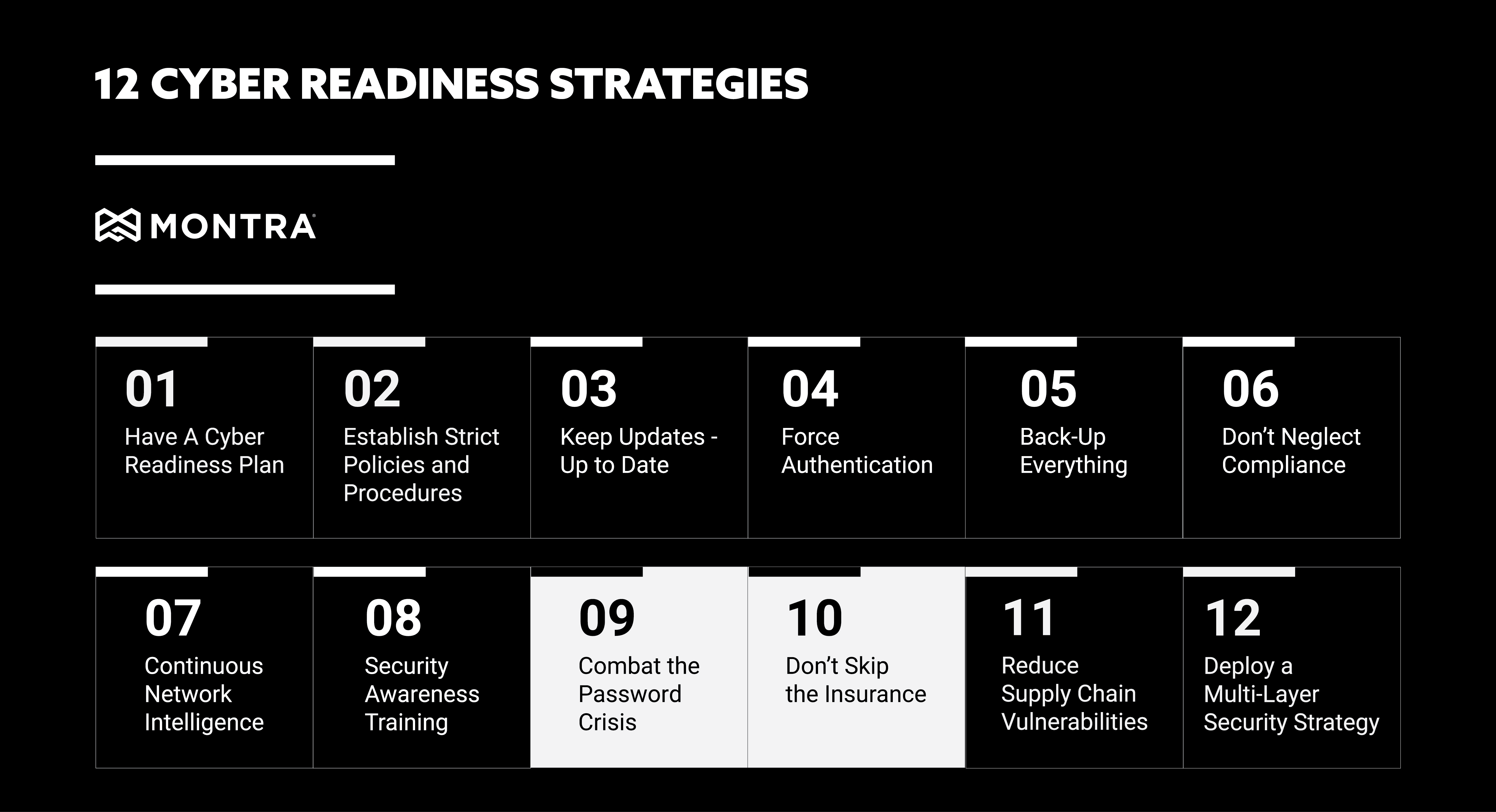
Cyber-readiness Strategies 9 and 10: Passwords and Insurance

It's becoming increasingly difficult to keep up with the cyber security threats out there. From ransomware and phishing to malicious insiders and business email compromises, there are many dangers lurking in the digital world that can affect your organization. To stay safe, it's important to have a robust cyber readiness strategy in place. This starts with making sure your employees are aware of the threats and know how to protect themselves, but it also includes implementing technology solutions and procedures that can help you mitigate or prevent attacks. In our prior installment of this series, we touched on Continuous Network Intelligence and Security Awareness Training. Keep reading for strategies #9 and #10; Combating the Password Crisis and Don't Skip Insurance.

Combat the Password Crisis 

In today's fully connected world, passwords are the first line of defense against cyber-attacks. However, they are also often the softest target for attacks. This is because many people use weak or easily guessed passwords, and they often reuse them across multiple accounts. This makes it easy for hackers to gain access to your systems if they can just crack one password. To combat this, it's important to have strong password policies in place. This includes using a mix of letters, numbers, and special characters, as well as changing passwords regularly. This can be managed by policy on many systems so that users are forced to use strong passwords and unique passwords across systems. For some systems, these controls cannot be set, but alerts can be triggered so that IT staff will get notified when users set their passwords poorly. 

When users are forced to use difficult and unique passwords, it's also critical to use a password manager to help users keep track of all their different login credentials. This will make it easier for your users to comply with the password policies. Some desktop browsers have a basic password manager built-in and third-party software can also be used that provides additional features like secure password sharing within groups. 

Don't Skip the Insurance 

No matter how well you prepare, there's always a chance that your organization could be the victim of a cyber-attack. This is why it's so important to have insurance in place. Cyber insurance can help cover the costs of an attack, including business interruption, data recovery, and legal fees. It can also help with reputational damage control if your organization's name is dragged through the mud. 

Cyber-insurance is a relatively new area of business insurance, so there are a wide variety of cyber insurance carriers with different underwriting policies. It is important to do your research and find one that fits your organization's needs and that is cost-effective. It is also helpful to work with cyber experts, who can help you make some small changes to your IT operation that can have a big impact on your cyber insurance costs. Implementing multi-factor authentication across all your applications and using DNS Security can have a positive impact on your risk scoring with an insurance carrier. 

These are just two more of the many things you can do to improve your cyber readiness strategy. Stay tuned for our next, and final installment, where we'll be covering strategies #11 and #12; Reduce Supply Chain Vulnerabilities and Deploying a Multi-Layer Security Strategy. If you would like more information or have questions about how strong your cyber-readiness is, please contact Montra at sales@montra.io.

Three Tips to Improve HR and IT Process Integration

When it comes to discussing employee onboarding and offboarding there are two main players who are involved in the process, HR and IT. Often HR and IT professionals find themselves at odds with each other because their daily workflows are so different and there is often little understanding of that between the departments. However, technology has come a long way and there are now systems in place that can assist with the integration of employee onboarding, offboarding and other workforce processes. Here are Montra's top tips to ensure a successfully integrated HR and IT onboarding/offboarding process: 

1.  Set Regular Communication Schedules 

Schedule regular check-ins between the two department heads to ensure both teams are on the same page. A commonly heard complaint from IT professionals is that they are not included in the on/offboarding process until the very end and that teams are not working together to create a seamless transition for employees. As with any relationship, communication is key to success. When it comes to HR and IT integration, clear and concise communication will go a long way. Making sure both teams are aware of deadlines and expectations will help to avoid any stressful surprises down the road. 

2. Automate Reminders 

Automating tasks and reminders in the onboarding/offboarding processes is a great way to improve efficiency and accuracy across the board. Whether it is with email or more sophisticated systems, automated reminder notifications can minimize communication delay and ensure that longer lead time processes like background checks and laptop procurement are able to get started as quickly as possible in the process. 

3. Use Technology to Integrate 

There are several HR and IT software integration solutions on the market. They are often too complex to implement for most companies – requiring external consultants to implement. Montra’s Via Workforce Manager software is designed with the mid-market in mind. Via Workforce Manager is workforce management software that helps businesses manage the IT aspects of onboarding and offboarding. Implementation is straightforward in most modern HRIS. Via Workforce Manager does everything from user account creation across multiple applications to managing the laptop and phone ordering processes and even enables employee mass notifications. 

By using these tips, your HR and IT departments can work together seamlessly to ensure a smooth onboarding and offboarding experience for your employees. By integrating the software into your company’s current HR and IT systems, you can improve communication between these two vital groups and make your business run smoother. 

If you are interested in learning more about the Via Workforce Manager software or would like to try it for yourself, please email us at sales@montra.io. We would be happy to answer any of your questions and discuss how the software could benefit your business. 

Checklist for IT Employee Offboarding

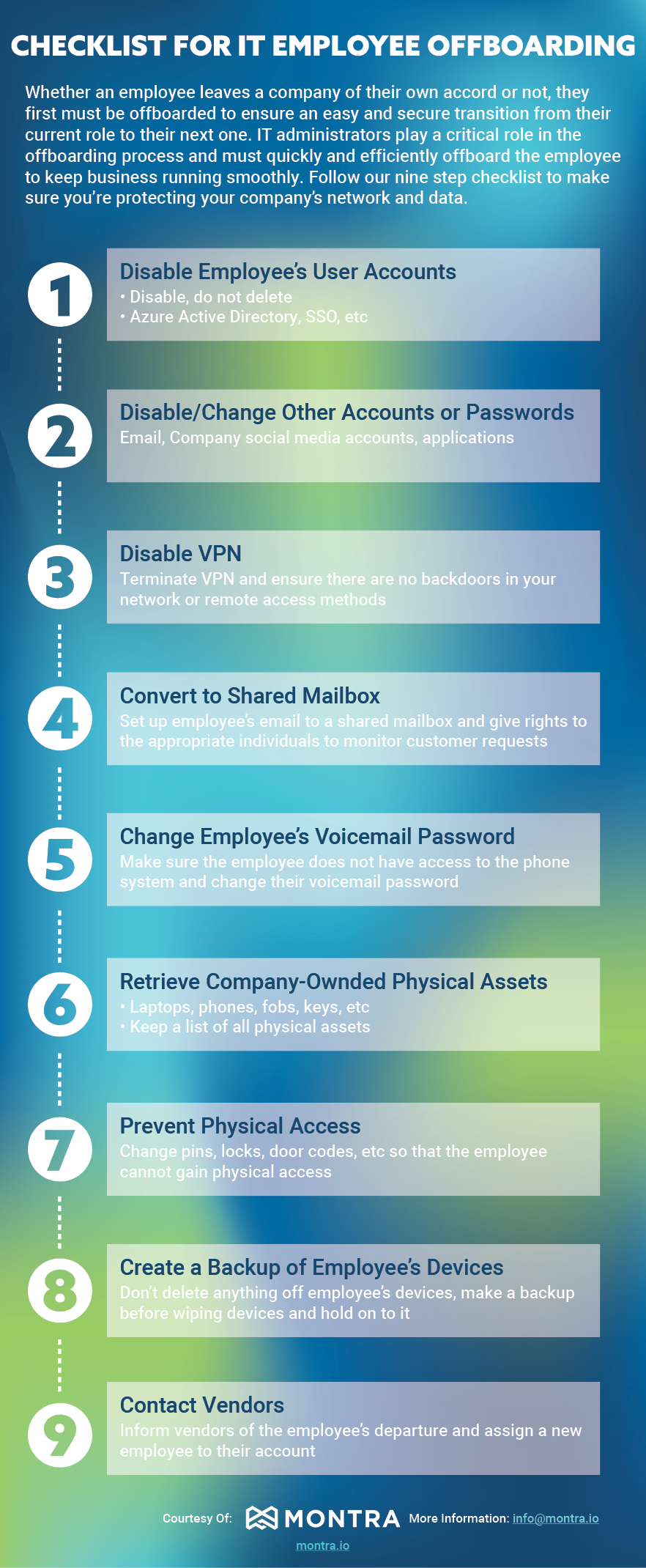
Whether an employee leaves a company of their own accord or not, they first must be offboarded to ensure an easy and secure transition from their current role to their next one. IT administrators play a critical role in the offboarding process and must quickly and efficiently off-board the employee to keep business running smoothly. Follow our nine-step checklist to make sure you’re protecting your company’s network and data.

The Montra IT Employee Offboarding Checklist

Whether an employee leaves voluntarily or not, IT administrators must quickly and efficiently offboard them to keep business running smoothly and data secure. Follow these nine steps:

  1. Disable Employee's User Accounts — Disable, do not delete. This includes Azure Active Directory, SSO, email, company social media accounts, and applications.
  2. Disable VPN — Terminate VPN access and ensure there are no backdoors remaining in your network or remote access methods.
  3. Convert to Shared Mailbox — Set up the employee's email as a shared mailbox and assign appropriate individuals rights to monitor incoming customer requests.
  4. Change Employee's Voicemail Password — Ensure the employee no longer has access to the phone system and change their voicemail password.
  5. Retrieve Company-Owned Physical Assets — Collect laptops, phones, fobs, keys, and any other physical assets. Keep a running list of all items.
  6. Prevent Physical Access — Change pins, locks, and door codes so the employee cannot gain physical access to your facilities.
  7. Create a Backup of Employee's Devices — Do not delete anything off the employee's devices. Make a full backup before wiping and retain it.
  8. Disable or Change Other Accounts or Passwords — Address any remaining accounts or passwords not covered in earlier steps.
  9. Contact Vendors — Inform vendors of the employee's departure and assign a new employee to manage those relationships.

Six Steps to Successful Employee Offboarding

When an employee leaves a company, offboarding is the process of ensuring that they have a smooth and secure transition from their current role to their next one. This includes tasks such as ensuring that all their accounts are closed and transferred, returning all devices and that the former employee can proceed easily to their new job.  

Employee off-boarding is critical not just for securing company data, but also for maintaining a safe workplace. A recent study has shown that about 89% of employees still had access to their company's network and data after termination and around 83% continued to access their old employer's accounts. With insider cyber-attacks rising by 44% over the past two years, it is more critical than ever to properly off-board employees after they leave your company. 

Here are some of the key steps involved in successfully offboarding an employee along with some of the best practices for making the process smoother.  

1. Disable all accounts and change passwords

One of the first steps in offboarding an employee is to disable their user accounts and change any passwords they may have had access to. This helps to ensure that the former employee does not have any access to company data or systems. Additionally, it is important to update any additional identity security measures such as multi-factor authentication that the employee may have been using. 

2. Collect company-owned devices

The next step is to collect any company property that the employee may have, such as phones, laptops, keys, or ID badges. It is important to do this as soon as possible so that the employee does not have access to company resources. Additionally, you should check with the employee to make sure that they have not taken any confidential information with them. If an employee is working remotely, you will need to arrange for someone to collect their devices from them or have the employee ship their devices back. 

3. Securely erase company devices

Either remotely or when the company devices are returned, securely erase the information on those devices. This will ensure that any company data on the devices cannot be accessed by the former employee. Once this is done you can prepare the devices for use by a new employee.

4. Contact Third-Parties

You should also notify any customers, partners or vendors, with whom the employee worked and provide them with the new contact information for your company. This will ensure that there are no potential information issues and that third-parties are able to continue working with your company without interruption.

5. Update your company's HR records

Finally, you will need to update your company's HR records to reflect the employee's departure. This includes removing them from any health insurance or other benefits they may have been receiving. You will also need to update their contact information and emergency contact information. Once this is done, you can send out a farewell message to current employees. Additionally, by keeping open communication with the departing employee, you can help to make the transition as easy as possible for them. 

6. Follow cyber-compliance policies

When offboarding an employee, it is important to make certain you are operating within compliance of any relevant cyber-security regulations. For example, the National Institute of Standards and Technology Cyber Security Framework (NIST CSF) requires companies to take specific measures when deleting employee data. Additionally, ISO 27001 is a standard for information security management and requires companies to have a plan for terminating employees. The Health Insurance Portability and Accountability Act (HIPAA) requires companies to protect the privacy of employee health information. By following all applicable regulations, you can help to ensure that your company complies when offboarding employees. 

You can make sure that your company's offboarding procedure is effective and safe by following these procedures. Whether an employee leaves your company by their choice or yours, offboarding them as quickly and efficiently as possible is key to limiting any exposure of your business to a disgruntled former employee. By following these tips, you can minimize the amount of time they have access to your IT systems and ensure that they depart on good terms. If you have any questions about how to execute these tips or would like help with offboarding your employees, feel free to reach out to us at sales@montra.io.