
What Agentic AI Means for Your IT

If you’ve heard an IT company claim they use “agentic AI” and wondered what that actually means in practice ‚ you’re not alone. The phrase is everywhere right now, but most explanations stop at the buzzword and never get to what does it do, and why you should care.

The answer: agentic AI, applied to IT management, means your IT systems act instead of wait. Instead of a human IT administrator triggering every provisioning task, access change, or device assignment, an AI-powered system monitors your business systems, detects what needs to happen, and executes it automatically‚ without a delay, and without a mistake caused by someone copy-pasting the wrong name into a form.

This is a fundamental shift in how managed IT services work. And for growing companies in Atlanta and beyond, it’s the difference between IT that scales with your business and IT that becomes a bottleneck every time you hire, promote, or offboard someone.

What “Agentic” Means

Traditional software is reactive. You log in, you click a button, something happens. AI-assisted software is helpful but still human-initiated. It suggests the next step, but you still take it.

Agentic AI is different. An agentic system has a goal, monitors for conditions, makes decisions, and takes actions independently. In an IT context, that looks like this:

Your HR system records a new hire starting in two weeks. Your agentic IT platform reads that signal, determines what applications, devices, and access levels that role requires, cross-references your security policies, and begins provisioning everything automatically in the background, days before the employee walks in the door.

No IT ticket. No manual checklist. No back-and-forth between HR and IT. The system acted.

Why This Matters More Than You Think

Manual IT management has a hidden cost most companies don’t fully measure, and it shows up most clearly in the requests that seem simple but never are. Consider what happens when someone submits a help desk ticket asking for temporary access for an executive while she’s on vacation:

  • The ticket sits in the queue until an IT admin gets to it
  • The admin reads the request and tries to figure out what it actually means: which systems, which dates, what level of access — then emails back to clarify and waits
  • Once the details are sorted, the admin manually edits the conditional access policies in Entra ID or Active Directory, scoping permissions by hand
  • Nobody sets an end date — because that requires a separate reminder, a separate task, a separate manual step
  • The executive returns from vacation. The access is still open. It stays open for weeks.
  • A security audit flags the over-provisioned account. IT spends another hour cleaning it up. A compliance incident gets logged.

A single routine request, the kind that comes in a dozen times a week at a growing company, consumed 3 to 6 hours of IT staff time, introduced real execution risk, and still ended with an error.

Agentic AI handles the entire sequence differently. When the Via AI sees that same ticket, it parses the request in seconds: who needs access, to which systems, for which dates. It sends a plain-language summary back to the requestor asking for confirmation. Once approved, it creates a scoped, time-bounded conditional access policy that activates on the start date, and automatically revokes on the end date, with a full audit trail. The requestor gets a notification. The ticket closes. The IT team never touches it.

That’s 10 times faster. And unlike the manual version, there’s nothing left to forget.

Via AI Flow Conditional Access
Where Agentic AI Is Already Working in IT Management

The most impactful applications of agentic AI in IT management today aren’t theoretical. They’re running right now inside well-managed companies.

Identity Lifecycle Automation

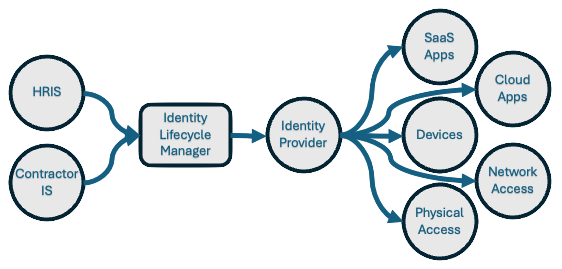
When an employee is hired, promoted, transferred, or terminated, their digital identity needs to change. New access granted. Old access revoked. Group memberships updated. Security roles adjusted. Done manually, this is tedious, error-prone, and often delayed, which creates real security exposure. Done with agentic AI, every identity change triggers automatically from your HRIS, with no human in the loop required.

Device Lifecycle Management

From procurement to deployment to refresh to retirement, a managed device goes through dozens of touchpoints over its lifespan. Agentic systems track where every device is, flag devices approaching end-of-life, automate imaging and configuration before deployment, and initiate return-materials-authorization (RMA) workflows when something breaks ‚all without an administrator manually tracking spreadsheets.

SaaS Access Reconciliation

The average company uses 80+ SaaS applications. Keeping track of who has access to what‚ and making sure terminated employees lose that access immediately‚ is nearly impossible to do manually at scale. Agentic IT management reconciles your active employee roster against your SaaS application access lists continuously, surfacing orphaned accounts, over-provisioned users, and compliance gaps automatically.

Security and Compliance Monitoring

Agentic systems can monitor policy compliance across your device fleet and user accounts in real time, alerting on deviations before they become incidents. When a device falls out of patch compliance or a user’s MFA configuration lapses, the system flags it‚ or in many cases, remediates it without waiting for a quarterly audit.

The Difference Between AI-Assisted and AI-Powered IT

It’s worth drawing a clear line here, because not all IT vendors who use the word “AI” mean the same thing.

AI-assisted IT means a human IT administrator uses AI tools to work faster, maybe a chatbot that helps write runbooks, or a dashboard that uses machine learning to surface anomalies. The human is still in the loop for every action.

AI-enabled IT is agentic AI‚ which means the software itself is the actor. The platform monitors conditions, makes decisions within defined parameters, and executes actions. The human sets the rules, reviews exceptions, and is only called upon for high risk actions. The system handles everything that fits within those rules, which is the vast majority of day-to-day IT operations.

For most growing companies, the distinction matters enormously. If your MSP is using AI to help their team work slightly faster, you’re getting marginal improvements. If your IT platform is agentic ‚Äî acting on your behalf continuously ‚Äî you’re getting a fundamentally different level of service.

What This Means for Atlanta Businesses Specifically

Atlanta is consistently one of the fas growing cities in teh US for small businesses. The companies winning here are in FinTech, healthcare, management consulting, enterprise SaaS, and cyversecurity. Businesses in these sectors are adding headcount quickly, often expanding into new offices or geographies, and operating in environments with regulatory and compliance requirements.

That growth creates pressure on IT. More hires mean more provisioning. New offices mean new device deployments. Compliance requirements mean constant policy enforcement. And every one of those tasks, done manually, adds to the IT backlog.

Agentic AI-powered IT management is built for this environment. It doesn’t get slower as you grow. The automation scales linearly with your headcount. The 10th hire is as well-provisioned as the 100th hire. The 50th offboarding is as thorough as the first.

Montra is headquartered in Atlanta and built the Via platform specifically for companies operating in this kind of high-growth, compliance-aware environment. We’ve seen firsthand what happens when a 50-person company tries to manage IT the same way it did at 20 people ‚ and we’ve built the automation to prevent it.

What to Ask Your MSP About AI

If you’re evaluating a managed service provider and they claim to use AI, here are five questions worth asking:

  1. Is the AI taking actions or just making suggestions? An agentic system acts. A reporting dashboard doesn’t.
  2. What triggers an automated action? The answer should be a specific business event, like a new hire in the HRIS, a device check-in failure, or a SaaS license anomaly.
  3. What’s the human review process? Good agentic IT has guardrails. That is things the system does automatically within policy, and things it flags for human review. Ask where the line is.
  4. Can you show me the automation? Any MSP with real agentic AI can demo it running. If the answer is a slide deck or a video, keep moving.
  5. How does it integrate with my HRIS and identity provider? Agentic IT needs to connect to the systems that contain your sources of truth: your HR system and your Identity Provider, and your device management platform.

The Bottom Line

“Agentic AI” is a real capability today. It’s not a dream as long as it’s implemented correctly. For IT management, it means moving from a world where IT administrators manually execute every routine task to one where AI executes the routine automatically and IT administrators focus on architecture, exceptions, and strategy.

For growing companies, it means IT that doesn’t become a bottleneck as you scale. For leadership, it means fewer surprise IT failures and more predictable operations. For security and compliance teams, it means continuous enforcement rather than periodic audits.

Montra is one of the first and only managed IT service providers that has deployed a genuinely agentic platform and deployed it for Atlanta-area companies managing real growth. If you want to see what that looks like in practice, we’re happy to show you.

Montra Technologies is an Atlanta-based managed service provider (MSP) and IT automation company. We help mid-market companies manage workforce technology, devices, SaaS access, and security compliance through our services and Via platform, which is powered by agentic AI and built for scale. Named to the Inc. 5000 two consecutive years and recognized by Channel Futures as an MSP 501 company.

What Is Identity Lifecycle Management? A Practical Guide for Modern IT Teams

In today’s digital landscape, where data breaches and cyber threats are prevalent, businesses are increasingly focusing on Identity Lifecycle Management (ILM) to safeguard their sensitive information and ensure secure access control.

For instance, an Atlanta-based professional services firm implemented Via and received a 2x reduction in onboarding time and a 3x reduction in onboarding and offboarding mistakes within the first two months. They have improved the experience for their new employees who are getting productive faster, and they are reducing their security and compliance risks by ensuring “zombie” accounts aren’t left open after a departure.

Understanding Identity Lifecycle Management

ILM Diag

The Identity Lifecycle

Identity Governance enables organizations to strike a delicate balance between productivity – ensuring swift access to necessary resources for individuals entering the organization – and security – determining adjustments in access rights as per changes in employment status.

At the core of Identity Governance lies Identity Lifecycle Management, a crucial component for effectively managing digital identities. Scaling up governance successfully requires the modernization of the infrastructure supporting identity lifecycle management in applications. The objective of Identity Lifecycle Management is to streamline and automate the entire digital identity lifecycle process for individuals associated with an organization.

Identity Lifecycle Management encompasses the processes and technologies used by organizations to manage the lifecycle of user identities within their systems. It involves creating, maintaining, and revoking user access rights throughout the user’s journey with the organization:

  • Onboard: When a person requires access, applications require an identity. Hence, a new digital identity might need creation if not already existing.

  • Transfer: When someone transitions across boundaries necessitating adjustments to their digital identity by adding or removing access authorizations.

  • Offboard: When someone no longer requires access, it’s necessary to revoke access. Subsequently, the identity may become unnecessary for applications except for audit or forensic purposes.

Benefits of Implementing Identity Lifecycle Management

Implementing ILM offers several benefits to businesses including:

  • Security Enhancement: By enforcing access controls, it bolsters security measures to restrict sensitive data and system access solely to authorized users.

  • Administrative Efficiency: The solution simplifies user access management tasks, minimizing the chances of human error and unauthorized entry.

  • Compliance Maintenance: Additionally, ILM aids organizations in adhering to regulatory standards like GDPR and HIPAA, ensuring continued compliance.

Addressing Challenges with Identity Lifecycle Management

Businesses face challenges such as ensuring rapid onboarding and offboarding processes, and maintaining a balance between security and user convenience. ILM addresses these challenges by providing automated workflows for user provisioning and deprovisioning, role-based access control, and continuous monitoring of user activities.

Implementing Montra Via for Efficient Identity Lifecycle Management

To streamline the ILM process and ensure compliance, companies can leverage cutting-edge solutions like Montra Via. Via offers advanced features such as automated onboarding and offboarding of users, profile-based provisioning of user accounts on over 350 applications, direct integration with identity providers like Microsoft Entra and HR systems like ADP Workforce Now. By implementing Via, organizations can improve operational efficiency, enhance security, and reduce compliance risks.

Tips for Creating a Successful Identity Lifecycle Management Strategy

Creating and maintaining a successful ILM strategy requires more than just great software. Businesses need to change their processes and make certain their people have what they need to be successful. Any businesses should consider the following tips:

  • Balance Security and Accessibility: Strive to find a balance between stringent security measures and user-friendly access controls to ensure that users will follow the processes they should.

  • Security Awareness Training: Provide comprehensive training to employees on security best practices, data protection protocols, and the importance of adhering to ILM policies.

  • Rights Monitoring: Regularly monitor user access rights, review permissions, and conduct audits to identify and address any security vulnerabilities.

  • Seek Guidance: Keep abreast of industry trends, regulatory changes, and emerging technologies to adapt your ILM strategy accordingly. And if you need, find partners that can help you stay current.

By following these best practices, businesses can establish a robust Identity Lifecycle Management framework that safeguards critical assets, mitigates risks, and fosters a culture of proactive cybersecurity.

In conclusion, Identity Lifecycle Management plays a crucial role in modern business operations by ensuring secure and efficient management of user identities. By adopting advanced solutions like Montra Via and adhering to best practices, organizations can effectively navigate the complexities of identity management and safeguard their digital assets.

For more information about Montra, please contact us at info@montra.io.

Sources

Benefits of Microsoft 365 and Azure Active Directory for Identity Management

Identity management is critical for businesses today. In a world where more and more employees are working remotely and accessing corporate data from a variety of devices, it’s important to have a robust system in place to manage and protect employee identities. That’s where Microsoft 365 and Azure Active Directory come in.

When used together, Microsoft 365 and Azure Active Directory provide a complete solution for identity management in organizations. Microsoft 365 provides the productivity and collaboration tools that users need, while Azure Active Directory handles the single sign-on and security features. This offers several benefits, including a consistent experience for users across all applications, enhanced security through centralized control.

Azure Active Directory

Azure Active Directory is a cloud-based identity management service that provides single sign-on (SSO) capabilities and robust security features. It offers several capabilities, including an enterprise identity service that provides single sign-on, multifactor authentication, and conditional access.

Microsoft 365

Microsoft 365 is a cloud-based productivity and collaboration suite that is the most popular SaaS platform in use today. It includes the Microsoft Office applications, Outlook, OneDrive, SharePoint, and Teams. It offers several capabilities, including email, calendaring, contacts, tasks, and document management.

Using Microsoft 365 and Azure Active Directory for identity management provides several benefits:

1. Centralized Management of Workforce Identities

Organizations that use Microsoft 365 and Azure Active Directory can manage their workforce identities in a centralized way. This means that they can provide their employees with a single set of credentials to access all the applications and services that they need, both on-premises and in the cloud. This makes it much easier for administrators to manage user accounts and reduces the chances of users forgetting their passwords or having their accounts hacked.

2. Consistent User Experience across Applications

When users sign into Microsoft 365 with their Azure Active Directory credentials, they will have the same experience across all the applications that they use. This includes the Office applications, Outlook, OneDrive, SharePoint, and Teams. They will also be able to access their files and documents from any device, including their mobile phones.

This makes it easier for users to access the information and resources they need, regardless of which application they are using. Additionally, it reduces the need for training on multiple applications.

3. Enhanced Security through Centralized Access Control

Azure Active Directory provides organizations with the ability to control access to their applications and resources in a centralized way. This includes the ability to set up multifactor authentication and conditional access rules, making it easier to monitor and control access to resources.

This enhanced security helps to protect corporate data and makes it more difficult for hackers to gain access to sensitive information. Additionally, it reduces the chances of users accidentally disclosing corporate data.

4. Reduced IT Costs and Increased Efficiency

M365 and Azure AD offer reduced IT costs and increased efficiency by enabling organizations to manage all identities in one place. This is because administrators can manage users in a centralized way, eliminating the need to maintain multiple user accounts across different applications. This makes it easier to provision and deprovision users, as well as to monitor and control access to resources.

Additionally, Azure Active Directory integrates with the Microsoft 365 suite of products, making it easier to deploy and manage. This integration can help to reduce the amount of time and effort required to manage user accounts.

Microsoft 365 and Azure Active Directory are a valuable combination to give organizations of any size the ability to manage identities. While the capabilities provided are great, the ability to cost-effectively leverage these capabilities can be beyond the scope of even the largest IT organizations.

At Montra, we understand the importance of workforce identity management and security, which is why we have spent time developing our own software that leverages the core capabilities of M365 and Azure AD to ease the use of it for all IT organizations. If you have any questions about our identity management services and software, please contact us at sales@montra.io.